
If you are searching for social media captions for small business, you probably do not need “more content.” You need captions that sound like a real person, make your offer clear, and give people a reason to engage without forcing it.
Table of Contents
Why “good” captions feel easy (even when they are not)
The best social media captions for small business are rarely clever. They are clear.
They do three jobs:
- They tell people what the post is about quickly
- They give one useful idea (or one believable next step)
- They make it easy to respond (comment, save, click, DM, or keep following)
If your captions feel awkward, it is usually not a creativity problem. It is a focus problem. Captions improve fast when you decide who you are talking to, what you want them to do, and what they need to believe first.
Think: clarity beats “trying to be interesting” when you want enquiries.
The real reason captions sound robotic
Robotic captions usually come from one of these:
- Writing for “everyone” instead of one buyer type
- Trying to say five things in one caption
- Copying big-brand vibes when your business needs trust, not polish
- Hiding the point because you do not want to be salesy
The fix is not longer captions or more emojis. The fix is a simple structure you can repeat.
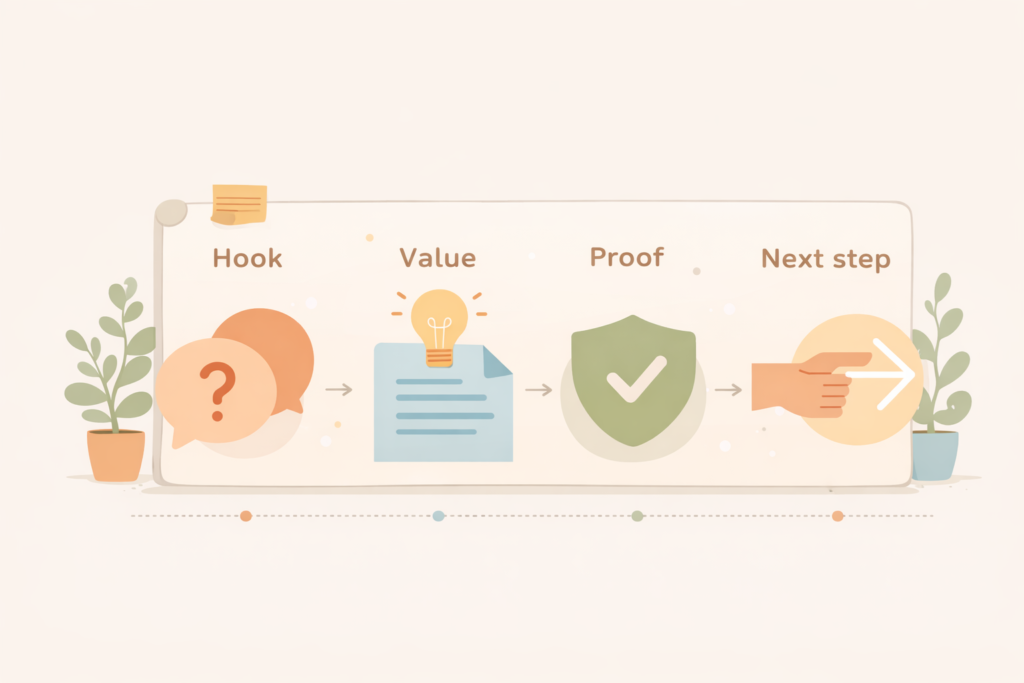
A 4-part framework for social media captions for small business
Use this 4-part framework for nearly any post. It works for short captions and long captions, and it is easy to hand to a writer or VA later.
1) Hook (one line)
Pick one hook style:
- A direct problem: “If your enquiries have slowed this month, start here.”
- A misconception: “Posting daily is not the same as marketing.”
- A result: “Three changes that improved lead quality.”
- A question: “Do you know why people save posts but do not click?”
- A tiny story: “This happened on a client call today…”
2) Value (two to six lines)
Share one idea only. One example. One checklist. One step.
3) Proof (optional, one to two lines)
Proof can be soft and still work:
- “We use this structure in our content briefs.”
- “This is the process we follow for client posts.”
- “This question comes up every week with service businesses.”
Avoid making up metrics. Keep it grounded and believable.
4) Next step (CTA that fits)
Choose one:
- Comment a word (simple)
- Save this (useful checklist)
- DM if you want a template (lead-friendly)
- Click through (traffic goal)
- Tell me your situation (conversation goal)
This is the backbone of social media captions for small business that feel human while still moving people forward.
Pick one caption goal before you write
Before you draft, decide what the caption is meant to do.
Common goals:
- Engagement: start a conversation
- Trust: reduce buyer anxiety
- Traffic: drive clicks to a blog or service page
- Leads: encourage DMs or enquiries
- Retention: remind followers why you are worth following
One post can do two things sometimes, but if you start with one main goal, your social media captions for small business will be sharper and easier to write.
18 caption templates you can copy and adapt
Below are templates you can reuse. Replace the brackets with your details. Use your real words, not “marketing voice.”
Education captions (teach one thing)
1) The simple version
“Here is the simple version of [topic]:
- [step]
- [step]
- [step]
If you want help applying this to [their context], comment ‘PLAN’.”
2) Mistake to fix
“Most people do [mistake]. It backfires because [reason].
Try this instead: [one better move].”
3) Checklist
“Quick checklist before you [action]:
- [item]
- [item]
- [item]
Save this for later.”
4) Myth vs reality
“Myth: [common belief]
Reality: [truth]
If you are stuck on [problem], start with [first step].”
5) FAQ answer
“Question: [customer question]
Answer: [short answer]
Details: [1 to 2 lines]
If you want a quick recommendation for your situation, DM me.”
Service selling captions (clear, calm, not pushy)
6) Who it is for
“If you are [buyer type] and you need [outcome], this is for you.
We help with [service] so you can [result].
Want details? Comment ‘INFO’.”
7) What you get
“What you get when we handle [service]:
- [deliverable]
- [deliverable]
- [deliverable]
If you want a quote, send your website link.”
8) Before and after (no hype)
“Before: [pain]
After: [better situation]
The change was not magic. It was [one principle] and consistent execution.”
9) Process preview
“Our process for [service] looks like this:
- [step]
- [step]
- [step]
It keeps quality high and revisions low.”
10) Objection handler
“If you are thinking ‘[objection]’, you are not wrong.
The trade-off is [truth].
Here is when it is worth it: [criteria].”
If you want captions written in your brand voice and tied to a content plan, this is exactly what VVRapid’s Socials, Blogs and Article Writing service is built for.
Trust and brand voice captions (sound human)
11) Behind the scenes
“Behind the scenes: today we are working on [task].
The goal is [outcome].
The part most people miss is [detail].”
12) Lesson learned
“I used to [old approach]. It caused [problem].
Now I do [new approach].
If you are in [situation], try [one tip].”
13) A small win
“Small win: [win].
It matters because [why it matters].
What are you working on this week?”
14) Your values
“We do not do [thing].
We do [better thing] because [reason].
If you value that too, you will like working with us.”
Engagement captions (get comments without bait)
15) Pick one
“Pick one: [option A] or [option B]?
Tell me why.”
16) Finish the sentence
“Finish the sentence: ‘The hardest part of [topic] is ____.’”
17) Hot take (polite)
“Unpopular opinion: [statement].
If you disagree, tell me what you see in your business.”
18) Mini-audit prompt
“If you share your website and what you sell, I will reply with one caption angle you can post this week.”
When you build a small swipe file like this, social media captions for small business stop being a daily struggle and become a repeatable system.
Platform tweaks: same idea, different format
A common mistake is writing one caption and pasting it everywhere. Keep the idea the same and change the shape.
Instagram and Facebook
- Stronger hooks and simpler sentences
- More line breaks for readability
- Clear CTAs like “save this” or “DM”
For official guidance on tools and post types, Meta’s business help centre is worth bookmarking.
- Lead with a business outcome or lesson
- Use short paragraphs, fewer emojis
- Make the point in the first two lines
LinkedIn’s marketing blog also shares platform updates and content tips you can adapt for small business.
.Google Business Profile posts (if relevant)
- Keep it short
- Offer, timeframe, and location cues if applicable
- Direct CTA to call or learn more
Google’s Business Profile help docs are useful if you are treating GBP posts as part of your content system.
A weekly workflow that makes captions fast
Here is a realistic workflow for busy owners. It helps you produce social media captions for small business without living in Canva.
Step 1: Pick 3 themes for the week (10 minutes)

Examples:
- Education: answer one buyer question
- Proof: show a process, a result, or a lesson learned
- Offer: explain who you help and how
Step 2: Draft 3 hooks per post (10 minutes)
Do not write full captions yet. Just hooks.
For example, if you sell website maintenance:
- “Most website issues start small. Here is what to check weekly.”
- “If your site is slow, your marketing is paying a tax.”
- “The most common update mistake we see (and how to avoid it).”
Step 3: Choose the best hook and finish the caption (20 minutes)
Use Hook, Value, Proof, Next step.
Step 4: Save your best lines (ongoing)
Create a swipe file that includes:
- Hooks that got replies
- CTAs that got DMs
- Objections customers mentioned on calls
- Phrases that sound like you
After 3 to 4 weeks, you will have enough raw material that social media captions for small business get much easier.
Checklist: captions that sound human and still convert
Run this quick check before you post:
- □ Does the first line say what this is about?
- □ Is there only one main point?
- □ Would the caption make sense to a stranger?
- □ Is the tone consistent with how you speak to customers?
- □ Is the CTA easy to do (comment, save, DM, click)?
- □ If it is selling, did you explain who it is for?
- □ Did you remove vague claims and filler?
- □ Did you include one concrete step, example, or detail?
This checklist improves social media captions for small business more than new “hook lists” ever will.
Common mistakes with social media captions for small business
Mistake 1: Trying to be “relatable” instead of being specific
Fix: name the situation.
“If your enquiries drop after quoting” beats generic pain points.
Mistake 2: Writing a caption that needs context the image does not provide
Fix: assume the caption must stand on its own.
Mistake 3: Overloading one caption with five ideas
Fix: split it into a mini series. One idea per post.
Mistake 4: Hiding the offer because you fear being salesy
Fix: explain the problem you solve, the outcome, and the next step. Calm clarity is not pushy.
Mistake 5: Using engagement bait that attracts the wrong audience
Fix: ask questions that filter for your buyer.
“What is your biggest challenge with getting consistent enquiries?” attracts more relevant comments than “Agree?”
When to outsource captions and what to ask for
Outsourcing can be worth it when:
- You post consistently but results are flat
- Captions feel like a time sink
- Your message is inconsistent across platforms
- You want to connect content to SEO and website traffic
If you hire help, ask for:
- A simple brand voice guide (one page is enough)
- Monthly themes and post goals
- Caption drafts plus hook options
- A revision loop that is not endless
- A lightweight tracking method (what gets saved, clicked, replied to)
If your goal is to turn captions into website visits that actually convert, pair your content plan with basic SEO. VVRapid’s SEO service is designed for exactly that kind of alignment: Search Engine Optimisation
Captions and blogs work better together (quick decision support)
If your posts get likes but leads are slow, the missing piece is often the “next step” destination:
- A clear service page
- A helpful blog article that answers a buyer question
- An enquiry path that is simple and trustworthy
This is where social media captions for small business become more than “posting.” Captions grab attention, but your site does the heavy lifting.
If your landing pages are not doing their job (or you are not sure), improving your website structure and clarity will usually lift results across every channel. Here is VVRapid’s website design and development service if you want a clean, conversion-friendly foundation: Website Design & Development
How VVRapid can help
If you want social media captions for small business that sound like you, but take less time, VVRapid can help you build a repeatable caption system, write in your brand voice, and connect social content to your wider marketing goals. That can include caption templates, monthly themes, and posts aligned to your services and SEO priorities.
If you need that content to map to a bigger plan (offers, campaigns, seasons, and what to publish next), a roadmap keeps everything consistent and easier to execute: Digital Strategy Roadmaps
FAQ: social media captions for small business
How long should captions be?
As long as they need to be to deliver one clear point. Short captions work when the post is simple. Longer captions work when you are teaching, handling objections, or telling a short story.
Should I use hashtags in captions?
Use hashtags if they help discovery on your platform, but keep them relevant and do not let them dominate the caption. Focus on the first two lines first.
How often should I post?
Start with what you can sustain. Three solid posts a week beats daily posting followed by silence. Consistency is a real growth lever.
What is the best CTA for a small business?
Match the CTA to the post goal. Ask for a reply when you want conversation, ask for a save when you share a checklist, invite a DM or click when you are ready for leads or traffic.
Can a writer capture my voice?
Yes, if you provide examples and feedback. Share posts you like, words you never use, and how you explain your service on a call.
Next step
If you want a set of captions written in your voice (plus templates you can reuse), take a look at VVRapid’s Socials, Blogs and Article Writing service and use it as a starting point for what you need: Socials, Blogs & Article Writing