A content calendar for small business is not a spreadsheet you feel guilty about. It is a simple plan that helps you publish consistently, build trust, and stop guessing what to post next.
Table of Contents
If you have already read VVRapid’s guide on building a realistic mix of social posts and blogs, this article is the next step: turning “good intentions” into a calendar your team can actually follow.
What a content calendar for small business is, and what it is not
A content calendar for small business is:
- a short, realistic publishing plan for the next 30 to 90 days
- a way to connect content to what you sell, not just what you feel like writing
- a system for batching, approvals, and reusing ideas across channels
- a record of what shipped, so you can improve without overthinking
A content calendar for small business is not:
- a promise to post daily
- a list of random topics with no business link
- a complicated tool your team never opens
- a substitute for quality, helpful content
If your calendar is not helping you ship, it is not a calendar. It is a mood board.
Google’s guidance also pushes creators to focus on content that benefits people, not content created mainly to manipulate rankings. A calendar should support that goal, not replace it.
Before you plan: pick your 90-day goal and your constraints
Most calendars fail because they start with “topics” instead of outcomes.

Before you open a tool or a spreadsheet, answer these four questions:
- What is the business goal for the next 90 days?
Examples: more qualified enquiries, better leads from LinkedIn, higher conversion on a core service, fewer sales calls that start from zero. - Which offer are you supporting most?
Pick one main offer. If you spread content across everything, nothing compounds. - Who is the primary B2B buyer?
Be specific. “Business owners” is not a buyer. “Operations manager at a 30 person logistics company” is closer. - What constraints are real right now?
Time, approvals, subject matter experts, design capacity, budget, team size. This is not pessimism. This is how a content calendar for small business becomes achievable.
Light South Africa note (useful globally too): if your team or clients span regions, build deadlines that respect time zones and public holidays. Consistency beats intensity every time.
Content calendar for small business: the 90-day framework
Here is the method that works for busy B2B teams. It is designed to be simple, repeatable, and hard to break.
Step 1: Choose 3 content themes that match revenue
Pick three themes that connect directly to your offer and your buyer’s questions.
A good theme has:
- clear relevance to what you sell
- enough depth to support multiple posts
- natural “decision questions” inside it
Example themes for a B2B service business:
- Cost and scope clarity: what affects pricing, what is included, what buyers should compare
- Risk and trust: common mistakes, timelines, compliance, what “good” looks like
- Implementation and results: process, onboarding, change management, what to expect
This is also where SEO becomes practical. SEO is about helping search engines understand your content and helping users decide whether to visit your site from search.
Step 2: Pick your weekly shipping rhythm
A content calendar for small business should match your reality. For most B2B teams, a “Growth” rhythm is plenty:
- 2 blog posts per month
- 2 to 3 LinkedIn posts per week
- 1 email or newsletter per month (optional, but powerful)
That is enough to build momentum without turning content into a second job.
If you want a done for you option later, VVRapid’s Socials, Blogs & Article Writing service is built around planning topics, researching keywords, and keeping brand voice consistent.
Step 3: Use one pillar per month, then support it
This is the secret to “less content that does more.”
Each month, choose:
- 1 pillar topic (a deeper blog post that answers a big question)
- 2 supporting posts (narrower questions that link to the pillar)
- 8 to 12 social posts that reuse the same ideas in smaller pieces
This creates a connected system, not isolated posts. It also makes internal linking easier, which helps user journeys and SEO.
If you are building topic clusters, VVRapid’s SEO content hubs guide explains how to plan connected pages without turning publishing into a full-time machine.
Step 4: Build a production workflow that avoids bottlenecks
Publishing fails less because of creativity and more because of workflow.
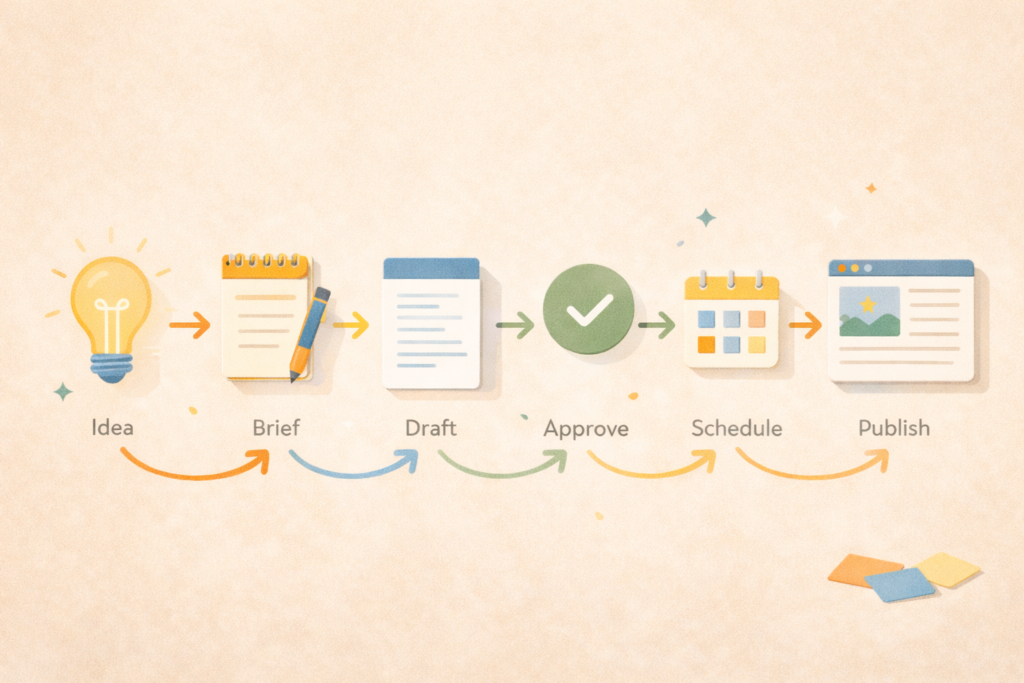
Your content calendar for small business needs a simple status flow:
- Idea confirmed
- Brief ready
- Draft in progress
- Review requested
- Approved
- Scheduled
- Published
- Repurposed
Tools can help if they reduce friction. If you want templates, Asana and Trello both provide calendar and editorial workflows you can adapt.
The 90-day calendar template you can copy
Here is a simple 12-week layout. Keep it boring on purpose.
Assumptions: B2B services, global audience, Growth rhythm, LinkedIn as primary channel.
| Week | Blog focus | Supporting topic or asset | Social focus (2 to 3 posts) | CTA |
|---|---|---|---|---|
| 1 | Pillar: “How to choose X without guessing” | FAQ list from sales calls | Mistakes, myths, checklist | Service page |
| 2 | Support post 1 | Simple framework graphic | Proof points, process steps | Book a call |
| 3 | Support post 2 | Short case-style story (anonymised) | Objections answered | Download or enquiry |
| 4 | Refresh and repurpose week | Update pillar, add internal links | Highlights from month | Next pillar teaser |
| 5 | Pillar 2 | Comparison guide | Costs, timelines | Service page |
| 6 | Support post 1 | Buyer checklist | What good looks like | Book a call |
| 7 | Support post 2 | FAQ expansion | Common questions | Enquiry |
| 8 | Refresh and repurpose week | Improve CTAs, add proof | Repurpose series | Next pillar teaser |
| 9 | Pillar 3 | Implementation guide | Process breakdown | Service page |
| 10 | Support post 1 | Risk and trust post | “Avoid this” series | Book a call |
| 11 | Support post 2 | Decision support post | “How to choose” series | Enquiry |
| 12 | Review and plan next quarter | KPI review | What worked, what to repeat | Next quarter CTA |
This is the point: a content calendar for small business is a system that cycles. Publish, repurpose, improve, repeat.
How to fill the calendar in one planning session
Set a 60 minute meeting. Do it monthly or quarterly.
Part 1: Extract real questions (15 minutes)
Pull:
- the top 10 questions you hear on calls
- the objections prospects raise before buying
- common confusion points that slow down decisions
- “what does it cost” and “how long does it take” questions
These are B2B trust builders.
Part 2: Turn questions into titles (15 minutes)
For each question, write a helpful title that includes:
- a clear outcome
- a clear scope
- plain language
Avoid clever. Choose clear.
Part 3: Assign each item a purpose (15 minutes)
Label each piece:
- Awareness: helps a new buyer understand the problem
- Consideration: helps a buyer compare options
- Decision: helps a buyer choose you or take the next step
A content calendar for small business works best when it includes all three, not only awareness content.
Part 4: Choose owners and deadlines (15 minutes)
For each item, assign:
- who briefs
- who writes
- who reviews
- who publishes
- a deadline that is realistic
If no one owns it, it will not ship.
Checklist: a content calendar for small business that does not collapse
Use this checklist before you commit to the next 90 days.
- We have one clear 90-day goal.
- We are supporting one main offer.
- We know the primary B2B buyer and their top concerns.
- We have 3 themes tied to revenue.
- We have a weekly shipping rhythm that matches our capacity.
- We have one approval owner, not five.
- We have a status flow from idea to published.
- We will repurpose each blog into multiple social posts.
- We will review results monthly and adjust.
If you want help connecting content to wider priorities, a roadmap can turn “random marketing” into a plan you can execute: Digital Strategy Roadmaps
Common mistakes with a content calendar for small business
Mistake 1: Planning too much content
A packed calendar looks impressive and ships nothing.
Fix: cut output by 30% and focus on consistency.
Mistake 2: Treating social and blog as separate worlds
If your blog and social do not support each other, your effort splits.
Fix: one pillar, then repurpose into smaller posts.
Mistake 3: Ignoring review time
B2B content often needs SME review, legal checks, or leadership approval.
Fix: build review time into the calendar. Put deadlines earlier than you think.
Mistake 4: Writing content that never leads anywhere
If every post ends with “hope this helped,” you are leaving value on the table.
Fix: include a calm next step: read a guide, view a service page, request a quote.
VVRapid also offers a quote request flow for Socials, Blogs & Article Writing if you need a custom plan: Request a Socials Blogs & Article Writing Quote
Mistake 5: Choosing topics that cannot prove anything
B2B trust needs specificity.
Fix: include process steps, examples, boundaries, and what to expect.
Simple tools that make a content calendar easier
Use whatever your team will actually open.
Options worth considering:
- Asana templates for social and editorial calendars if you want tasks, approvals, and visibility.
- Trello editorial calendar if you want a lighter board with clear stages.
- Notion templates if you want a database plus calendar view.
Pick one. Do not rebuild the calendar every month. The tool is not the strategy.
FAQ
How far ahead should a small business plan content?
For most B2B teams, 30 to 90 days is the sweet spot. A content calendar for small business that goes further often becomes inaccurate.
How many posts per week is realistic?
If you are busy, aim for 2 to 3 social posts per week and 2 blogs per month. Consistency beats volume. This aligns with how VVRapid frames a realistic growth cadence for small businesses.
Should I plan content around SEO keywords or campaigns?
Both, but start with customer questions. Keywords help you structure and name content, but campaigns help you prioritise what matters now. The best calendars connect the two.
What if we do not have time to write?
Then the calendar should include smaller, easier content types: FAQs, checklists, short explainers, and repurposing. You can also outsource writing while keeping strategy internal.
How do I know if the calendar is working?
Track simple signals: enquiries, lead quality, time on page, impressions, and whether sales calls start more informed. Also review which topics drive the best conversations and repeat them.
How VVRapid can help
If you want a content calendar for small business that actually ships, VVRapid can plan topics, build a realistic publishing rhythm, and produce the blogs and social posts for you through Socials, Blogs & Article Writing. For better compounding results, pair it with Search Engine Optimisation so content supports long-term visibility.
If you need a broader quarterly plan, Digital Strategy Roadmaps can connect content to priorities and execution.
Next step
Block 60 minutes this week and build your next 90 days using the template above. If you would rather have a team handle planning, writing, and consistency, view VVRapid’s Socials, Blogs & Article Writing service and request a quote through the site.