
An app rebuild or improvement decision usually starts when an existing web app becomes slow, frustrating, expensive to maintain or difficult to change. The problem is that visible issues do not always reveal whether the app needs a few focused fixes, a broader redesign or a complete rebuild.
Table of Contents
For founders and small business owners, the safest approach is to assess the business value, user experience and technical condition separately. A dated interface does not automatically justify rebuilding the underlying system. Likewise, a fresh design will not solve unstable code, weak data structures or recurring integration failures.
This guide gives you a practical framework for choosing between improving what you have, modernising it in phases or starting again with a more maintainable foundation.
What Does App Rebuild or Improvement Mean?
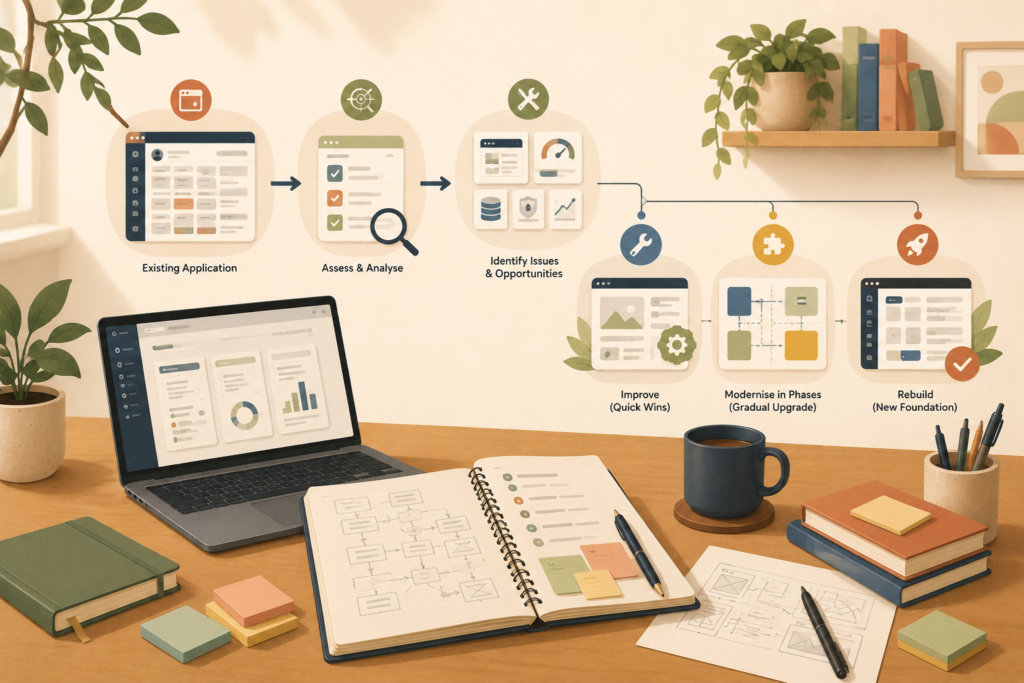
An app rebuild or improvement assessment compares three possible paths.
Improve the existing app
You retain the current application and make targeted changes.
This may include:
- Fixing specific bugs
- Improving slow workflows
- Simplifying confusing screens
- Updating dependencies
- Improving mobile responsiveness
- Strengthening security controls
- Reworking one integration
- Adding a small number of features
This option is often appropriate when the app’s core architecture is stable and the main problems are limited.
Modernise the app in phases
You keep the app operational while gradually replacing weak components.
For example, you might:
- Replace the login system
- Build a new reporting module
- Move one workflow to a new interface
- Introduce a cleaner API layer
- Replace an unreliable integration
- Migrate data in stages
- Update the administrative area separately
This approach can reduce the risk of one large cutover. Martin Fowler’s Strangler Fig pattern describes gradually moving behaviour from a legacy system into new components rather than replacing everything at once.
Rebuild the app
You create a new application while using the current app as a reference for workflows, data and business rules.
A rebuild may change:
- The application architecture
- The database structure
- The user interface
- The development framework
- Hosting and deployment
- Integrations
- Permissions
- Reporting
- Administrative tools
A rebuild should not mean blindly recreating every old screen and feature. It is an opportunity to preserve what works, remove what no longer matters and correct structural problems.
VVRapid’s app design and development service includes reviewing existing apps and recommending whether focused improvements or a more stable rebuild make sense.
Start With the Business Problem, Not the Technology
Before asking whether the code is old, ask why the business is considering change.
Common reasons include:
- Customers struggle to complete key tasks
- Staff rely on manual workarounds
- Important features take too long to develop
- Bugs return after being fixed
- The original developer is no longer available
- The app cannot support a new service
- Support costs continue to rise
- Management cannot access reliable reports
- Integrations fail regularly
- The business has outgrown the original workflow
Write the main reason in one sentence.
For example:
We need to decide between an app rebuild or improvement because staff cannot process customer requests efficiently, and each change creates new problems elsewhere.
This is more useful than:
The app feels old.
An effective decision must connect technical work to a business outcome. AWS application-modernisation guidance similarly recommends starting with business needs before focusing on technologies.
Separate User Experience Problems From Technical Problems
An app rebuild or improvement decision becomes clearer when you separate what users experience from what developers maintain.
User experience problems
These are visible to customers, staff or administrators.
Examples include:
- Confusing navigation
- Too many steps
- Poor mobile layouts
- Inconsistent buttons and forms
- Unclear error messages
- Slow screen responses
- Difficult search and filtering
- Important information hidden from view
- Repeated data entry
- Accessibility barriers
These issues may justify an app redesign, but not necessarily a full rebuild.
Technical problems
These affect reliability, maintenance and future development.
Examples include:
- Unsupported frameworks or dependencies
- Poorly structured code
- Limited test coverage
- Fragile deployment processes
- Database performance problems
- Duplicated business rules
- Weak access controls
- Inconsistent data
- Undocumented integrations
- A high volume of recurring errors
- Features that cannot be changed safely
Some apps have both types of problems. Others simply have a dated interface over a reliable backend.
Do not assume the answer from appearances alone.
When Improving the Existing App Is Usually Enough
Choose focused improvement when most of the following are true:
- The app performs its main job reliably
- Users understand the central workflow
- The database structure is still suitable
- The current technology remains supportable
- The code can be changed without widespread breakage
- Automated or repeatable testing is possible
- The development team can explain how the app works
- Problems are limited to identifiable areas
- Integrations are stable
- New features can still be added at a reasonable pace
In this situation, improving an existing app may provide better value than rebuilding it.
Examples of suitable improvement projects
A slow report
The rest of the app works well, but one report takes too long because of an inefficient database query.
A confusing registration flow
Users abandon account creation, but the authentication system and application architecture remain sound.
Poor mobile usability
The app was designed for desktop, but the main workflows can be made responsive without changing the backend.
One unreliable integration
The accounting connection fails occasionally, while the rest of the system remains stable.
These are targeted problems. A full legacy app modernisation project may be unnecessary.
When an App Redesign Is the Better Middle Ground
An app redesign focuses primarily on the user experience and interface while retaining much of the underlying application.
Consider an app redesign when:
- The app works but feels difficult to use
- The navigation reflects old business processes
- Screens have grown cluttered over time
- Mobile use has become more important
- Users need clearer feedback and guidance
- The brand has changed
- Different sections feel inconsistent
- The main workflows need fewer steps
An app redesign may still require development changes. A redesigned workflow can affect permissions, validation, data and integrations.
However, the purpose is different from a rebuild. You are improving how people interact with the system rather than replacing its entire foundation.
Before approving a redesign, confirm that the existing backend can support the proposed experience. Otherwise, the new interface may simply hide the same structural limitations.
Signs a Full App Rebuild May Be Necessary
A complete rebuild becomes more reasonable when several structural problems appear together.
1. The technology is no longer supportable
The app depends on abandoned libraries, outdated frameworks or hosting that cannot be updated safely.
Age alone is not the issue. The real question is whether the system can still be secured, maintained and extended.
2. Every change creates new defects
Small requests repeatedly affect unrelated parts of the app.
This often indicates tightly coupled code, unclear business rules or inadequate testing.
3. The app no longer matches the business
The original system may have been built for a smaller team, fewer services or a simpler customer journey.
If staff rely on spreadsheets and manual steps to compensate, the app may no longer support the process it was meant to manage.
4. The data structure blocks progress
A weak or inconsistent database can make reporting, integrations and new features increasingly difficult.
Examples include:
- Important information stored in free-text fields
- Duplicate customer records
- No reliable history of status changes
- Different meanings assigned to the same field
- Relationships between records that cannot be traced
5. Security cannot be improved confidently
A web app audit may reveal that access control, authentication, session handling or sensitive-data protection cannot be corrected without extensive structural changes.
OWASP’s Application Security Verification Standard provides a recognised basis for evaluating web application security controls and secure-development requirements.
6. Development has become disproportionately expensive
The cost of understanding, testing and repairing the existing code may be greater than the cost of building the same improvement on a stable foundation.
This does not mean a rebuild will be cheap. It means the current system creates ongoing friction that compounds with every change.
7. The app cannot meet future requirements
A rebuild may be justified when planned growth requires capabilities the current architecture cannot support, such as:
- Multiple organisations
- More complex permissions
- High transaction volumes
- Real-time processing
- Better reporting
- Internationalisation
- New regulatory requirements
- Major third-party integrations
What a Web App Audit Should Examine
Do not choose app rebuild or improvement based on a single developer’s quick opinion.
A structured web app audit should examine several areas.
Business fit
- Does the app still support the current operating model?
- Which workflows create the most friction?
- Which features are unused?
- Where do staff use workarounds?
- Which functions are essential to revenue or service delivery?
User experience
- Can users complete key journeys?
- Where do they hesitate or abandon tasks?
- Is the app usable on relevant devices?
- Are errors understandable?
- Is navigation consistent?
- Does the interface meet reasonable accessibility expectations?
Technical condition
- Is the technology supported?
- Is the code understandable and organised?
- Are tests available?
- Can developers deploy safely?
- Are errors logged and monitored?
- Which components cause the most defects?
- How much technical debt is present?
Data
- Is the data accurate and consistently structured?
- Are duplicates common?
- Can records be migrated?
- Are retention and deletion rules known?
- Is there a reliable backup and restore process?
Security
- Are authentication and permissions appropriate?
- Is sensitive information protected?
- Are dependencies maintained?
- Are security events recorded?
- Can vulnerabilities be patched safely?
Performance
- Which screens or actions are slow?
- Is the delay caused by frontend code, database queries, APIs or hosting?
- Is performance measured using real usage data?
- Does the app respond well on lower-powered devices and slower connections?
Google’s web performance guidance recommends evaluating user-focused measures such as loading, visual stability and responsiveness instead of relying on one general impression of speed.
Maintainability
- Is the app documented?
- Can another developer take over?
- Are environments and credentials controlled?
- Is source code stored properly?
- Can one module be changed without rewriting others?
A proper technical debt assessment should produce evidence, not just a list of complaints.
Use This App Rebuild or Improvement Decision Framework
Score each statement from 0 to 2:
- 0: Not true
- 1: Partly true
- 2: Clearly true
Business fit
- The app no longer supports our main workflow
- Staff depend on manual workarounds
- Important business rules are missing or incorrect
- The app prevents us from launching planned services
User experience
- Users struggle with important journeys
- The mobile experience is poor
- Navigation and terminology are inconsistent
- Support requests frequently relate to usability
Technical condition
- The technology is unsupported or difficult to maintain
- Small changes regularly cause new defects
- There is little useful documentation
- Testing and deployment are unreliable
Data and security
- Data is inconsistent or difficult to migrate
- Permissions cannot be managed confidently
- Security updates are difficult to apply
- Backups or recovery processes are unclear
Delivery
- New features take much longer than expected
- Developers are reluctant to change core areas
- Multiple attempted fixes have not solved the problem
- Support costs are increasing without improving stability
Interpreting the score
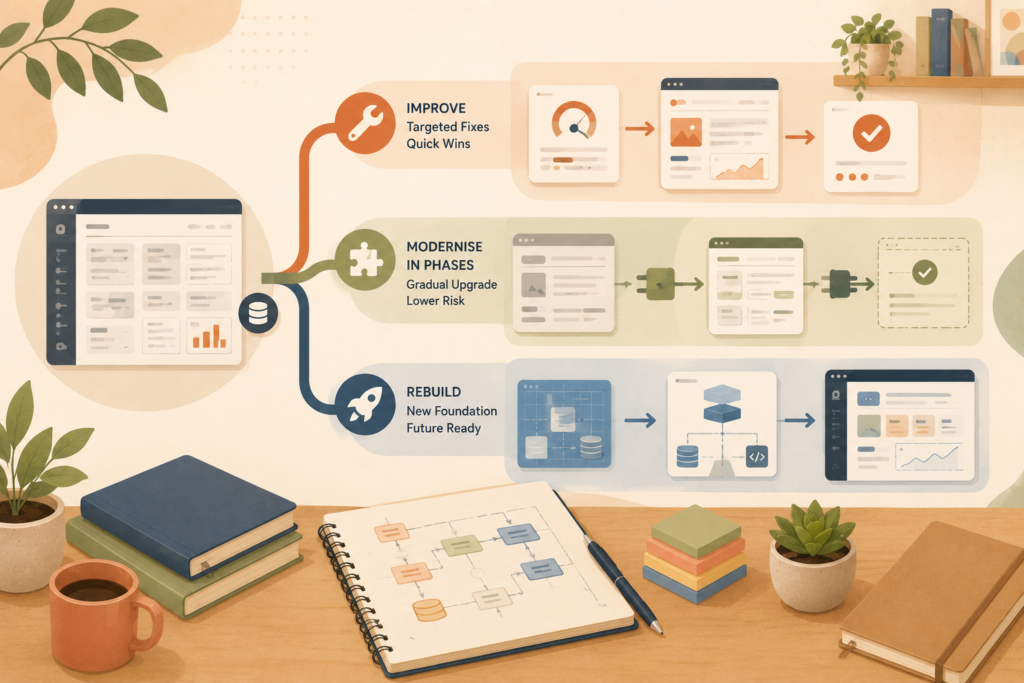
0 to 10:
Targeted improvements may be enough.
11 to 22:
Commission a deeper audit. A redesign or phased modernisation may be appropriate.
23 to 40:
A rebuild should be investigated seriously, especially if high scores appear across business fit, technical condition and security.
This is a discussion tool, not a technical verdict.
Consider a Phased Rebuild Before a Big-Bang Replacement
A rebuild does not always require switching the entire business to a new app on one day.
A phased approach may replace one area at a time.
For example:
- Create a stable data and API layer
- Replace the customer login and account area
- Move the main customer workflow
- Replace staff administration
- Migrate reporting
- Retire the remaining legacy components
Incremental replacement can reduce cutover risk and provide usable improvements sooner. Fowler’s Strangler Fig approach is specifically intended to move behaviour gradually while the older system remains in operation.
However, phased modernisation also introduces temporary complexity because old and new components must work together.
Ask the development team to explain:
- How data will remain consistent
- Which system is the source of truth
- How users will move between old and new areas
- How rollback will work
- When each legacy component can be retired
- Whether temporary integrations will be required
Protect Your Data During an App Rebuild
Data migration deserves its own plan.
Before moving anything, identify:
- Which records must be retained
- Which records can be archived
- Which duplicates should be removed
- Which fields need transformation
- Which relationships must remain intact
- Which records have legal retention requirements
- How attachments will be transferred
- How migration accuracy will be tested
Create backups before migration and define a rollback process.
Run a test migration using a realistic copy of the data. Then compare totals, relationships, sample records and critical reports.
Do not discover after launch that customer histories, attachments or status changes were lost.
Questions to Ask Before Approving an App Rebuild
Ask prospective developers:
- What evidence supports the rebuild recommendation?
- Which parts of the existing app can be retained?
- What are the main technical risks?
- How will data be migrated and verified?
- Can the work be delivered in phases?
- How will business continuity be protected?
- Which features should be removed rather than rebuilt?
- How will users test the new system?
- What documentation will be supplied?
- What monitoring and support are included after launch?
- How will scope changes be handled?
- What ownership and access will we receive?
You should also ask what happens if the audit shows that focused improvements are enough.
A trustworthy assessment should be capable of recommending a smaller project.
App Rebuild or Improvement Checklist
Before making a decision, confirm that you have:
- ☐ Defined the main business problem
- ☐ Identified the workflows causing the most friction
- ☐ Collected feedback from customers and staff
- ☐ Reviewed usage data where available
- ☐ Separated UX issues from technical issues
- ☐ Assessed the codebase and architecture
- ☐ Reviewed the database condition
- ☐ Checked security and access controls
- ☐ Measured actual performance problems
- ☐ Listed unsupported dependencies
- ☐ Estimated the cost of keeping the current app
- ☐ Identified future business requirements
- ☐ Considered phased modernisation
- ☐ Created an initial data-migration plan
- ☐ Compared improvement and rebuild scenarios
- ☐ Documented assumptions, exclusions and risks
Common App Rebuild Mistakes
Rebuilding because the interface looks old
A dated visual design may only need a redesign. Do not discard a stable system without assessing it.
Copying every existing feature
Some features may be unused, duplicated or based on an outdated process. Rebuilding them preserves unnecessary complexity.
Ignoring staff workarounds
Spreadsheets and manual notes often reveal missing workflows. Investigate why they exist before designing the replacement.
Treating data migration as a final task
Data quality can change the architecture, schedule and scope. Review it early.
Choosing technology before defining the problem
The framework matters less than whether the proposed architecture supports the users, data, integrations and operating model.
Attempting one enormous launch
A big-bang replacement can increase operational risk. Consider whether gradual migration is practical.
Skipping documentation again
A new app without technical and operational documentation can become the next legacy system.
Measuring success by launch alone
The goal is not simply to release a new application. It is to improve reliability, usability, maintainability and business performance.
How VVRapid Can Help
VVRapid can review an existing web app, identify UX and technical constraints, and help decide whether targeted improvements, phased modernisation or a rebuild is the most sensible path.
The assessment can cover workflows, interfaces, performance, integrations, data structure and maintainability.
Where the app is business-critical, ongoing website maintenance and care can support monitoring, updates and operational stability.
For projects involving wider systems and process decisions, a digital strategy roadmap can help prioritise the work before development begins.
The aim is to solve the real constraint without replacing more than necessary.
Frequently Asked Questions
How do I know whether to improve or rebuild an app?
Start with a web app audit covering business fit, user experience, architecture, data, security and maintainability. Improvement is usually suitable when problems are limited. A rebuild becomes more likely when structural issues affect several areas.
Is an app redesign the same as an app rebuild?
No. An app redesign primarily changes the user experience and interface. A rebuild replaces much of the underlying application, although the two projects can overlap.
Can an old web app still be worth improving?
Yes. Age alone does not make an app unsuitable. A legacy app may still be stable, secure and maintainable. The decision should depend on its condition and business fit.
What is technical debt?
Technical debt describes shortcuts, outdated decisions or accumulated complexity that make future changes slower, riskier or more expensive. Not all technical debt requires a rebuild.
Can an app be rebuilt in phases?
Yes. A phased rebuild can move workflows or components gradually while the current app remains available. This may reduce cutover risk, although it requires careful data and integration planning.
How long does an app rebuild take?
The schedule depends on workflows, screens, user roles, integrations, data migration, testing and rollout requirements. Pricing and timelines vary by scope and region. A technical assessment should take place before a reliable plan is approved.
Should we stop improving the old app during a rebuild?
Not necessarily. Critical security, reliability and compliance issues may still need attention. Non-essential feature work should usually be reviewed carefully to avoid investing twice.
A good app rebuild or improvement decision is based on evidence, not frustration alone.
Review VVRapid’s App Design & Development service when you need an independent assessment of whether your existing web app should be improved, modernised or rebuilt.