
Business website requirements are the practical information, content, assets, access details, and decisions your developer needs before meaningful website development can begin.
Table of Contents
A signed proposal does not mean your business is ready for development. The project can still stall if nobody has prepared the copy, supplied the logo files, confirmed the integrations, or decided who approves each stage.
Preparation does not require a technical specification hundreds of pages long. It requires a clear, organised set of inputs that helps your designer and developer build the right website without repeatedly pausing for missing decisions.
This guide covers the business website requirements to prepare once you have chosen a provider and are getting ready to start the project.
What Business Website Requirements Include
Business website requirements describe what the website must contain, what it must do, what resources are available, and who is responsible for each decision.
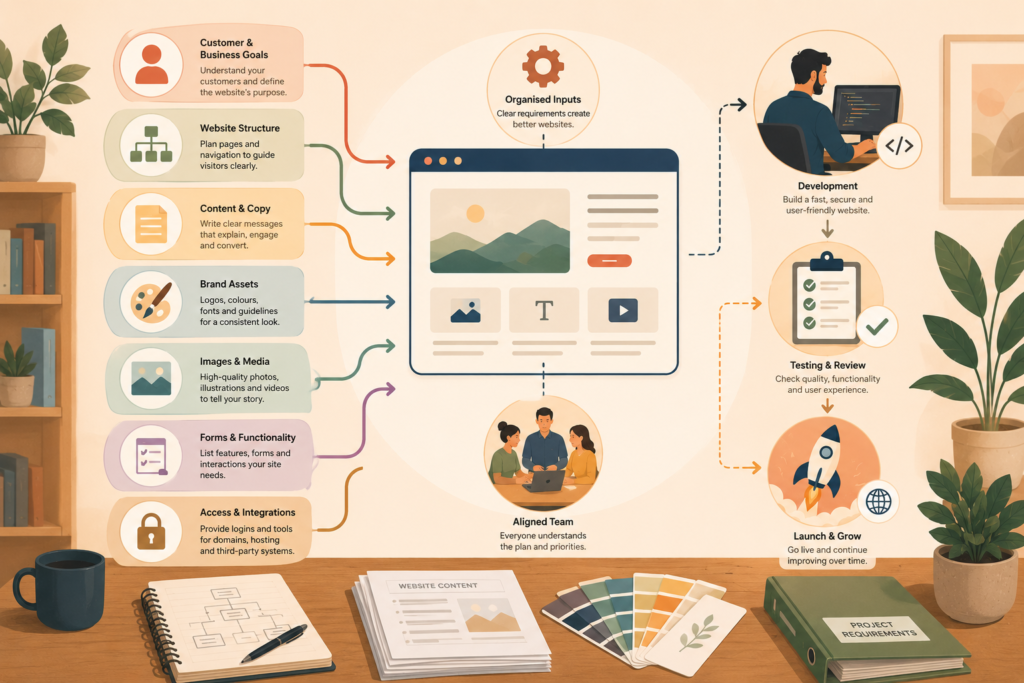
They normally include:
- Business and customer information
- Website goals
- Required pages
- Draft or approved content
- Brand files
- Images and media
- Forms and functionality
- Third-party integrations
- Legal and privacy requirements
- Domain and hosting access
- Analytics requirements
- Project responsibilities
- Approval processes
- Launch priorities
These website project requirements are more practical than a general idea such as “we need a modern website”.
Your development team needs enough detail to make informed decisions about navigation, page layouts, technology, content presentation, and testing.
A clear starting point also makes it easier to identify which requirements are essential for launch and which can wait for a later phase.
For businesses still defining the overall project scope, VVRapid’s website design and development brief provides a useful earlier-stage planning template: https://vvrapid.com/website-design-and-development-brief-template/
Start With the Website’s Primary Business Goal
Every project should have one primary goal.
The website may need to:
- Generate qualified enquiries
- Sell products
- Secure bookings
- Explain complex services
- Build trust before a sales conversation
- Help customers find local branches
- Support recruitment
- Publish useful industry content
- Give customers access to an online portal
You can have supporting goals, but one should guide the hierarchy.
For example, a professional services website may need to build credibility, explain services, and publish articles. Its primary goal might still be to generate consultation requests.
Write the primary goal in one sentence:
The main purpose of this website is to help [audience] take [priority action].
This gives your team a reference point when discussing layouts, navigation, calls to action, and functionality.
Without a shared goal, different stakeholders may make conflicting requests. One person may prioritise brand storytelling while another wants every page to push an immediate sale.
Define the Priority Customer Actions
Your business website requirements should explain what visitors need to do.
Possible actions include:
- Complete an enquiry form
- Call the business
- Send a WhatsApp message
- Purchase a product
- Request a quote
- Book an appointment
- Download a guide
- Subscribe to updates
- Visit a physical location
- Apply for a role
- Log in to an account
Rank these actions rather than treating them all as equally important.
Your website development partner can then design clear pathways around those priorities.
Also confirm what should happen after each action. For example:
- Which email address receives form submissions?
- Should a lead be added to a CRM?
- Does the customer receive an automatic reply?
- Who follows up?
- Does the booking system check live availability?
- Which payment methods must be available?
A button is only the visible part of a larger business process.
Prepare Your Customer and Audience Information
Developers do not need a lengthy market research report, but they do need enough context to understand who will use the website.
Prepare a short audience summary covering:
- Typical customer type
- Location or service area
- Main problem or need
- Questions customers ask before buying
- Common trust concerns
- Level of technical knowledge
- Preferred contact method
- Device or browsing habits, where known
- Language requirements
- Accessibility considerations
A South African local service business may need prominent telephone and WhatsApp actions, maps, service-area information, and clear trading hours.
A business serving the UK, EU, UAE, Australia, or New Zealand may need region-specific spelling, currencies, payment methods, privacy information, tax details, or contact options.
Do not assume your developer knows how your customers buy.
Create a Confirmed Website Page List
A website content checklist starts with a confirmed page list.
Common pages include:
- Home
- About
- Services overview
- Individual service pages
- Products or shop
- Portfolio
- Case studies
- Blog
- Frequently asked questions
- Contact
- Privacy policy
- Terms and conditions
The right structure depends on the website’s job.
A service business may need separate pages for priority services so that each can answer specific customer questions and target relevant searches.
An online store may need product categories, shipping information, returns guidance, payment information, and customer account pages.
For practical guidance on organising a service website, see VVRapid’s service business website structure article: https://vvrapid.com/service-business-website-structure-9-pages/
For every page, define:
- The page’s purpose
- Intended audience
- Main message
- Required content
- Primary action
- Supporting proof
- Person responsible for the content
This turns a loose sitemap into useful website project requirements.
Prepare the Website Content
Content delays can stop development even when the technical work is ready to continue.
Your website assets checklist should identify which content already exists and which content must still be created.
Written content
Prepare or assign responsibility for:
- Headlines
- Service descriptions
- Product descriptions
- About information
- Team biographies
- Frequently asked questions
- Calls to action
- Contact details
- Location information
- Testimonials you have permission to use
- Case studies
- Legal content
- Blog articles
Do not rely on the developer to extract final copy from old brochures, emails, meeting notes, and social posts unless content preparation is included in the agreed scope.
When professional writing support is needed, VVRapid’s Socials, Blogs & Article Writing Services can help with service pages, supporting articles, and other website content.
Proof and trust material
Collect the evidence that helps customers feel confident.
This may include:
- Accreditations
- Professional memberships
- Awards
- Client logos you are authorised to display
- Authentic reviews
- Product specifications
- Certifications
- Guarantees your business genuinely provides
- Delivery information
- Returns policies
- Team qualifications
- Original project photographs
Trust material should be confirmed before layouts are finalised. Otherwise, the design may reserve space for proof that never arrives.
Organise Your Brand and Image Files
Your developer should not need to search through message threads for the latest logo.
Create one shared folder containing approved brand material.
Include:
- Primary logo
- Alternative logo versions
- Vector logo files where available
- Brand colour values
- Font information and licences
- Brand guidelines
- Photography
- Product images
- Team photographs
- Icons or illustrations
- Video files
- Social media links
Use clear filenames and remove outdated versions.
For example:
company-logo-full-colour.svgcompany-logo-white.pngteam-director-name.jpgproduct-name-front-view.webp
Confirm that your business owns or has permission to use every supplied image, font, video, and graphic.
Avoid lifting images from Google search results. Your development team should know whether images are original, licensed stock, supplier-provided, or still required.
Document Website Functionality Requirements
Website functionality requirements explain what visitors and administrators must be able to do.
List each feature in plain language.
Examples include:
- Contact forms
- Quote request forms
- Online bookings
- Event registrations
- Product filtering
- Online payments
- Recurring subscriptions
- Customer accounts
- File uploads
- Document downloads
- Location search
- Live chat
- Newsletter registration
- Multilingual content
- Restricted member content
For each feature, describe the desired user journey.
For example:
A customer selects a service, chooses an available date, pays a deposit, receives confirmation, and is added to the business calendar.
This is more useful than writing “booking system required”.
Also identify exceptions. What happens if a payment fails, a timeslot becomes unavailable, a file is too large, or a customer enters an invalid address?
Confirm Third-Party Integrations
Integrations often create more work than their small icons suggest.
Your business website requirements should list every external system that must connect to the website.
Common examples include:
- Payment gateways
- CRM software
- Email marketing platforms
- Booking tools
- Accounting systems
- Inventory software
- Courier services
- Maps
- Analytics
- Advertising pixels
- Social feeds
- Customer support tools
- Property or vehicle listing feeds
- Review platforms
For each integration, confirm:
- Platform name
- Existing account owner
- Login or access method
- Subscription level
- API availability
- Required data flow
- Person responsible for approval
- Testing contact
- Ongoing licence cost
Do not assume every platform connects directly to WordPress or WooCommerce.
Some systems require a paid plugin, custom development, an automation platform, or cooperation from the third-party provider.
Where standard plugins cannot support the required workflow, VVRapid’s Custom Plugin Development service may be relevant.
Prepare Domain, Hosting, and Account Access
Your developer may require access to existing digital accounts before development or launch.
Create a secure access inventory for:
- Domain registrar
- DNS management
- Hosting
- Current website
- WordPress administrator account
- Business email
- Google Analytics
- Google Search Console
- Google Business Profile
- Tag Manager
- Payment gateways
- CRM
- Email marketing platform
- Social media accounts
- Existing premium plugins or themes
Do not place passwords in an ordinary email or shared spreadsheet.
Use secure account invitations where supported. A password manager can also provide controlled access without exposing every credential.
Confirm which email address should own the main accounts. Business-critical services should normally be controlled through a company-managed address rather than a former employee or supplier’s personal account.
For businesses that need hosting alongside development, VVRapid offers LiteSpeed WebServer Hosting.
Identify Legal, Privacy, and Accessibility Needs
Your developer can help implement website features, but your business remains responsible for identifying the laws, regulations, and industry rules that apply to it.
Business website requirements may need to cover:
- Privacy notices
- Cookie consent
- Terms and conditions
- Returns and refunds
- Delivery policies
- Competition terms
- Age restrictions
- Product warnings
- Professional disclaimers
- Accessibility obligations
- Data retention
- Marketing consent
- Cross-border data handling
Requirements differ by location, audience, business type, and the data being processed. Obtain appropriate legal advice where necessary.
Accessibility should be considered during design, content preparation, and development. The W3C explains that accessible websites are designed and developed so people with disabilities can perceive, understand, navigate, and interact with them.: W3C Introduction to Web Accessibility ↗
Prepare accessibility-related inputs such as:
- Meaningful image descriptions
- Video captions or transcripts
- Clear link wording
- Logical heading structures
- Understandable form instructions
- Alternatives for essential downloadable documents
Accessibility is not only a developer task. Content owners, designers, and developers all influence the result.
Define SEO and Measurement Requirements
SEO requirements should be discussed before pages are developed, not after the site is ready to launch.
Prepare:
- Priority services or products
- Important customer search topics
- Existing high-performing pages
- URLs that must be retained
- Planned page titles
- Target service areas
- Competitor or industry references
- Existing Search Console access
- Analytics requirements
- Conversion events to measure
For a redesign, identify existing pages that receive traffic or links. Redirect planning should happen before URLs are changed.
Google’s official SEO guidance recommends creating helpful content for people while ensuring that search engines can crawl, understand, and index it.: Google Search Central SEO Starter Guide ↗
For support with search strategy, page optimisation, and longer-term visibility, see VVRapid’s Search Engine Optimisation service.

Also define what success will be measured through:
- Form submissions
- Phone calls
- WhatsApp clicks
- Online sales
- Booking completions
- Downloads
- Newsletter sign-ups
- Account registrations
- Visits to important pages
“More traffic” is not enough on its own.
Assign Project Roles and Approvals
A website development process slows down when nobody knows who can make the final decision.
Assign the following roles:
Project owner
The person responsible for the business outcome, schedule, and internal coordination.
Main contact
The person who communicates with the development team and collects internal feedback.
Content owner
The person responsible for supplying and approving written content.
Technical contact
The person who can assist with domains, email, systems, integrations, or account access.
Final approver
The person authorised to approve designs, content, functionality, and launch.
One person may fill several roles in a small business.
The important part is clarity.
Also agree on how feedback will be supplied. Consolidated feedback from one contact is easier to action than separate, conflicting messages from multiple stakeholders.
Separate Launch Requirements From Later Improvements
Not every idea belongs in the first release.
Divide your website development requirements into three groups:
Required for launch
Features, pages, content, and integrations the website cannot operate without.
Valuable soon after launch
Improvements that matter but do not need to delay the initial release.
Future ideas
Features that may become useful as the business grows or collects more customer data.
This prevents the project from expanding every time a stakeholder suggests another feature.
It also helps the development team choose technology that can support future plans without building everything immediately.
Business Website Requirements Checklist
Before development begins, confirm that you have prepared:
- ☐ A one-sentence primary website goal
- ☐ Priority customer actions
- ☐ A short customer profile
- ☐ Confirmed service areas and regions
- ☐ An approved page list
- ☐ A purpose for every page
- ☐ Draft or final page copy
- ☐ Contact and company information
- ☐ Approved testimonials and trust material
- ☐ Brand guidelines
- ☐ Current logo files
- ☐ Licensed images and media
- ☐ Required forms
- ☐ Functionality descriptions
- ☐ Integration details
- ☐ Domain and hosting access
- ☐ Analytics account access
- ☐ Privacy and legal requirements
- ☐ Accessibility inputs
- ☐ SEO priorities
- ☐ Existing URLs that must be protected
- ☐ Named project roles
- ☐ One final approver
- ☐ A secure access-sharing method
- ☐ Launch requirements
- ☐ Post-launch priorities
Common Mistakes When Preparing for Website Development
Assuming the old website contains everything needed
Old content may be inaccurate, duplicated, poorly structured, or no longer aligned with the business.
Review it before migration.
Supplying content page by page during development
This often causes layouts to be designed around placeholder copy and then reworked when final content arrives.
Prepare priority pages early.
Describing features with one-word labels
“Bookings”, “portal”, or “CRM” does not describe the required workflow.
Explain who uses the feature, what they do, what data moves, and what happens afterwards.
Giving every stakeholder approval power
Too many independent decision makers create conflicting feedback.
Choose one person to consolidate responses and approve work.
Ignoring account ownership
The business should retain control of its domain, hosting, analytics, and essential third-party accounts.
Document ownership before launch.
Treating privacy and accessibility as final checks
These requirements can affect forms, content, media, tracking, layouts, and technology.
Raise them before development begins.
Trying to launch every possible idea
An oversized first phase increases cost, testing, risk, and delays.
Separate essential requirements from future enhancements.
How VVRapid Can Help
VVRapid designs and develops fast, modern websites for local businesses, online stores, blogs, and portfolio-led companies.
The team can help organise your requirements, plan the structure, develop the website, connect suitable tools, and prepare the project for launch.
Where needed, VVRapid can also support content, SEO, hosting, maintenance, and custom functionality.
Review the Website Design & Development service.
FAQ About Business Website Requirements
What are business website requirements?
Business website requirements are the goals, content, features, integrations, assets, access details, legal considerations, and responsibilities needed to plan and develop the website.
Do I need final content before development starts?
Final content is ideal for priority pages, but development can sometimes begin with approved drafts. Confirm who will produce the remaining content and when it will be delivered.
What files should I give my website developer?
Provide approved logo files, brand guidelines, written content, photographs, product information, videos, legal content, and any existing website data included in the project.
How detailed should website functionality requirements be?
Describe the complete user journey, including what triggers the feature, what information is collected, which systems are involved, and what should happen when the process succeeds or fails.
Who should approve a website project?
Choose one final approver with the authority to accept designs, content, functionality, and launch. Other stakeholders can contribute feedback through the main project contact.
Can requirements change during development?
Yes, but significant changes may affect scope, cost, technology, and the launch schedule. Record new ideas and decide whether they belong in the current phase or a future improvement.
Prepare the Inputs Before the Build
Good preparation does not remove every decision from a website project.
It removes avoidable uncertainty.
Clear business website requirements help your team understand the goal, prepare content, identify functionality, secure account access, assign responsibilities, and reduce preventable delays.
You do not need to solve the technical implementation yourself. You do need to explain what the website must help the business and its customers achieve.
Review VVRapid’s Website Design & Development service or contact the team to discuss your project requirements.