
If your organic traffic dropped suddenly, the first priority is not rewriting every page, changing all your titles or publishing more content. The first priority is identifying what changed, when it changed and which part of your search visibility was affected.
Table of Contents
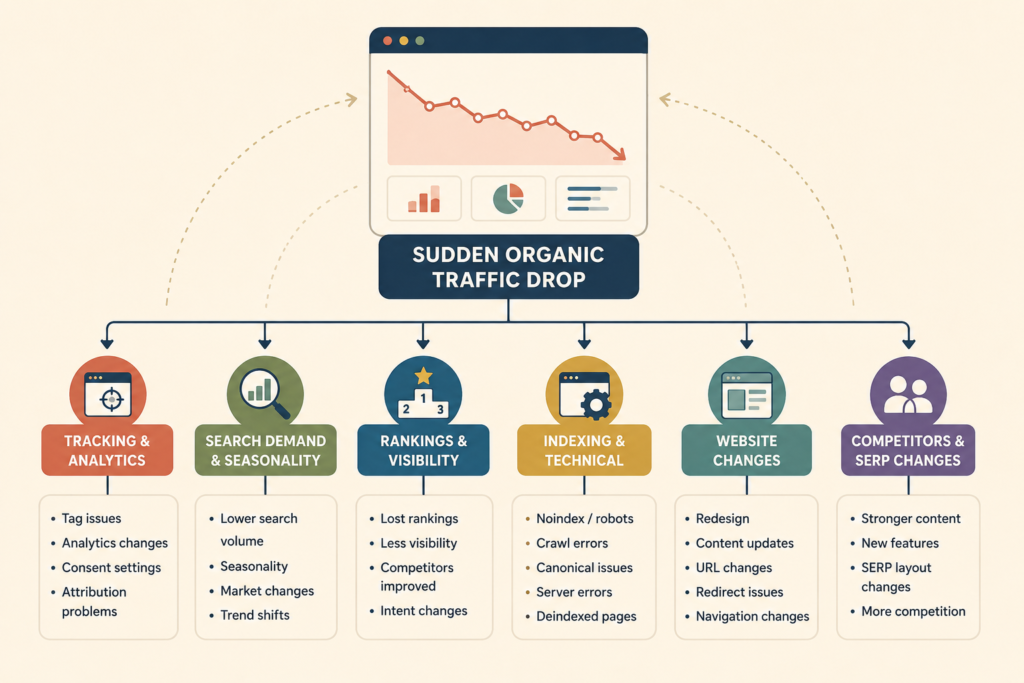
A sudden organic traffic drop can come from several different causes. Tracking may have failed. Search demand may have changed. Important pages may have lost rankings. A website update may have affected indexing. Competitors may have improved. A technical issue may also be preventing Google from crawling or understanding important pages correctly.
The shape of the decline usually provides the first useful clue.
A sharp sitewide Google traffic decline needs a different investigation from a slow six-month organic traffic loss. Losing traffic to one service page is also very different from seeing a broader organic visibility loss across the whole website.
This framework helps you work through the problem in the right order so you can diagnose the cause before making unnecessary changes.
VVRapid’s Search Engine Optimisation service includes technical reviews, on-page optimisation, analytics and ongoing adjustments to help businesses respond to ranking losses, technical issues and changing organic search performance.
First, Confirm That Organic Traffic Actually Dropped
Before investigating rankings or Google updates, confirm that the decline is real.
Start by comparing multiple data sources.
Look at:
- Google Search Console clicks
- Google Search Console impressions
- Google Analytics organic sessions
- Organic conversions
- Important landing-page traffic
- Search rankings
- Website availability
- Server or hosting issues where relevant
If Analytics suggests that search traffic dropped but Search Console clicks remain stable, you may have a tracking problem rather than an SEO problem.
Potential tracking causes include:
- Analytics tags removed during a website update
- Consent settings changing
- Google Tag Manager problems
- Incorrect channel attribution
- A new analytics property
- Cookie configuration changes
- Tracking scripts failing on certain pages
- Filters excluding some organic traffic
Google recommends using Search Console to understand Google Search performance and Analytics to understand what visitors do once they arrive on the website.: Google Search Console and Analytics for SEO ↗
If Search Console clicks and Analytics organic sessions both decline at roughly the same time, you have stronger evidence that the organic traffic loss reflects a genuine search performance problem.
Identify Exactly When the Traffic Decline Started
Do not begin with a vague statement such as “traffic seems lower lately”.
Identify the exact date or period when the decline began.
Compare:
- The previous seven days
- The previous 28 days
- The previous three months
- The same period last year
- The period before and after a known website change
Then determine whether the decline was sudden, gradual or seasonal.
Sudden and severe
A steep decline over one or two days may suggest:
- Tracking failure
- Website downtime
- Accidental noindex directives
- Robots.txt changes
- Major URL changes
- Broken redirects
- Server errors
- Manual actions
- Security problems
- A large technical deployment
Gradual
A slower Google traffic decline over several weeks or months may suggest:
- Competitors improving
- Content becoming outdated
- Search intent changing
- Rankings slipping gradually
- Internal linking weakening
- Search demand declining
- Important pages becoming less relevant
Seasonal
A decline that repeats at roughly the same time each year may reflect normal demand patterns rather than a technical SEO issue.
Identifying the timing is one of the most useful steps in website traffic troubleshooting because it immediately narrows the list of likely causes.
Use Search Console to Find Where the Traffic Loss Happened
Once you know the decline is real, avoid looking only at the total traffic graph.
Break the change down by:
- Query
- Page
- Country
- Device
- Search appearance
- Date
Google specifically recommends comparing periods and looking for the pages and queries with the biggest changes when investigating a Google Search traffic drop.: Google Search Console Performance report ↗
Start with pages.
Which pages lost the most clicks?
Sort landing pages by the largest decline.
You may discover that:
- One previously successful article accounts for most of the loss
- Several service pages declined
- Product or category pages were affected
- Traffic dropped across nearly the whole website
- Only one geographic market changed
If most of the organic traffic loss comes from one or two pages, investigate those URLs before making sitewide changes.
Then review queries.
Which search queries declined?
Compare the same periods and identify whether the affected terms are:
- Branded
- Non-branded
- Commercial
- Informational
- Local
- Product-related
- Service-related
This helps you see whether the issue is concentrated around a topic, page type or stage of the customer journey.
Compare Impressions, Rankings and Clicks Separately
A sudden organic traffic drop does not always mean rankings collapsed.
Look at impressions, average position and clicks together.
Impressions dropped
If impressions fall significantly, possible explanations include:
- Lower search demand
- Lost keyword visibility
- Deindexed pages
- Reduced topic relevance
- Seasonal changes
- Changes in search-result presentation
A significant decline in impressions often points to a wider organic visibility loss.
Impressions stayed stable but clicks dropped
This may suggest:
- Lower click-through rate
- Small ranking movements
- More prominent competitor results
- Search features taking attention
- Weak titles or descriptions
- Different search intent
If impressions remain healthy while clicks fall, the problem may be presentation or SERP competition rather than indexing.
Rankings and impressions both dropped
If rankings, impressions and clicks all decline, this is a stronger signal of a visibility problem.
Investigate:
- Page relevance
- Competitor improvements
- Content changes
- Technical changes
- Internal linking
- Search updates
- Indexing problems
Avoid treating one metric as the complete explanation.
Check Whether Search Demand Has Changed
Sometimes search traffic dropped because fewer people are searching for the topic.
This can happen because of:
- Seasonality
- Economic changes
- Consumer behaviour
- New technology
- Industry shifts
- Events
- Changing terminology
- Declining product interest
For example, a page can maintain approximately the same ranking position while impressions and clicks decline because overall search demand fell.
Compare:
- Year-on-year Search Console impressions
- Search trends
- Related keyword variations
- Seasonal business patterns
- Broader market conditions
Google recommends considering seasonality and changing search interest when diagnosing search traffic changes.
Do not redesign a successful page purely because demand temporarily decreased.
Check for Recent Website Changes
Create a timeline of website activity around the start of the Google traffic decline.
Look for:
- Website redesigns
- Platform changes
- Theme updates
- Plugin updates
- URL changes
- Redirect changes
- Navigation changes
- Content rewrites
- Deleted pages
- Category changes
- New canonical tags
- Robots.txt changes
- Server changes
- Hosting migrations
- Domain migrations
- HTTPS changes
If the organic traffic dropped immediately after a major website change, that change deserves close investigation.
The timing does not automatically prove causation, but it gives you a strong place to start.
Check Indexing Before Rewriting Content
If a sudden organic traffic drop affects several important pages, confirm that those URLs can still be indexed.
Check key URLs in Google Search Console.
Look for problems such as:
- Page excluded by noindex
- Page blocked from crawling
- Incorrect canonical URL
- Redirect errors
- Server errors
- 404 responses
- Duplicate-page signals
- Crawled but not indexed pages
Google explains that pages need to be crawlable and indexable before they can appear in Search.: Google crawling and indexing documentation ↗
Check robots.txt carefully
A poorly configured robots.txt file can prevent Googlebot from crawling important URLs.
Look for any broad rules introduced recently.
For example:
Disallow: /
would block crawling across the site if applied broadly.
Do not change robots.txt blindly during website traffic troubleshooting. Confirm the problem first.
Check noindex directives
A noindex directive can remove a page from search results even when the page still works normally for users.
This can happen because of:
- Staging settings
- SEO plugin changes
- Template changes
- Developer deployments
- CMS configuration
If several important pages disappeared at the same time, inspect shared templates and settings.
Review Canonical Tags
Canonical tags help indicate which URL should be treated as the preferred version when similar pages exist.
An incorrect canonical can point Google toward another URL.
Review whether affected pages:
- Canonicalise correctly
- Point to unrelated pages
- Use outdated URLs
- Changed after a template update
- Have conflicting canonical signals
If the Google Search traffic drop follows a migration or URL restructuring project, canonical and redirect checks become particularly important.
Check Redirects and Deleted URLs
When pages move, old URLs should normally redirect to the most appropriate replacement.
Problems can occur when:
- Redirects are missing
- Important pages return 404 errors
- Redirect chains become excessive
- Redirects point to irrelevant destinations
- Old URLs redirect to the homepage
- Internal links still point to removed URLs
Use the list of previously high-traffic pages from Search Console to check whether those URLs still exist and behave correctly.
This is much more efficient than reviewing every URL on the website without prioritisation.
Check Whether Important Pages Changed
Sometimes organic traffic dropped after a well-intentioned content update.
Compare the current page with its previous version.
Ask:
- Was useful content removed?
- Did the main topic change?
- Was the title rewritten?
- Were important headings removed?
- Were internal links deleted?
- Did the page become significantly shorter?
- Was service information replaced with generic marketing copy?
- Did the URL change?
- Was structured information removed?
- Does the page still match the same search intent?
Not every content update improves SEO.
A cleaner-looking page can still suffer lost organic rankings if useful information disappears or the page becomes less relevant to the query.
Analyse Page-Level Ranking Losses
If indexing is healthy, investigate the affected pages individually.
For each important page, record:
- Previous clicks
- Current clicks
- Previous impressions
- Current impressions
- Previous ranking range
- Current ranking range
- Main queries lost
- Competing pages
- Content changes
- Internal links
- Conversion value
Prioritise pages based on business value rather than traffic alone.
A service page that lost 100 highly relevant visits may matter more than a blog article that lost 2,000 low-intent visits.
This is especially important when assessing lost organic rankings because traffic volume does not always reflect commercial value.
Review Search Intent
Search results change because user behaviour changes.
A page that ranked strongly two years ago may no longer match what searchers want today.
Review the current results for important queries.
Ask:
- Are service pages ranking?
- Are guides ranking?
- Are product pages ranking?
- Are local results dominant?
- Are videos prominent?
- Are comparison pages appearing?
- Has the expected content format changed?
If your page type no longer matches the dominant search intent, adding more keywords may not solve the problem.
The page may need to be repositioned.
Compare the Page With Current Competitors
If the organic visibility loss developed gradually, inspect the pages that replaced yours.
Evaluate competitors for:
- Topic coverage
- Content clarity
- Freshness
- Search intent alignment
- Useful examples
- Original information
- Internal linking
- Site structure
- Authority
- Page experience
- Commercial relevance
Do not copy competitors.
The goal is to identify where your page may no longer be as useful or relevant as the current ranking alternatives.
Check Internal Linking
Important pages can become less prominent internally without being deleted.
This can happen when:
- Navigation changes
- Blog categories change
- Hub pages are removed
- Old articles are deleted
- New content pushes older pages deeper into the site
- Internal links are removed during rewrites
Check whether important pages still receive links from relevant parts of the website.
Weak internal linking can contribute to organic traffic loss, especially when pages become harder for users and crawlers to discover.
Check Whether a Google Update Coincides With the Decline
If the Google traffic decline happened around a confirmed update, compare the timing carefully.
Do not assume every ranking loss is caused by an algorithm update.
First rule out:
- Tracking errors
- Technical problems
- Website changes
- Indexing issues
- Seasonality
- Search demand changes
If the decline aligns closely with an update and affects many pages or topic groups, review whether your content still provides strong value compared with competing results.
Google recommends identifying affected pages and queries rather than making random sitewide changes.: Google Search core updates guidance ↗
Diagnose the Shape of the Traffic Drop
The pattern can help prioritise likely causes.
Entire site dropped overnight
Check first:
- Tracking
- Website availability
- Robots.txt
- Noindex
- Manual actions
- Security
- Major technical deployments
One section dropped
Check:
- Template changes
- Internal linking
- Canonicals
- Section-specific content changes
- Competitor gains
One page dropped
Check:
- Ranking queries
- Search intent
- Page changes
- Competitor pages
- Internal links
- Indexing status
Search traffic dropped gradually over several months
Check:
- Competitor improvements
- Content age
- Search demand
- Topic relevance
- Gradual ranking losses
- Website quality
- Internal linking
Impressions stayed stable but clicks fell
Check:
- Ranking-position changes
- Titles and descriptions
- Search-result layout
- Search features
- Competing snippets
Diagnosing the pattern helps prevent applying the same solution to every organic traffic loss.
Build an SEO Traffic Recovery Plan in the Right Order
Once the cause is clearer, build an SEO traffic recovery plan around impact and confidence.
Priority 1: Fix critical technical problems
Address problems such as:
- Website downtime
- Incorrect noindex tags
- Robots blocks
- Broken redirects
- Server errors
- Important 404 pages
- Incorrect canonicals
These can affect search eligibility directly.
Priority 2: Recover high-value pages
Prioritise pages that previously generated:
- Qualified leads
- Sales
- Bookings
- Important service traffic
- Strong non-branded visibility
A good SEO traffic recovery plan focuses first on pages that matter commercially.
Priority 3: Fix content and intent gaps
Update pages where:
- Search intent shifted
- Important information is missing
- Competitors now provide a stronger answer
- Information is outdated
- The page no longer reflects the current offer
Priority 4: Improve internal structure
Review:
- Internal links
- Navigation
- Topic relationships
- Anchor text
- Orphaned pages
- Broken links
Priority 5: Monitor recovery

After making changes, monitor:
- Impressions
- Clicks
- Ranking ranges
- Indexed pages
- Organic enquiries
- Qualified leads
The aim is not simply to recover organic traffic. The aim is to restore search visibility that supports the business.
For businesses that need a prioritised approach across SEO, content and website changes, a Digital Strategy Roadmap can help organise the work by impact and urgency.
What Not to Do After an Organic Traffic Drop
Do not rewrite the whole website immediately
A sitewide rewrite can remove useful content and make diagnosis harder.
Find the affected area first.
Do not publish dozens of blogs as a reflex
More content does not fix indexing issues, redirect problems or lost service-page relevance.
Do not change every page title
If impressions disappeared, title changes may be addressing the wrong issue.
Do not delete pages simply because traffic fell
A page may still support internal links, conversions, backlinks or niche searches.
Do not blame a Google update without evidence
The timing may be coincidental.
Check your own technical changes and website history first.
Do not focus only on traffic volume
Losing 1,000 low-intent visits may matter less than losing 50 visitors who regularly became enquiries.
Measure commercial impact as part of your SEO traffic recovery process.
Organic Traffic Recovery Checklist
Use this checklist when organic traffic dropped unexpectedly:
- ☐ Confirm the decline in Search Console.
- ☐ Compare Search Console with Analytics.
- ☐ Identify the exact start date.
- ☐ Compare year-on-year data.
- ☐ Identify pages with the largest click losses.
- ☐ Identify queries with the largest losses.
- ☐ Compare clicks and impressions separately.
- ☐ Review ranking changes.
- ☐ Separate branded and non-branded traffic.
- ☐ Check search demand and seasonality.
- ☐ Review recent website changes.
- ☐ Check important URLs for indexing.
- ☐ Review robots.txt.
- ☐ Check noindex directives.
- ☐ Check canonical tags.
- ☐ Test redirects.
- ☐ Review 404 and server errors.
- ☐ Compare current and previous page content.
- ☐ Check current search intent.
- ☐ Review competing pages.
- ☐ Check internal links.
- ☐ Compare timing with confirmed search updates.
- ☐ Prioritise high-value commercial pages.
- ☐ Record changes made during recovery.
- ☐ Monitor leads as well as traffic.
How VVRapid Can Help
When organic traffic dropped, the most useful first step is understanding whether the issue comes from tracking, technical changes, indexing, content, competition or shifting demand.
VVRapid’s SEO support combines technical reviews, Search Console analysis, on-page optimisation, content planning and ongoing monitoring so ranking losses and traffic changes can be investigated in context.
Review the Search Engine Optimisation service for ongoing SEO support.
If your website also needs technical maintenance or fixes after updates, VVRapid’s Website Maintenance & Care service may also be relevant.
For a tailored assessment, use the SEO quote request page.
Frequently Asked Questions
Why did my organic traffic suddenly drop?
A sudden organic traffic drop can be caused by tracking problems, indexing issues, website changes, lost organic rankings, reduced search demand, seasonality, competitor improvements or Google updates.
What should I check first when Google traffic declines?
Confirm whether Search Console clicks also declined. If Analytics shows a drop but Search Console remains stable, investigate tracking before changing your SEO strategy.
Can a website update cause organic traffic loss?
Yes. URL changes, redirects, noindex tags, canonical changes, navigation changes and removed content can all contribute to an organic traffic loss.
How do I know whether I lost organic rankings?
Compare Search Console queries, pages, impressions, clicks and average positions between the affected period and an earlier comparable period.
Can seasonal demand cause search traffic to drop?
Yes. A website can maintain similar rankings while impressions and clicks decline because fewer people are searching during that period.
Should I rewrite pages after a Google update?
Not automatically. First identify which pages and queries lost performance and rule out technical, indexing and demand-related causes.
How long does SEO traffic recovery take?
There is no fixed recovery period. The timeframe depends on the cause, the scale of the problem, how quickly fixes are implemented and when affected pages are recrawled and reassessed.
Can broken redirects cause a Google Search traffic drop?
Yes. Missing or incorrect redirects can leave valuable URLs returning errors or send users and search engines to irrelevant destinations.
Should I delete pages that have lost organic traffic?
Not simply because traffic declined. Review rankings, backlinks, internal-linking value, conversions and relevance before deciding whether to update, consolidate, redirect or remove the page.
How do I recover organic traffic after a decline?
Start with diagnosis. Confirm the drop, identify affected pages and queries, check indexing and technical changes, review search demand and competition, then build an SEO traffic recovery plan based on commercial priority.
Conclusion
When organic traffic dropped, reacting quickly is less important than diagnosing accurately.
Confirm the decline, identify when it started, isolate the affected pages and queries, check technical and indexing signals, review search demand, investigate website changes and compare current competitors.
A strong diagnosis should help you understand whether you are dealing with a Google traffic decline, lost organic rankings, a technical issue or a broader organic visibility loss.
Once the cause is clear, you can work to recover organic traffic through targeted fixes rather than guesswork.