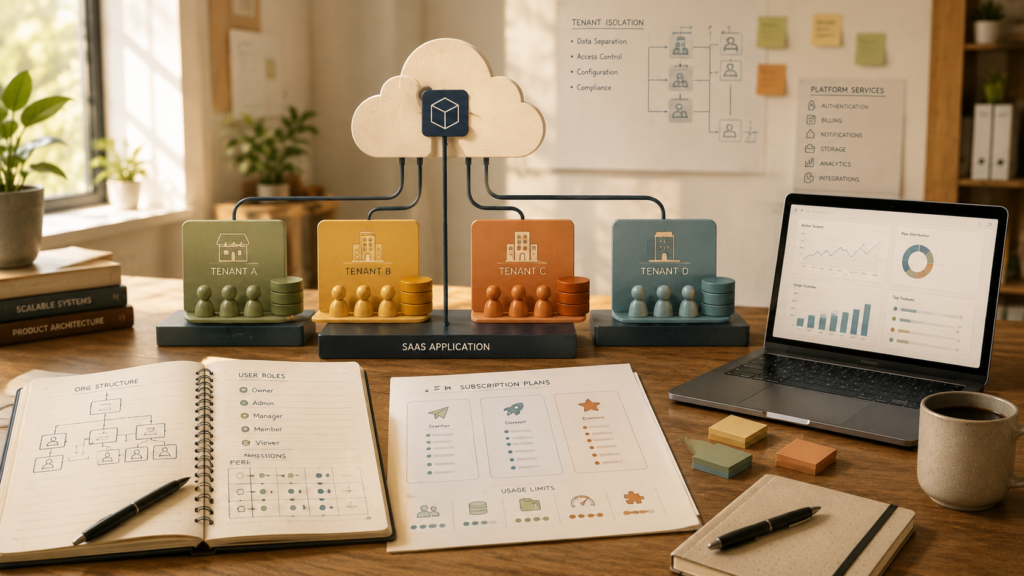
Multi-tenant SaaS architecture allows one software product to serve multiple customer organisations while keeping each organisation’s users, settings and data appropriately separated. For founders, this decision affects far more than hosting. It influences onboarding, permissions, billing, reporting, support, security and the cost of operating the product.
Table of Contents
You do not need to design the technical architecture yourself. You do need to make several product and business decisions before development starts.
A developer cannot choose a sensible tenant model without understanding who your customers are, what level of isolation they expect, how teams will use the product and whether different organisations need different plans or configurations.
This guide explains the questions founders should resolve before commissioning a multi-tenant application.
What Is Multi-Tenant SaaS Architecture?
In a multi-tenant SaaS architecture, one application serves multiple customers, commonly called tenants.
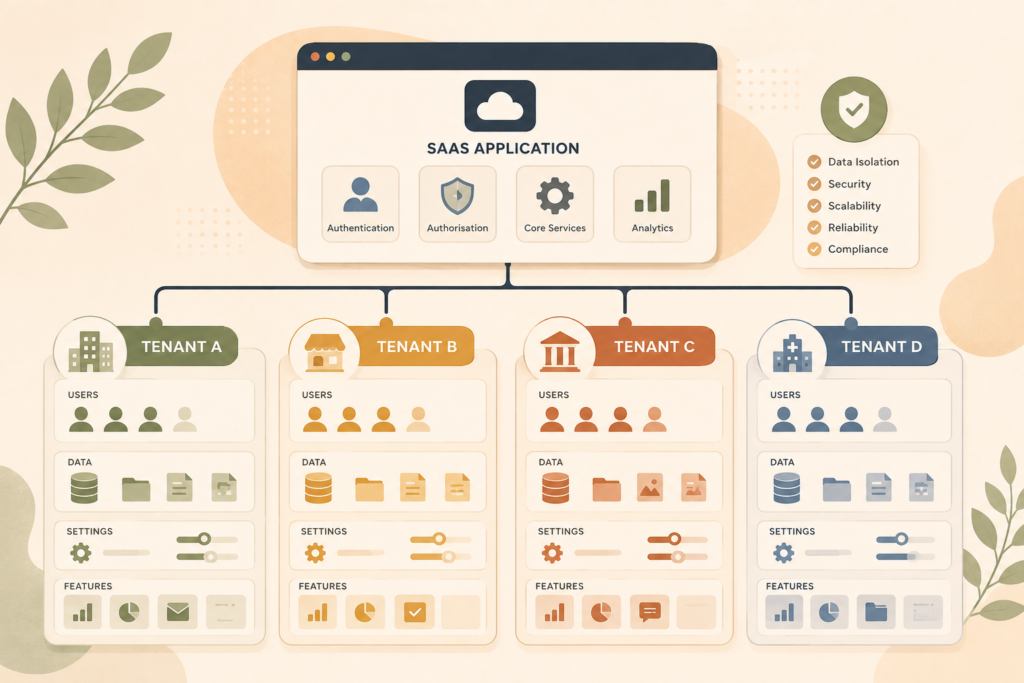
A tenant might be:
- A company
- A franchise
- A school
- A clinic
- An agency
- A department
- A branch network
- A professional practice
- A customer workspace
Each tenant may have several users, but those users belong to the same organisation or account.
For example, a project-management SaaS product might serve 200 companies. Each company has its own workspace, team members, projects, settings and subscription. Customers use the same underlying product, but one company should not see another company’s information.
Microsoft describes multitenancy as an approach where components are shared between multiple tenants, which usually correspond to customers. It also notes that multitenancy does not require every component to be shared.: Microsoft Azure Architecture Center, SaaS and Multitenant Architecture ↗
VVRapid’s App Design & Development service supports SaaS-style products involving multiple roles, structured data, integrations and architecture designed with growth in mind.
Multi-Tenant Versus Single-Tenant Applications
The difference is not simply whether an app has several customers.
Single-tenant application
Each customer receives a separate application environment or deployment.
The customer may have its own:
- Application instance
- Database
- Storage
- Configuration
- Release schedule
- Infrastructure resources
This can provide strong isolation and greater customer-specific control. It can also increase infrastructure and operational work because each environment must be maintained.
Multi-tenant application
Several customers share some or all of the application infrastructure.
They may share:
- The application code
- Servers or computing resources
- Databases
- Storage services
- Deployment pipelines
- Monitoring systems
Tenant-specific rules are then used to separate data, access and configuration.
Hybrid architecture
Some SaaS products use a mixture.
For example:
- Most customers share infrastructure
- Large enterprise customers receive dedicated databases
- Customers in certain regions use separate deployments
- Sensitive file storage is isolated while the core app remains shared
Microsoft’s multitenancy guidance describes several isolation levels, including fully shared resources, partially separated resources and dedicated instances or databases for particular tenants.
The correct model depends on your customers, risk profile, operating costs and product promises.
Define Exactly What a Tenant Represents
Before discussing database design, write a clear definition of a tenant.
For example:
A tenant is a subscribing company. Each company can invite several users, create departments and control access to its own projects and documents.
This sounds simple, but real products often introduce ambiguity.
Ask:
- Can one person belong to more than one tenant?
- Can a consultant switch between client workspaces?
- Can a parent company manage several subsidiaries?
- Can one tenant have multiple branches?
- Can a user hold different roles in different tenants?
- Can an internal support employee enter customer accounts?
- Can organisations merge or split?
- Can records move from one tenant to another?
A user is not always the same thing as a tenant.
One user might belong to:
- Their employer’s workspace
- A client’s workspace
- A partner organisation
- A test or demonstration workspace
Your SaaS development planning should define how the application identifies both the signed-in person and the tenant context in which they are currently working.
AWS guidance notes that tenant isolation depends on having a reliable way to identify the tenant accessing a resource. Tenant identity and user identity must work together rather than being treated as interchangeable.: AWS, Identity and Isolation ↗
Map Organisations, Teams and Users
An organisation-based account usually contains several layers.
A simple model might be:
- Platform
- Tenant organisation
- Users
- Roles
A more complex SaaS product might include:
- Platform
- Tenant organisation
- Locations
- Departments
- Teams
- Projects
- Users
- External collaborators
Do not add layers because they sound enterprise-ready. Each layer creates rules, screens, permissions and edge cases.
For example, adding departments may require decisions about:
- Whether a project belongs to one department
- Whether managers see other departments
- Whether reports can combine departmental data
- Whether users can move between departments
- Whether billing depends on department size
- Whether settings apply globally or per department
Start with the simplest organisational structure that supports the product.
Plan SaaS User Permissions at Two Levels
SaaS user permissions commonly operate at both platform and tenant level.
Platform-level permissions
These belong to the SaaS provider.
Examples include:
- Platform owner
- Support administrator
- Billing administrator
- Operations team member
These users may manage subscriptions, investigate errors or assist customers.
Tenant-level permissions
These belong to each customer organisation.
Examples include:
- Organisation owner
- Administrator
- Manager
- Standard user
- Read-only user
- External collaborator
Your product brief should describe what each role can:
- View
- Create
- Update
- Delete
- Approve
- Export
- Invite
- Configure
Avoid relying only on role names.
“Manager” means different things in different businesses. Write permissions as explicit actions.
For example:
A manager can view all projects in their department, assign work and approve completed tasks, but cannot change billing details or organisation-wide settings.
Also decide whether customers can create custom roles. Custom permissions increase flexibility, but they also add interface, validation, support and testing complexity.
Treat Tenant Data Isolation as a Core Requirement
Tenant data isolation means preventing one tenant from accessing another tenant’s information.
It should apply to more than database records.
Isolation may be required across:
- Database queries
- File storage
- Search indexes
- Caches
- Background jobs
- Reports
- Exports
- Logs
- Notifications
- Integrations
- Analytics
- Backups
OWASP identifies cross-tenant data leakage, broken tenant isolation, tenant impersonation and resource exhaustion as important multi-tenant application risks.: OWASP Multi-Tenant Security Cheat Sheet ↗
Your brief does not need to specify how developers must implement isolation. It should state:
- Which data is tenant-owned
- Which records may be shared
- Whether platform staff can access tenant data
- Whether access must be logged
- Whether customers need dedicated resources
- Whether data must remain in a particular region
- Whether customers can export or delete their information
Security should not rely on hiding tenant identifiers in the interface. Tenant boundaries must be enforced whenever data is requested or changed.
Choose a Tenant Data Model Deliberately
There are several common database approaches.
Shared database and shared tables
Multiple tenants use the same database tables. Each tenant-owned record includes a tenant identifier.
Potential advantages:
- Efficient resource use
- Simpler central deployment
- Lower infrastructure cost per small tenant
- Easier product-wide updates
Important considerations:
- Every relevant query must respect tenant scope
- One busy tenant may affect shared performance
- Customer-specific backup or restoration may be harder
- Errors in access logic can create serious exposure
Microsoft notes that shared multitenant databases require careful query scoping and can introduce noisy-neighbour risk when tenants share computing and storage resources.
Shared application with separate tenant databases
Customers use the same application, but each tenant has a separate database.
Potential advantages:
- Stronger data separation
- Easier tenant-specific backup and restoration
- Greater flexibility for large customers
- Reduced risk of cross-tenant database queries
Important considerations:
- More databases must be provisioned and monitored
- Schema updates must be applied consistently
- Reporting across tenants becomes more complex
- Infrastructure cost may be higher
Separate application environments
Each tenant receives a more isolated deployment.
This may suit customers with strict security, compliance, data-residency or performance requirements.
However, dedicated environments increase operational cost. Microsoft’s deployment-stamp guidance notes that dedicated tenant infrastructure can improve isolation while requiring more resources and more complex fleet management as customer numbers grow.
Hybrid tenant model
A scalable web application may combine models.
For example:
- Smaller plans use shared infrastructure
- Enterprise plans use dedicated databases
- Certain regions have separate deployments
- High-volume tenants move to dedicated resources
The architecture should support your expected customer mix, not an imaginary future where every possible enterprise requirement must be supported immediately.
Decide How Tenant Onboarding Works
Multi-tenant onboarding is not just a registration form.
When a new customer joins, the system may need to:
- Create the tenant organisation
- Create the first owner account
- Apply a subscription plan
- Configure feature access
- Create default roles
- Generate default settings
- Prepare storage or database resources
- Send invitations
- Record consent and agreements
- Start a trial or billing period
Decide whether tenants are created through:
- Self-service registration
- A sales-assisted process
- An internal administrator
- An invitation from a partner
- An API
- A marketplace integration
Also plan what happens when the same company registers twice or when a user accepts an invitation using an existing account.
These details influence the data model and user journeys.
Connect Plans, Billing and Feature Entitlements
Your SaaS billing architecture should connect commercial plans to actual product behaviour.
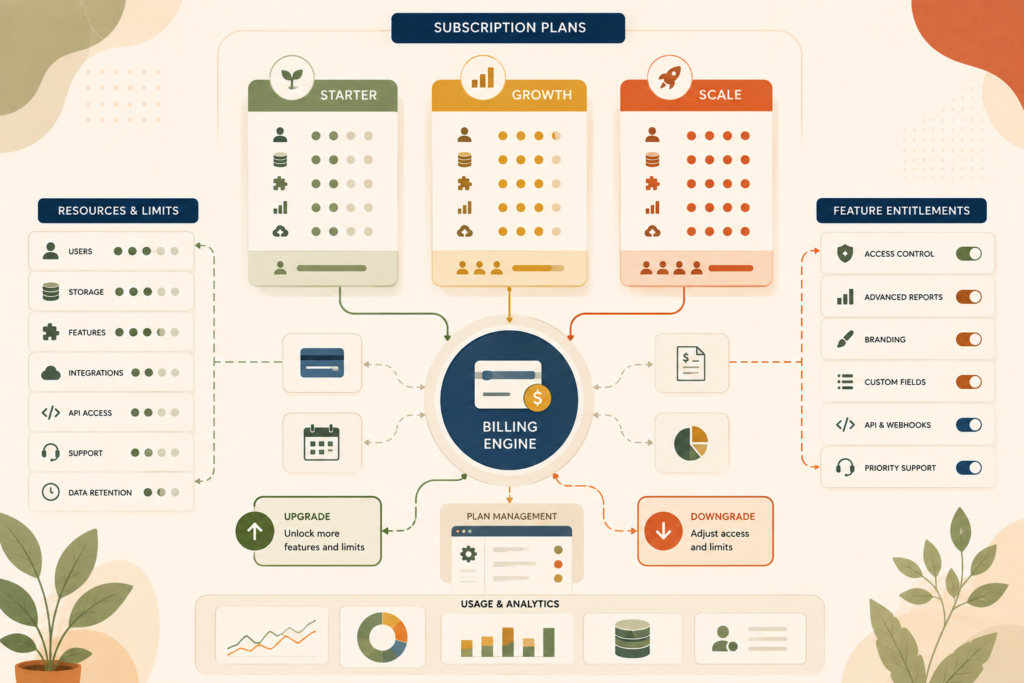
A plan might control:
- Number of users
- Number of projects
- Storage limits
- Available integrations
- Reporting features
- Support level
- Branding options
- API access
- Data retention
- Automation volume
Do not spread plan checks randomly throughout the application.
The product should have a clear way to determine which features and limits apply to each tenant.
Stripe’s SaaS guidance covers recurring billing, trials, customer portals, invoices and entitlements used to map subscription products to application features.: Stripe, Integrate a SaaS Business ↗
Plan these billing events:
- New subscription
- Trial start and end
- Upgrade
- Downgrade
- User-limit increase
- Failed payment
- Cancellation
- Reactivation
- Refund
- Account suspension
A downgrade is especially important. Decide what happens when a tenant exceeds the limits of its new plan.
For example, do you:
- Block new records?
- Make premium features read-only?
- Remove access immediately?
- Allow a grace period?
- Require the customer to choose which users remain active?
Plan Tenant Configuration Without Forking the Product
Customers often request different settings.
Useful tenant-level configuration may include:
- Logo and brand colours
- Email templates
- Workflow stages
- Notification preferences
- Time zone
- Currency
- Date format
- Working hours
- Approval thresholds
- Custom fields
- Enabled integrations
Configuration is different from creating custom code for every customer.
Too many customer-specific code branches can make the SaaS product difficult to test and maintain. Prefer controlled settings, feature flags and reusable rules where practical.
Before development, classify requests as:
- Standard for every tenant
- Configurable by the tenant
- Available only on certain plans
- A paid integration
- A genuine custom-development request
- Not part of the product
This keeps the shared product coherent.
Design Platform Administration and Support Access
The SaaS provider needs its own administrative tools.
Platform administrators may need to:
- Find a tenant
- View subscription status
- Review usage
- Suspend an account
- Investigate failed jobs
- Resend invitations
- Manage feature access
- View system health
- Assist with account recovery
Support access creates security and privacy questions.
Decide:
- Can support staff view customer data?
- Must the customer approve access?
- Is impersonation allowed?
- Is every support action logged?
- Can sensitive fields be hidden?
- How long does temporary access last?
- Can a tenant see the support-access history?
Avoid sharing passwords or asking customers to send credentials.
Plan Reporting at Tenant and Platform Level
You may need two types of reporting.
Tenant reporting
Each customer sees information about its own organisation.
Examples include:
- User activity
- Project completion
- Usage totals
- Billing history
- Operational performance
Platform reporting
The SaaS provider sees aggregated product information.
Examples include:
- Active tenants
- Trial conversion
- Feature adoption
- Storage consumption
- Failed integrations
- Support volume
- Subscription changes
Define which metrics may be aggregated and which information must remain tenant-specific.
Also plan how exports preserve tenant boundaries. Background-generated reports and emailed files must be scoped as carefully as on-screen data.
Account for Performance and Noisy Neighbours
Shared resources create efficiency, but one tenant’s heavy workload can affect others.
This is sometimes called the noisy-neighbour problem.
Examples include:
- A tenant imports a very large dataset
- One customer runs expensive reports repeatedly
- An integration generates excessive requests
- A bulk notification job consumes shared resources
- One tenant stores far more files than expected
Microsoft’s multitenancy guidance identifies security isolation and performance isolation as core requirements while also keeping per-tenant operating costs sustainable.
Plan:
- Usage limits
- Rate limits
- Job queues
- Fair scheduling
- Storage quotas
- Monitoring by tenant
- Alerts for unusual activity
- Dedicated resources for larger plans
Your pricing model should reflect customers that consume substantially more resources.
Multi-Tenant SaaS Architecture Checklist
Before development, confirm that you have defined:
- ☐ What a tenant represents
- ☐ Whether users may belong to multiple tenants
- ☐ Organisation, branch, team and user relationships
- ☐ Platform-level roles
- ☐ Tenant-level roles
- ☐ Tenant data ownership
- ☐ Shared versus tenant-specific records
- ☐ Required isolation level
- ☐ Database tenancy approach
- ☐ File and search isolation
- ☐ Tenant onboarding
- ☐ Invitations and account switching
- ☐ Subscription plans
- ☐ Usage limits
- ☐ Feature entitlements
- ☐ Upgrade and downgrade behaviour
- ☐ Tenant configuration
- ☐ Platform administration
- ☐ Support-access controls
- ☐ Tenant and platform reporting
- ☐ Data export and deletion
- ☐ Monitoring by tenant
- ☐ High-volume tenant handling
- ☐ Offboarding and account closure
- ☐ Audit-log requirements
Common Multi-Tenant SaaS Architecture Mistakes
Treating the tenant as an ordinary user
A tenant is usually an organisation or account containing several users. Confusing these concepts causes problems with ownership, billing and permissions.
Adding the tenant identifier later
Tenant context affects data, storage, integrations, logs and background tasks. It should be considered from the beginning.
Applying isolation only to database screens
Files, search, caches, exports and notifications can also leak information across tenants.
Assuming admin and user are enough
Organisation owners, managers, billing contacts and external collaborators often require different access.
Building custom versions for every customer
Uncontrolled customer-specific logic makes testing, upgrades and support increasingly difficult.
Ignoring failed payments and downgrades
Subscription changes must translate into predictable product behaviour.
Forgetting platform support tools
Without controlled administration, support teams may rely on unsafe database changes or shared credentials.
Promising enterprise isolation without costing it
Dedicated databases or environments can provide stronger separation, but infrastructure and operational costs must be reflected in the plan.
Designing only for new tenants
Plan upgrades, cancellations, mergers, data exports and tenant deletion before they become urgent.
How VVRapid Can Help
VVRapid helps founders plan and build SaaS-style web applications with clear tenant structures, user journeys, permissions, data models and integrations.
The planning process can identify which resources should be shared, what needs stronger isolation and how subscriptions should control product access.
Where the product depends on specialised integrations or WordPress-connected workflows, Custom Plugin Development may also be relevant.
For broader product, process and launch planning, a Digital Strategy Roadmap can help organise priorities before development begins.
The goal is a SaaS foundation that fits the business you are building, without adding unnecessary complexity too early.
Frequently Asked Questions
Does every SaaS product need multi-tenant architecture?
No. A product serving one organisation or a small number of separately managed customers may use a single-tenant model. The architecture should follow the business model and customer requirements.
Is multi-tenant SaaS architecture less secure?
Not automatically. It does create additional isolation responsibilities. Security depends on how tenant context, access control, data separation, storage and testing are implemented.
Should every tenant have a separate database?
Not always. Shared, separate and hybrid database models each have trade-offs. The right approach depends on isolation, cost, scale, compliance and operational needs.
Can users belong to more than one tenant?
Yes, if the product requires it. The application must then provide a clear tenant-switching process and enforce permissions separately within each organisation.
How should SaaS plans control features?
Plans should map to defined entitlements, usage limits and product rules. Upgrade, downgrade, cancellation and failed-payment behaviour should be planned before billing is integrated.
Can we start with shared infrastructure and isolate large customers later?
Potentially. A hybrid architecture can move selected tenants to dedicated resources, but the migration path should be considered in the initial data and deployment design.
What should happen when a tenant cancels?
Define access duration, exports, retention, deletion, billing records and reactivation rules. Do not leave tenant offboarding until the first cancellation request.
Good multi-tenant SaaS architecture begins with clear product decisions, not an oversized infrastructure diagram.
Review VVRapid’s App Design & Development service when you are ready to turn your organisation structure, subscription model and tenant requirements into a practical SaaS development plan.