Custom WordPress functionality becomes worth considering when your website still works, but your business has started working around it. Staff copy information between systems, customers jump through unnecessary steps, reports need spreadsheet gymnastics, or a simple business rule cannot be handled without human intervention.
Table of Contents
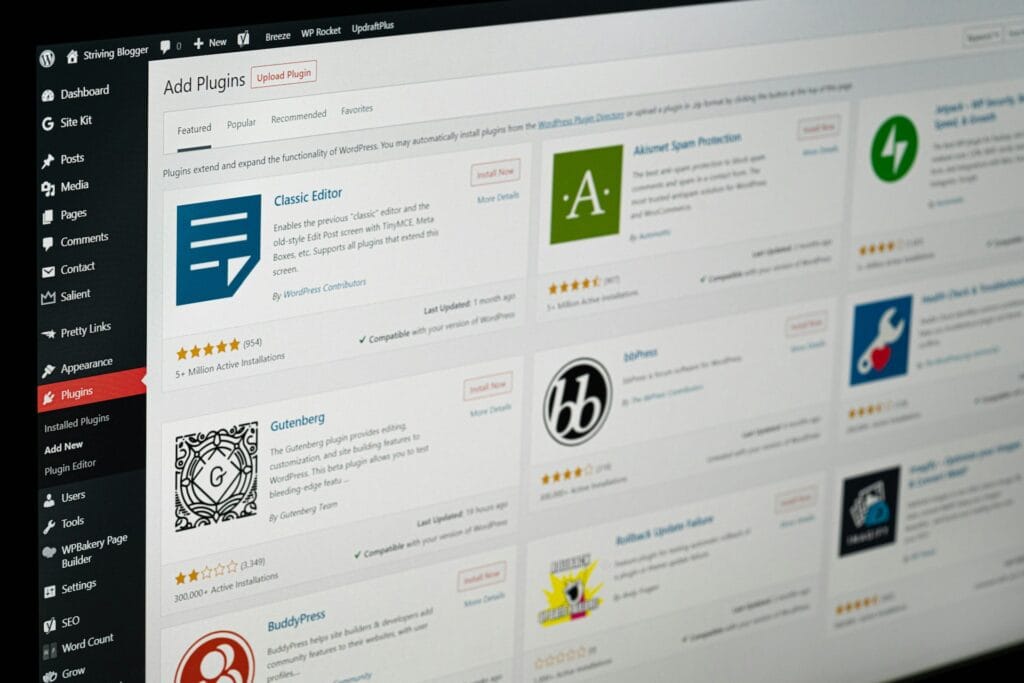
That does not automatically mean you need custom development. WordPress has a huge plugin ecosystem, and an existing tool is often the fastest and most sensible solution. You can browse the official WordPress Plugin Directory here: WordPress Plugin Directory ↗
The more useful question is this: does your website support the way your business actually operates today?
For a growing company, custom WordPress functionality can become relevant when the answer is increasingly “not quite.”
If your main problem is too many plugins, overlapping features, update anxiety or plugin conflicts, that is a different issue. Read our guide to WordPress plugin technical debt instead.
This article is about what happens when the website itself is missing capabilities your business now needs.
What custom WordPress functionality actually means
Custom WordPress functionality is simply website functionality designed around a specific business requirement instead of forcing the business into the limitations of a generic tool.

That could be something relatively focused, such as:
- calculating a price using your own business rules
- changing what different users can see or do
- routing enquiries based on location or service
- generating a document from information submitted online
- giving customers a personalised account area
- creating an internal approval process
- showing staff a purpose-built operational dashboard
- connecting a website action to another business system
WordPress itself is designed to be extended through plugins, which is one reason it can support far more than standard pages and blog posts. The official WordPress Plugin Handbook explains the plugin system in more detail: WordPress Plugin Handbook ↗
For the business owner, however, the code is not the interesting part.
The interesting part is what the website can stop your team doing manually.
Custom WordPress functionality: 7 business problems worth noticing
1. Your staff keep re-entering information
A customer completes a form on your website.
Then someone copies their details into a spreadsheet.
Later, another person enters the same information into your CRM, accounting platform, project system or internal database.
Nothing is technically “broken,” but the process is inefficient.
This is a common point where custom WordPress functionality starts having practical value. The website already has the information. The missing piece is making that information move somewhere useful or trigger the next step automatically.
Think about the cumulative cost.
Five minutes of unnecessary admin is easy to ignore. Five minutes repeated 30 times a day is not.
This is where business process automation and custom website functionality can become more meaningful than adding another standalone tool.
For more complex integration requirements, VVRapid’s Custom Plugin Development service is designed around extending WordPress and connecting it with the systems a business already uses.
2. Customers have to leave your website to complete an important process
Perhaps your website generates the enquiry, but customers then have to:
- download a document
- email information separately
- request a quote manually
- phone to confirm availability
- use an unrelated third-party portal
- repeat details they have already provided
- wait for someone to send the next step
Sometimes this is completely reasonable. Not every process belongs on a website.
But when the gap creates abandoned enquiries, confusion or unnecessary customer service work, custom WordPress functionality can help turn separate steps into a more coherent customer journey.
For example, a service business might allow customers to select requirements, provide supporting information and receive the correct next step immediately.
A wholesaler could show different ordering options depending on the customer’s account type.
A training provider might let users complete an application process from one account rather than exchanging several emails.
These are WordPress custom features built around the customer journey, not features added simply because they are technically possible.
3. Your website collects useful data but does very little with it
Many WordPress business websites are good at collecting information.
Forms capture leads. WooCommerce stores orders. User accounts hold customer details. Booking systems collect dates and preferences.
The missed opportunity is what happens next.
If your team constantly reads submissions and decides manually what should happen, the website may be collecting data without using it intelligently.
Custom WordPress functionality can apply your own business rules to that information.
For example:
- send different enquiries to different departments
- flag high-priority requests
- assign leads by territory
- show different next steps based on an application
- calculate eligibility using submitted information
- create follow-up tasks
- generate an internal record automatically
This is where website automation can remove repetitive decision-making without trying to automate decisions that genuinely require human judgement.
The goal is not automation for its own sake.
It is getting software to handle predictable work so people can focus on exceptions, customers and decisions.
4. Different staff members need different ways to use the website
WordPress administrator screens are designed to work for millions of websites.
Your operations team is not.
As a company grows, staff might need access to website information without needing access to everything else.
A sales employee may need leads but not website settings.
A warehouse team may need fulfilment information but not marketing tools.
A branch manager may need information for one location only.
A customer service employee might need a simplified view of orders, customer notes and actions.
This is another practical use for custom WordPress functionality.
Instead of training every employee to navigate a complicated WordPress dashboard, custom WordPress development can provide focused tools around the tasks people actually perform.
That may mean a tailored admin screen, custom permissions, filtered records or a small internal dashboard.
Good custom functionality should usually make work simpler for the user, not expose more technology to them.
5. Your pricing, quoting or eligibility rules are too specific for generic tools
Some businesses have straightforward pricing.
Others really do not.
A quote might depend on:
- location
- quantity
- dimensions
- customer type
- selected services
- delivery method
- product combinations
- contract terms
- availability
- minimum order values
- several rules working together
Businesses often handle this by asking customers to submit a generic enquiry and waiting for someone to calculate the answer manually.
That may be appropriate for highly consultative work.
But if the rules are predictable, custom WordPress functionality could potentially handle some or all of the calculation.
The same applies to eligibility.
Perhaps only certain customers qualify for a service, delivery option, application path or product configuration. A website can apply those rules consistently and immediately.
This kind of custom website functionality can improve the customer experience while reducing repetitive admin behind the scenes.
The important question is whether the business rules are stable and clear enough to encode.
If nobody inside the company agrees on how the calculation should work, software will not fix that problem.
6. Getting a useful report means exporting everything to a spreadsheet
Spreadsheets are excellent tools.
They are less excellent when every Monday starts with someone downloading three CSV files, matching columns, deleting duplicates and rebuilding the same report.
If information already exists inside your WordPress business website, WooCommerce store or connected systems, custom WordPress functionality can sometimes present the useful part directly.
That could include:
- sales by branch
- enquiries by service
- application statuses
- outstanding actions
- fulfilment exceptions
- customer activity
- internal performance measures
- operational queues
This does not mean recreating a full business intelligence platform inside WordPress.
Sometimes a dedicated analytics platform is absolutely the better solution.
The opportunity is usually smaller and more practical: give the right person the information they repeatedly need without forcing them to rebuild it by hand.
If reporting requirements sit alongside wider website or system changes, a Digital Strategy Roadmap can help determine what should be improved first rather than building disconnected features one at a time.
7. Growth keeps multiplying administrative work
One of the clearest signs that a digital process needs attention is when revenue grows and administrative work grows at almost exactly the same rate.
More customers create more emails.
More branches create more spreadsheets.
More orders create more checking.
More services create more form variations.
More employees create more manual coordination.
Growth naturally creates work, but not every task needs to scale linearly with the business.
This is where custom WordPress functionality can become part of a broader scaling strategy.
A good WordPress custom feature can take a repeatable process and make it easier to manage at 500 transactions than it was at 50.
That might involve routing, validation, account management, workflow automation, integrations or better internal tools.
It does not need to turn your website into a giant software platform.
Often, solving one expensive bottleneck is more valuable than building ten impressive features.
When custom WordPress functionality makes financial sense
The question should not be, “Would a custom feature be nice?”
Ask whether the problem is frequent, important and expensive enough to solve.

Custom WordPress functionality becomes easier to justify when:
- the same problem occurs repeatedly
- several employees are affected
- customers regularly experience the friction
- mistakes have a measurable business cost
- the process is important to revenue or service delivery
- growth is making the problem worse
- the business rules are reasonably well defined
- an existing plugin does not solve the requirement cleanly
There is still a build-versus-buy decision.
If an established plugin solves 95 percent of the requirement at a sensible cost, using it may be the better business decision.
Custom plugin development makes more sense when the missing 5 percent is actually the part your business depends on.
A business-owner checklist before commissioning custom functionality
Before asking anyone to build something, work through this checklist:
- ☐ What specific business problem are we solving?
- ☐ Who currently performs this task?
- ☐ How often does it happen?
- ☐ What does the current process cost in staff time?
- ☐ Does the problem affect customers?
- ☐ What mistakes or delays happen today?
- ☐ What information already exists inside WordPress?
- ☐ Which other systems are involved?
- ☐ Is there an existing plugin that solves the requirement adequately?
- ☐ Which parts genuinely need custom WordPress functionality?
- ☐ What should happen automatically?
- ☐ Where should a person remain involved?
- ☐ What would success look like three months after launch?
If these questions are difficult to answer, start with the workflow rather than the software.
That is often the difference between useful custom functionality and an expensive feature nobody really needed.
Common mistakes when adding WordPress custom features
Building around a vague frustration
“We need the website to do more” is not a specification.
Start with the task, bottleneck or customer problem.
Automating a messy process
If five employees perform the same task five different ways, coding it immediately may simply make the confusion permanent.
Agree on the process first.
Trying to rebuild every business system inside WordPress
WordPress can be extended considerably, but that does not mean every CRM, accounting function or operational system belongs inside it.
Sometimes the better solution is integration.
Sometimes it is a separate application.
Sometimes it is an existing SaaS product.
Treating custom as automatically better
It is not.
A proven existing plugin can be faster, cheaper and easier to maintain.
The purpose of custom WordPress functionality is to solve requirements generic products do not handle well, not to replace good software for the sake of owning custom code.
Building too much in version one
Start with the bottleneck that matters most.
A focused feature that removes 10 hours of monthly admin is more useful than an ambitious platform that takes months to reach the people who need it.
Custom plugin, website change or separate app?
Not every custom feature should become a WordPress plugin.
A plugin may make sense when the functionality belongs naturally within an existing WordPress website.
A broader website project may be appropriate when the issue is tied to navigation, user experience, site structure or conversion rather than business logic. VVRapid’s Website Design & Development service covers that broader website layer.
A separate web app may make more sense when the product has complex user interactions, extensive data requirements or needs to operate independently from the marketing website.
The right architecture depends on the problem.
Customers do not care which technical label was used.
They care whether the process works.
How VVRapid can help
VVRapid builds custom WordPress functionality for businesses that need their websites to do something more specific than an off-the-shelf tool comfortably allows. That can include focused workflow tools, integrations, WooCommerce extensions, custom admin features and business-specific logic.
The starting point is the business requirement, not the plugin.
If an existing solution makes more sense, that should be part of the discussion too.
If the requirement genuinely needs custom development, the aim is a focused solution that fits the way your business operates.
View VVRapid’s Custom Plugin Development options if you have a website process that has become difficult to manage manually.
FAQ: Custom WordPress functionality
What is custom WordPress functionality?
Custom WordPress functionality is a feature or workflow created specifically for the requirements of a particular website or business. It can include custom calculations, dashboards, user workflows, integrations, permissions, automation and other WordPress custom features.
Do I need custom development if WordPress cannot do something?
Not necessarily. Check whether an existing plugin or service already solves the requirement well. Custom WordPress development is most useful when your business needs functionality that generic tools cannot provide cleanly.
Can custom functionality reduce manual admin?
Yes, when the task follows predictable rules. Custom WordPress functionality can automate data movement, calculations, routing, notifications and repetitive website workflows. Human involvement should remain where judgement is required.
Is a custom plugin the same as a custom website?
No. A custom plugin usually adds specific behaviour or business logic to WordPress. A custom website project may also involve design, structure, content, conversion and the wider customer experience.
Can an existing WordPress plugin be customised instead?
Sometimes. Whether that is sensible depends on how the plugin is built, how much needs to change and whether extending it creates future maintenance problems. In other cases, a separate custom plugin that works alongside the existing software is cleaner.
How do I know if custom functionality is worth paying for?
Look at frequency, staff time, customer impact, errors and growth. If the same limitation repeatedly costs the business time or opportunities, custom WordPress functionality may be worth comparing with the cost of continuing the current process.
Final thought
Your WordPress website does not need to do everything.
It should do the things that matter to your business well.
When staff have to compensate for missing website capabilities every day, customers face avoidable friction, or growth keeps multiplying repetitive work, it is worth reviewing whether the website should take on more of that workload.
Sometimes the answer will be an existing plugin.
Sometimes it will be a process change.
And sometimes custom WordPress functionality is the cleaner way to make the website fit the business instead of making the business fit the website.
External sources used in this article (helpful resources)
- Source: WordPress Plugin Directory ↗
- Source: WordPress Plugin Handbook ↗