Briefing a web designer well does not mean telling them exactly where every button, photo, colour, and heading should go. Your job is to give the designer enough business context and creative direction to understand what the website should communicate, who it needs to appeal to, and how it should feel.
Table of Contents
That sounds simple, but many website projects start with vague instructions such as “make it modern”, “we want something premium”, or “make it look like this competitor.”
Those comments are not useless. They are simply incomplete.
A better web design brief explains why you like something, what customers need to feel, what visual choices already belong to your brand, and what the designer has freedom to solve.
This guide focuses specifically on that creative handover.
If you still need to define pages, functionality, integrations, content responsibilities, and project scope, use VVRapid’s existing Website Design and Development Brief template alongside this article.
Briefing a Web Designer Is Different From Defining Website Scope
One reason briefing a web designer becomes confusing is that several planning conversations often get mixed together.
Website scope answers questions such as:
- How many pages are required?
- Does the website need ecommerce?
- Are bookings required?
- Which integrations are needed?
- Who supplies the content?
- What needs to be ready for launch?
Creative direction answers different questions:
- How should the business feel visually?
- What should visitors notice first?
- Should the design feel established, energetic, technical, calm, luxurious, approachable, or something else?
- Which existing brand elements must be retained?
- Which websites provide useful inspiration?
- Which design styles should be avoided?
Both matter.
But they do different jobs.
VVRapid’s existing Website Design and Development Brief covers the broader project planning process. This article helps you improve the design conversation that sits inside that process.
Start With the Impression Customers Should Get
When briefing a web designer, begin with the impression you want the website to create.
Avoid starting with colours or layouts.
Start with perception.
For example:
- “We want homeowners to feel that we are dependable and straightforward.”
- “We sell a premium service, but the website should not feel exclusive or intimidating.”
- “Our customers are technical buyers, so clarity and competence matter more than trendy visual effects.”
- “We are a young brand, but we do not want the website to feel childish.”
- “Customers are often nervous before contacting us, so the site should feel calm and reassuring.”
These statements give the designer useful context.
They describe the outcome rather than prescribing the solution.
This is an important part of small business web design because a small company’s website often has to communicate credibility very quickly.
Define Your Website Goals Before Talking About Style
Good creative direction still needs a business objective behind it.
Before discussing typography, imagery, colours, or website design inspiration, explain what the site is primarily expected to accomplish.
Common website goals include:
- generating enquiries
- encouraging quote requests
- securing appointments
- selling products
- presenting a portfolio
- building credibility before a sales conversation
- explaining a complex service
- encouraging telephone or WhatsApp contact
- attracting job applicants
- supporting content and SEO
A website can have several goals, but there should usually be a clear priority.
For example, a consulting website might need to demonstrate expertise, explain several services, publish insights, and introduce the team.
Its primary goal could still be generating consultation enquiries.
When briefing a web designer, explaining that priority helps the designer decide what deserves visual emphasis.
Describe Your Customer Like a Real Person
“Everyone” is rarely useful audience information.
The designer does not need an enormous market research document, but a short customer description can improve the quality of the design decisions.
Explain:
- who typically buys from you
- whether they are consumers or business buyers
- their approximate level of knowledge
- what problem brings them to the website
- what makes them hesitant
- what they normally compare before choosing
- which devices they are likely to use
- which information they need before making contact
A South African home services company might know that customers commonly want to see service areas, WhatsApp contact options, examples of completed work, and clear trust signals.
A professional services business selling internationally may need a more restrained presentation that works equally well for visitors in South Africa, the UK, UAE, Europe, Australia, or New Zealand.
Briefing a web designer with this customer context gives them something more useful than a list of favourite colours.
Give Brand Direction Without Trying to Design the Website
If you already have formal brand guidelines, send them.
Useful brand material includes:
- current logo files
- approved colour palette
- typography
- photography style
- icon style
- illustration style
- brand guidelines
- tone of voice
- existing brochures or marketing material
But many small businesses do not have a complete brand system.
That is fine.
You can still provide useful creative direction.
Use descriptive words carefully
Choose three to five words that describe how the business should feel.
For example:
- warm
- established
- precise
- contemporary
- understated
Then explain each one.
“Premium” can mean minimalist and restrained to one person, and glossy black with gold details to another.
Specific explanations make your website project brief more useful.
Separate what must stay from what can change
Tell the designer which brand elements are fixed.
Perhaps:
- the logo must remain
- the corporate green must remain
- existing product packaging must visually fit the site
- photography must remain authentic rather than stock-heavy
Then identify what is flexible.
That gives the designer room to solve the problem without accidentally discarding something important.
Use Website Design Inspiration Properly
Reference websites can be extremely helpful when briefing a web designer.
They can also create confusion if you simply send ten links and say, “I like these.”
A better method is to select two to four examples and explain exactly what you like about each.
For example:
Reference website 1
“I like the amount of white space and how calm the homepage feels.”
Reference website 2
“The service navigation is clear. I can immediately understand what the company offers.”
Reference website 3
“I like the photography style and restrained use of colour, but I do not like the large animations.”
This turns website design inspiration into actionable information.
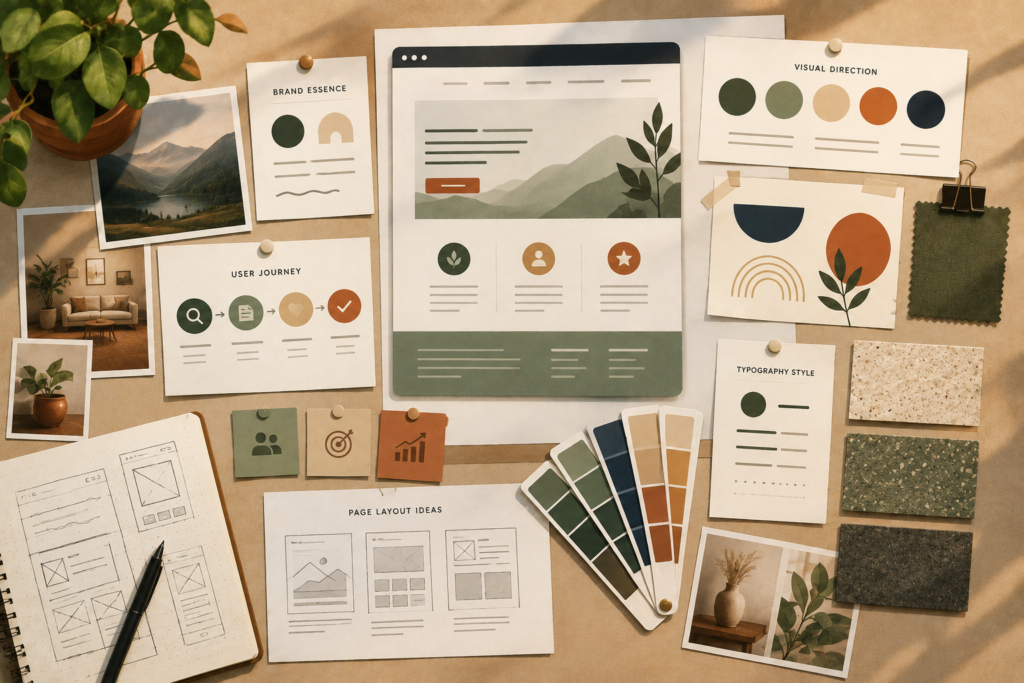
Nielsen Norman Group describes mood boards as a way to collect visual inspiration and communicate the intended feeling and visual direction of a digital product.: Nielsen Norman Group: Mood Boards in UX ↗
A small mood board can therefore be useful even if you are not a designer.
You might collect examples of:
- photography
- colours
- typography
- website sections
- packaging
- interiors
- editorial layouts
- illustrations
- textures
The goal is not to copy another website.
It is to communicate a visual direction.
Explain Why You Like Competitor Websites
Competitors are useful references, but approach them carefully when briefing a web designer.
Do not simply say:
“Make ours like Competitor X.”
Instead explain what works.
Perhaps the competitor:
- explains its services clearly
- uses excellent product photography
- has a strong portfolio
- feels trustworthy
- makes booking simple
- handles complex information cleanly
Then explain what you want to avoid.
Your website needs its own identity.
Competitor research should help uncover expectations in your market, not turn your business into an imitation.
Tell Your Designer What You Dislike Too
Negative examples can be surprisingly valuable.
When briefing a web designer, include a short “please avoid” list.
You might dislike:
- excessive animation
- dark backgrounds
- overly corporate stock photography
- bright gradients
- crowded layouts
- very thin fonts
- giant headings
- aggressive popups
- overly playful illustrations
- carousels
- complex menus
Again, explain why where possible.
“I don’t like dark websites” is useful.
“I don’t want a dark website because our existing packaging is already dark and we want the online experience to feel lighter and more approachable” is better.
Clear dislikes create boundaries without dictating the final design.
Explain Content Priority, Not Exact Layout
One of the most useful distinctions when briefing a web designer is the difference between content priority and layout instructions.
You should explain what matters most.
For example:
- Visitors must understand what we do.
- They need to know which customers we serve.
- They need to see evidence that we are credible.
- They should understand the next step.
- They should be able to request a quote easily.
That gives the designer a hierarchy.
You usually do not need to say:
“Put the headline 70 pixels from the top, then place three cards underneath it with icons on the left.”
That is a design solution.
Unless there is a genuine constraint, let the designer solve the layout.
Your role in the website design requirements process is to clarify what the page must communicate.
Be Clear About Your Content Situation
Creative decisions depend heavily on content.
A design built around professional photography will struggle if the only available images are small mobile screenshots.
When briefing a web designer, be transparent about what exists.
Identify:
- final copy
- draft copy
- missing copy
- professional photography
- product photographs
- team photos
- testimonials
- certifications
- case studies
- videos
- diagrams
- downloadable material
VVRapid has a separate Website Content Checklist for Small Business that covers the content preparation process in more detail.
If writing is the main gap, Socials, Blog & Article Writing Services can also support the content side of the project.
Do not pretend content is ready when it is not.
Designers can plan around missing material far more easily when they know about it early.
Mention Accessibility Before Visual Preferences Become Fixed
Accessibility belongs in the design conversation.
When briefing a web designer, avoid making visual demands that could undermine usability.
For example, very pale text, extremely small typography, colour-only navigation signals, or important information embedded inside decorative imagery can create problems.
The W3C’s design guidance recommends sufficient contrast, identifiable interactive elements, clear navigation, labelled forms, responsive layouts, and alternatives for images and media.: W3C Designing for Web Accessibility ↗
You do not need to become an accessibility specialist before commissioning a website.
Simply make accessibility part of the website design requirements rather than treating it as something to consider after the visual design is approved.
Give Feedback Against the Goal, Not Personal Taste
The quality of the brief matters, but so does the feedback after the first design arrives.
“Make it pop.”
“I don’t love it.”
“Can you make this section more exciting?”
These comments are difficult to act on.
Better feedback connects the design to an agreed objective.
For example:
- “The homepage feels more corporate than the approachable direction we discussed.”
- “The main enquiry action is getting lost beside the other buttons.”
- “This photography feels too generic for a business built around local expertise.”
- “The service section is visually strong, but it is difficult to tell which service is most important.”
- “This colour is on-brand, but the text is difficult to read against it.”
Nielsen Norman Group’s guidance on design critiques similarly recommends grounding feedback in objectives rather than subjective personal preference.: Nielsen Norman Group Design Critiques ↗
Good feedback tells the designer what problem you are experiencing.
It does not always need to prescribe the solution.
Decide Who Gives Final Feedback
Briefing a web designer becomes much harder when five stakeholders provide five independent sets of instructions.
Before design starts, decide:
- who collects internal comments
- who can request changes
- who has final approval
- how feedback will be supplied
- how quickly feedback can realistically be returned
A small business does not need a complicated approval process.
It needs clarity.
Ideally, one person consolidates feedback before sending it to the designer.
That helps prevent contradictory instructions such as one stakeholder asking for a more minimal design while another asks to add more content, colour, and visual elements.
Checklist: Briefing a Web Designer
Use this before your first creative discussion.
- Define the primary website goal.
- Describe the main customer in plain language.
- Explain the impression the business should create.
- Choose three to five brand personality words.
- Explain what those words mean to you.
- Supply current logos and brand assets.
- Identify fixed brand elements.
- Identify areas where the designer has freedom.
- Share two to four useful reference websites.
- Explain what you like about each reference.
- Add visual examples beyond websites if useful.
- Include a short list of styles you dislike.
- Explain which content should receive the most emphasis.
- Confirm which content and imagery already exist.
- Flag missing content early.
- Mention accessibility expectations.
- Name the person responsible for consolidated feedback.
- Confirm who gives final design approval.
This checklist is intentionally about briefing a web designer creatively.
Use the more detailed VVRapid Website Design and Development Brief when you need to document page scope, functionality, integrations, timelines, and broader project requirements.
Common Mistakes When Briefing a Web Designer
Saying “modern” without explaining what it means
Modern might mean minimalist, colourful, editorial, technical, bold, or something completely different.
Give references and explain what appeals to you.
Sending too many inspiration links
Twenty examples can create more confusion than three thoughtful ones.
Curate.
Copying a competitor
Use competitors to understand market expectations, not as a design template.
Designing every section yourself
A detailed sketch can be useful when there is a functional reason for it.
But prescribing every layout decision can limit the designer’s ability to solve the actual UX problem.
Giving feedback based only on taste
“I don’t like blue” may be valid if blue conflicts with the brand.
It is less useful when the project is being judged entirely on one person’s personal preferences rather than the agreed audience and goals.
Hiding missing content
If photography, testimonials, product details, or copy are not ready, say so.
Good website project planning accounts for gaps.
Allowing everyone to approve everything
Too many decision-makers often produce compromise designs with no clear direction.
Give people appropriate input, but establish one final decision route.
How to Package Your Creative Direction
You do not need special software when briefing a web designer.
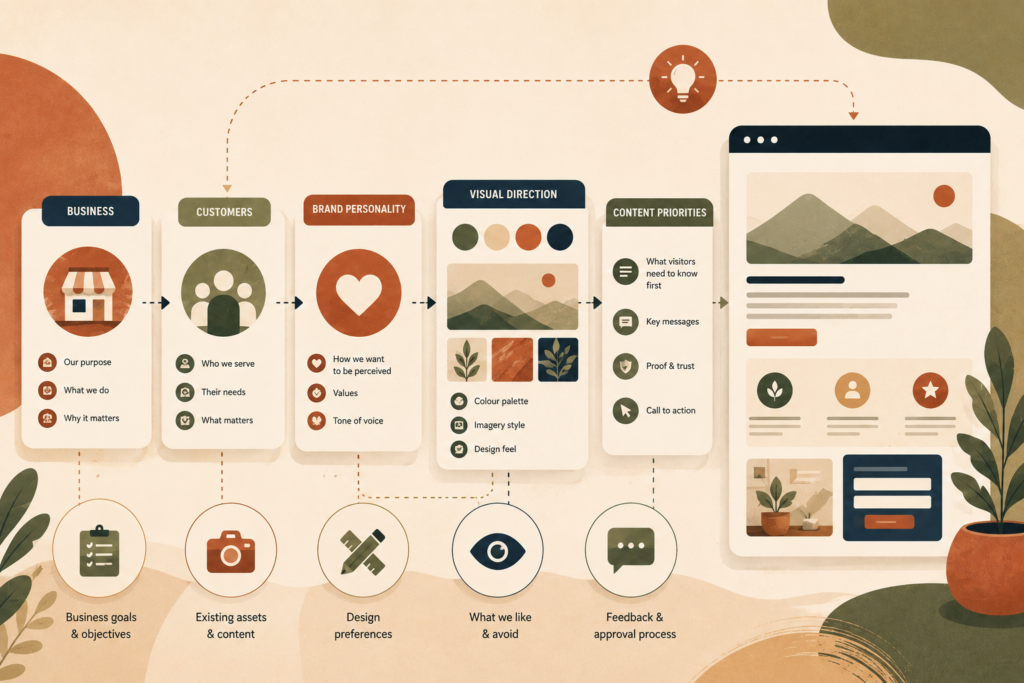
A simple document can contain:
Business:
One paragraph explaining what the company does.
Customer:
A short description of the main audience.
Goal:
The primary action the website should encourage.
Desired impression:
Three to five descriptive words with explanations.
Brand assets:
Links to approved logo, colour, photography, and other files.
Website design inspiration:
Two to four examples with notes explaining what you like.
Avoid:
A short list of visual styles or patterns you do not want.
Content priorities:
What customers must understand first, second, and third.
Feedback:
Who supplies it and who gives final approval.
That may only take one or two pages.
Clarity matters more than length.
How VVRapid Can Help
VVRapid’s Website Design & Development service can take your business goals, brand direction, content, and practical requirements and turn them into a structured WordPress website.
If your project is still at the planning stage, the existing Website Design and Development Brief can help define the wider scope before design begins.
Search Engine Optimisation can support page and search planning, while content services can help when the messaging itself still needs work.
You do not need to arrive with a finished design.
You need enough clarity to give the design process a useful direction.
FAQ
What should I prepare before briefing a web designer?
Before briefing a web designer, prepare a short business overview, customer description, primary website goal, brand assets, useful visual references, content priorities, and examples of styles you like or dislike.
How many example websites should I give my designer?
Two to four strong examples are usually more useful than a large collection. Explain specifically what you like about each example rather than expecting the designer to guess.
Do I need a complete brand guide before briefing a web designer?
No. When briefing a web designer, you can still provide useful direction through your existing logo, colours, photographs, brand personality words, and examples of the visual feeling you want.
Should I tell my web designer exactly how the website should look?
Usually, focus on goals, priorities, constraints, and preferences. Give the designer room to solve the layout and UX. Specific layout instructions make sense when there is a genuine functional or business requirement.
What is the difference between a website design brief and creative direction?
A full website project brief normally covers scope, pages, functionality, content, integrations, timeline, and responsibilities. Creative direction focuses more specifically on brand feel, audience perception, visual references, content hierarchy, and design preferences.
How should I give feedback on website designs?
Connect feedback to the agreed audience, brand, or website goals. Explain what feels wrong and why rather than giving vague comments or prescribing a visual fix immediately.