
Custom app development for service businesses becomes worth considering when your team is spending too much time chasing updates, re-entering information, or patching together processes across email, spreadsheets, and chat tools. At a certain point, adding more admin is not efficient. A better system is.
Table of Contents
Many service businesses start with workable systems. A spreadsheet for bookings. A shared inbox for client communication. A folder for documents. A few staff members who “just know” how things move from enquiry to delivery. That works for a while, until volume grows and small delays start multiplying.
Then the real cost appears. Client updates are missed. Staff duplicate work. Managers have less visibility. Customers ask for self-service options. Teams want fewer manual handoffs. This is where a mobile-friendly web app, customer portal, or internal workflow app can make a measurable difference.
If you are still deciding whether the problem is strategy, process, or software, it helps to map the workflow first. VVRapid’s Digital Strategy Roadmaps is a useful next step if you want to clarify what should be built and why.
What custom app development for service businesses actually means
At a practical level, custom app development for service businesses means creating software around the way your business actually works, instead of forcing your team to squeeze into a generic tool.
That app could be:
- a customer portal where clients can log in, upload documents, approve quotes, track progress, and download invoices
- an internal workflow app for managing jobs, team assignments, approvals, checklists, and status changes
- a booking and scheduling app that handles appointments, reminders, and capacity
- a service dashboard that combines reports, customer records, communication, and task history in one place
In many cases, this does not need to be a native app from day one. A secure web app with responsive design is often the better first move. It is faster to access, easier to update, and more cost-effective for many small and mid-sized service companies.
This is also where good app design and development matters. A useful app is not just a feature list. It should reduce clicks, remove confusion, and fit real day-to-day work. If you are comparing broader digital options, VVRapid’s App Design & Development explains the kinds of business apps that can be planned and built.
Signs your admin process has outgrown spreadsheets and inboxes
Not every service business needs a custom app. But many wait too long to improve a workflow that is already slowing growth.
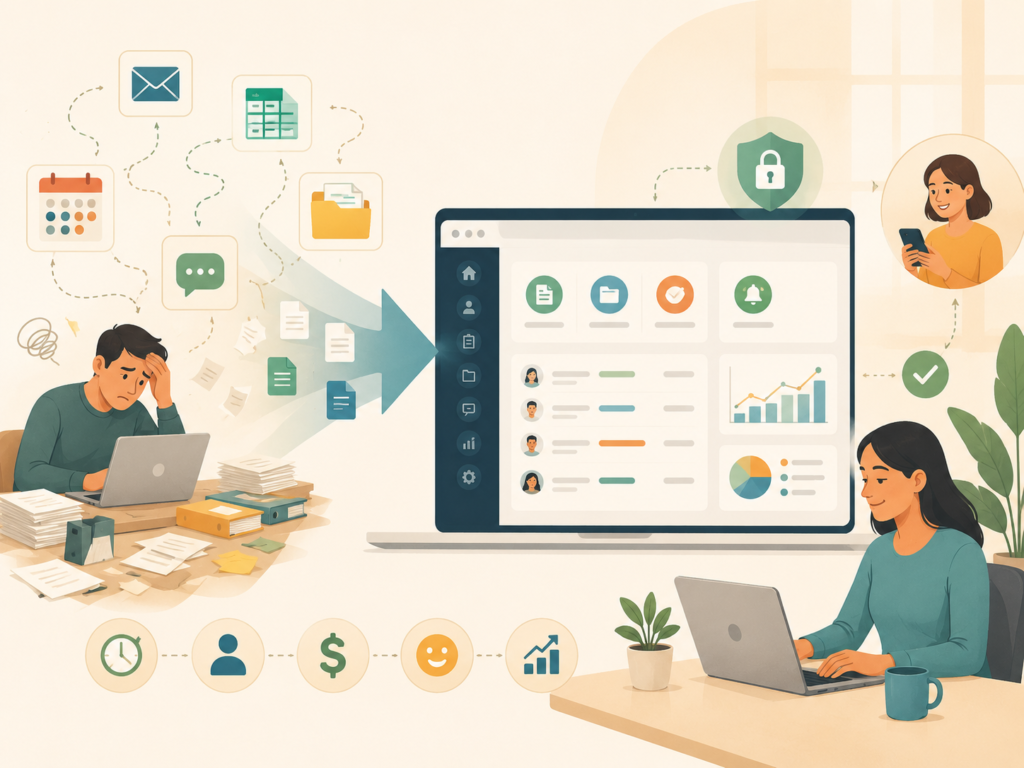
Here are common signs the current setup is no longer enough:
- staff re-enter the same client information into multiple systems
- customers keep asking for status updates
- documents go missing or sit in the wrong inbox
- appointment scheduling creates back-and-forth messages
- jobs stall because approvals are not visible
- managers cannot see where bottlenecks are
- your team relies too heavily on one or two people who know the process
- there is no clean audit trail for actions, messages, or changes
- the business wants a better client experience without increasing headcount
Think: if work stops when one person is off for the day, the process is too dependent on memory.
For many service brands, especially those with multiple steps between enquiry and delivery, custom app development for service businesses is less about “having an app” and more about removing friction.
When a portal beats more admin
This is the key question. When does a portal or internal app make more sense than hiring another administrator or continuing with patched-together tools?
A portal usually wins when the same interactions happen repeatedly.
A portal makes sense when customers need self-service
A customer portal is valuable if clients regularly need to:
- book or request services
- upload forms or supporting files
- view progress or status
- approve work or next steps
- access invoices, statements, or reports
- message the team without relying on long email threads
This improves the client experience while reducing routine admin. Instead of your team answering the same questions again and again, customers can see what they need in one place.
An internal workflow app makes sense when the team needs structure
An internal workflow app is often the better answer if the main pain is operational. For example:
- assigning jobs between departments
- managing inspection or field-service steps
- moving work through review and approval stages
- tracking overdue actions
- controlling access by staff role
- keeping a history of notes, files, and task changes
This kind of service business app gives managers visibility and helps teams work in a more consistent way.
More admin only helps if the process is already strong
Hiring more people into a broken workflow can increase cost without fixing the root problem. If a process is unclear, repetitive, or too manual, a new staff member often ends up becoming part of the workaround.
By contrast, custom app development for service businesses can standardise the journey and reduce dependency on manual follow-up.
If the app needs to connect with your website, forms, or lead flow, VVRapid’s Website Design & Development can also support a joined-up front-end experience.
Features to prioritise before nice-to-haves
One of the biggest traps in app planning is jumping straight to advanced features. Start with the basics that create real operational value.
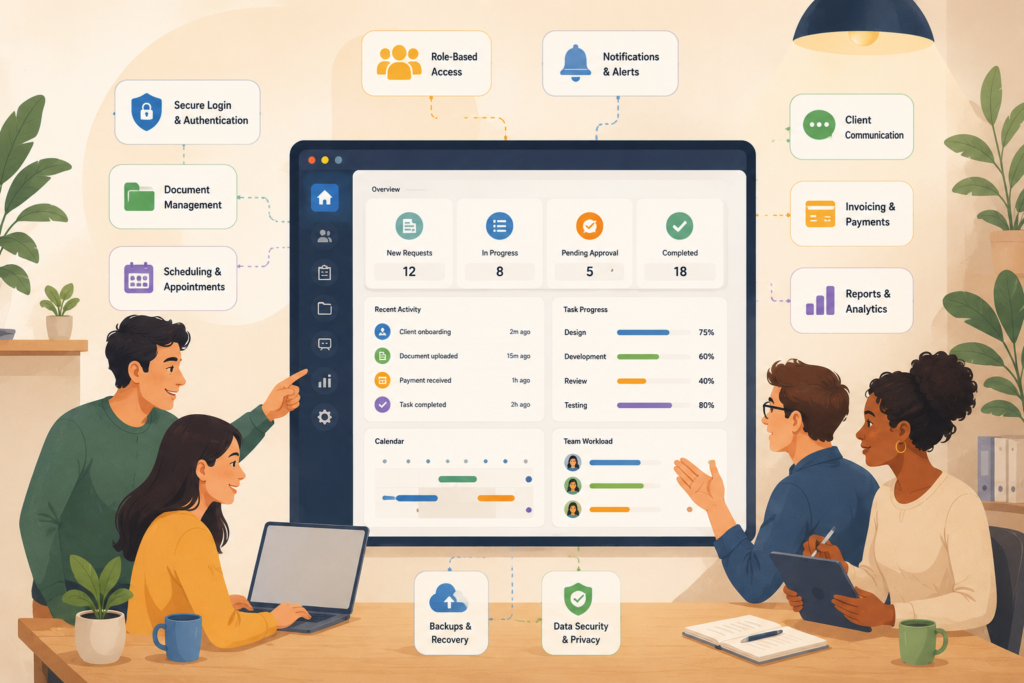
Priority features
1. Secure login and role-based access
Different users should see what is relevant to them. Customers, managers, admins, and team members often need different permissions. This protects data and simplifies the interface.
2. Clear workflow steps
A good app should reflect the actual process: submit, review, approve, schedule, deliver, close. If the flow is unclear, the app will feel confusing fast.
3. Forms and document handling
Many service businesses need structured forms, file uploads, signed approvals, or downloadable records.
4. Status tracking and notifications
Users should know what is happening without needing to ask. Automated alerts, reminders, and progress indicators save time.
5. Searchable records and reporting
Your team should be able to find jobs, customers, or documents quickly. Reporting matters too, especially if you want to spot delays, workload issues, or service trends.
6. Mobile-friendly design
A responsive interface is essential for teams working across laptops, tablets, and phones.
7. Integrations where they matter
Only add integrations that remove real friction, such as payments, CRM, calendars, forms, accounting tools, or messaging systems. If you need custom functionality beyond off-the-shelf tools, VVRapid’s Custom Plugin Development may be relevant too.
Nice-to-haves that can usually wait
- highly customised dashboards for every role
- advanced automation on day one
- complex analytics no one will review
- too many notification channels
- non-essential AI features
- separate native apps before the web app proves value
Checklist before requesting a quote
Before asking for proposals, use this checklist. It will make conversations faster and more useful.
Service business app planning checklist
- □ define the main business problem in one sentence
- □ list the users, such as customer, admin, manager, technician, or partner
- □ map the current process from first contact to completion
- □ identify the top 3 repetitive admin tasks
- □ note what information users need to upload, view, or approve
- □ decide whether the app is customer-facing, internal, or both
- □ list essential integrations, if any
- □ identify any security or compliance concerns
- □ gather examples of existing screens, forms, or reports
- □ decide what success looks like after launch
If you do this well, custom app development for service businesses becomes easier to scope and less risky to build.
How to scope timeline and budget sensibly
Budget conversations are easier when the scope is realistic. The first version should focus on the process that creates the most operational value.
Useful scoping questions include:
- what is the smallest version that would still save time?
- which users matter most in phase one?
- what can stay manual for now?
- which integration is essential, and which can wait?
- what data needs to be migrated, if any?
- who will own content, testing, and feedback on your side?
Illustrative budgets vary widely because pricing varies by scope and region. A simple customer portal with secure login, forms, and status tracking is very different from a multi-role system with deep integrations and reporting. That is why discovery and workflow mapping matter so much before development starts.
Common mistakes in custom app development for service businesses
Even good ideas can go wrong if planning is rushed. Here are the most common mistakes.
1. Building around assumptions, not real workflows
If the process is not mapped properly, the app often mirrors guesswork instead of reality. Team workshops and basic discovery prevent this.
2. Adding too many features too early
Trying to solve everything in version one makes the app slower to launch and harder to use. Focus on the actions that matter most.
3. Ignoring the user experience
A cluttered dashboard or confusing navigation creates friction. Good UX design is not cosmetic. It is operational.
4. Forgetting security and access control
Any app handling customer data, documents, or payments needs sound security basics. Review trusted resources such as OWASP Top 10 ↗ and NIST Digital Identity Guidelines ↗ when planning secure login and access rules.
5. Skipping accessibility and responsive design
Users will access your app on different devices and with different needs. The W3C Web Accessibility Initiative Overview ↗ is a useful reference for making interfaces more inclusive.
6. No ownership after launch
Apps need updates, monitoring, support, and improvement. If no one owns the app after launch, value drops quickly. Ongoing support matters, which is why Website Maintenance & Care can be a useful companion service for businesses that need stability and upkeep.
How VVRapid can help
VVRapid can help you shape a practical app around the way your service business works, not the other way around. That can include discovery, workflow mapping, app design, development, secure user access, responsive interfaces, and ongoing improvement. If you are still working out whether you need a customer portal, internal workflow app, or broader digital solution, a staged approach usually makes the decision clearer. You can start by reviewing the App Design & Development service or contact VVRapid to discuss your process.
FAQ
What is custom app development for service businesses?
It is the design and build of software tailored to a service company’s workflow, customer journey, and internal operations. That could include a customer portal, staff dashboard, or booking and workflow system.
Does every service business need a custom app?
No. Some businesses can improve a lot with simpler process fixes or better use of current tools. A custom app makes more sense when repeatable admin, fragmented systems, or poor visibility are slowing growth.
Is a web app enough, or do I need a mobile app too?
For many service businesses, a secure responsive web app is enough to start. It works across devices and is often easier to maintain. A native mobile app only becomes necessary in specific cases.
What should I prepare before speaking to a developer?
Prepare your process, user roles, pain points, must-have features, and any essential integrations. A rough workflow map is often more helpful than a long wishlist.
How long does custom app development for service businesses take?
It depends on scope, feedback cycles, integrations, and complexity. A focused phase-one build is usually faster and more effective than trying to include everything at once.
If your business is reaching the point where more admin feels like a patch, not a solution, it may be time to look at a better workflow. Start with clarity, then build the right thing. You can explore VVRapid’s app services or get in touch for a practical conversation about what your process actually needs.
External sources used in this article (helpful resources)
- Source: OWASP Top 10 ↗
- Source: NIST Digital Identity Guidelines ↗
- Source: W3C Web Accessibility Initiative Overview ↗