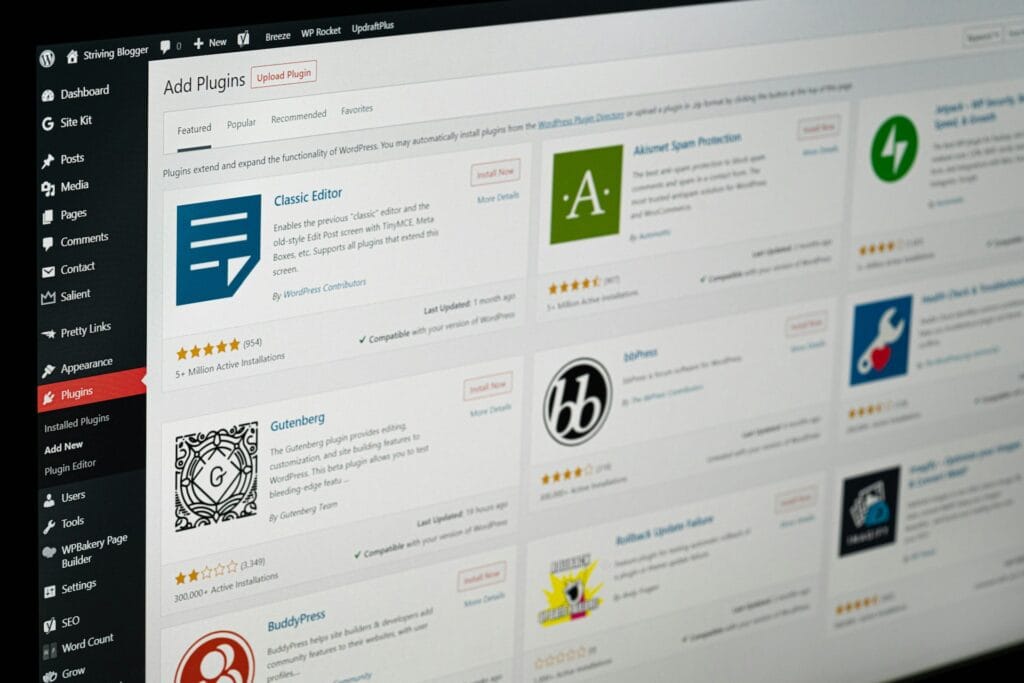
WooCommerce checkout customisation helps your online store collect the right information, show the right delivery and payment options, and reduce manual order handling when default checkout settings no longer fit.
Table of Contents
For many stores, the standard WooCommerce checkout is enough at the start. It lets customers enter their details, choose delivery, select a payment method, and place an order. The problem usually appears later, once your store needs custom delivery logic, B2B checkout rules, extra customer fields, conditional payment methods, or a cleaner handover to fulfilment.
At that point, adding another extension may work. Or it may create more admin, more testing, and more plugin overlap.
This guide explains what WooCommerce checkout customisation can include, when standard settings are enough, when a plugin is suitable, and when a custom WooCommerce plugin becomes the better route.
WooCommerce Checkout Customisation: What Can Actually Be Changed?
WooCommerce checkout customisation can change what customers see, what information they provide, which rules apply to their order, and what happens after checkout.
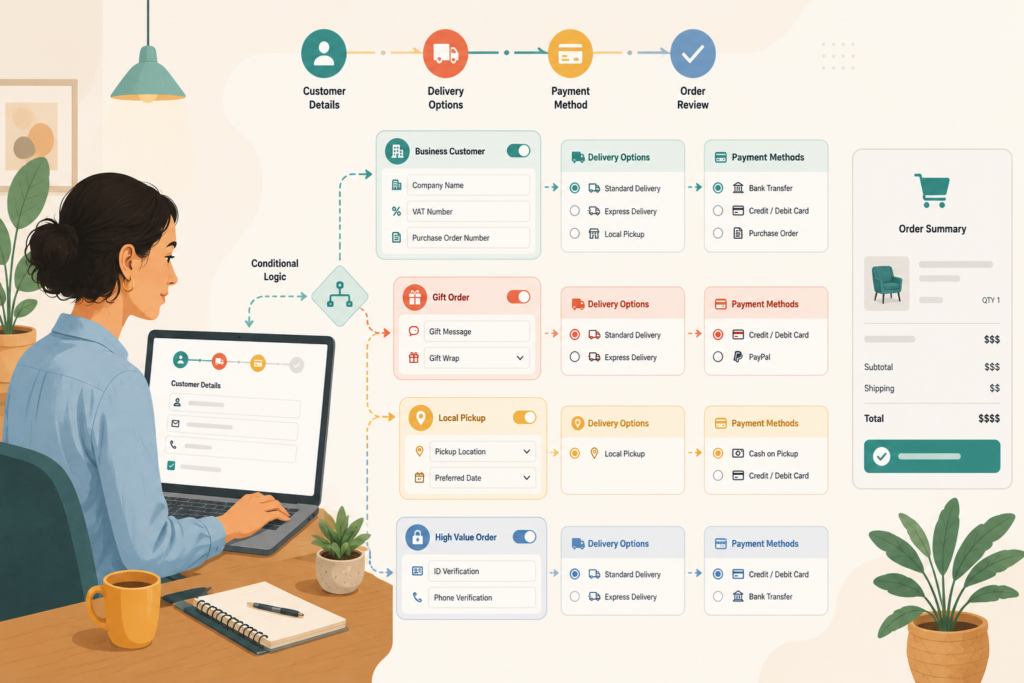
Common changes include:
- Adding custom checkout fields
- Removing unnecessary fields
- Rearranging billing, shipping, and order information fields
- Showing fields only for certain products or customer types
- Applying delivery rules by postcode, country, province, weight, or product category
- Showing or hiding payment methods based on order conditions
- Adding delivery dates, collection slots, or branch selection
- Capturing VAT, company, purchase-order, or tax details
- Sending order data to a CRM, courier, warehouse, accounting platform, or ERP
- Creating internal notifications for staff
WooCommerce now supports block-based checkout experiences, and its Checkout Fields block contains the customer information fields used to complete a purchase. WooCommerce notes that some field behaviour is dynamic and depends on the customer’s order and store settings.
That matters because older checkout customisations built for the classic shortcode checkout may not behave the same way with WooCommerce Checkout Blocks.
Signs Your Checkout Has Outgrown Standard Settings
Not every store needs advanced WooCommerce checkout customisation.
A simple retail store selling standard products with one delivery method and one or two payment options may be fine with default settings and a few trusted extensions.
Your checkout may need more careful planning when the website no longer matches the way your business fulfils orders.
Customers use order notes for essential details
Order notes are useful for optional instructions. They are not ideal for information your team needs to process the order correctly.
For example, customers may type:
- Delivery access notes
- Business registration details
- Gift messages
- Preferred collection dates
- Branch names
- Product personalisation requests
- Purchase-order numbers
- Special shipping instructions
If that information is important, it should usually be collected in structured WooCommerce checkout fields. Structured fields are easier to validate, display, search, export, and pass to another system.
Staff manually check every order
Manual review is sometimes necessary. But if your team checks every order because the checkout does not enforce basic rules, the website is creating avoidable work.
Examples include checking whether:
- A postcode is eligible for delivery
- A customer selected the right branch
- A B2B buyer entered a purchase-order reference
- A restricted product can be shipped to a region
- The correct payment method was used
- The order contains a product that needs extra lead time
Conditional checkout rules can prevent many of these issues before the customer places the order.
You rely on several overlapping plugins
A common checkout stack might include one plugin for fields, another for payment conditions, another for delivery dates, another for shipping logic, and another for notifications.
This can work, but it can also become fragile.
If several plugins are trying to control one checkout journey, testing becomes harder. A custom WooCommerce plugin may be cleaner when the rules are connected and business-specific.
VVRapid’s Custom Plugin Development service supports tailored WordPress and WooCommerce functionality, third-party integrations, REST API work, custom admin tools, and performance-conscious plugin development.
Useful Checkout Customisations for Growing Stores
The best WooCommerce checkout customisation is not the most complex one. It is the one that makes buying easier for customers and processing easier for your team.
Custom WooCommerce checkout fields
Custom fields can collect information that WooCommerce does not include by default.
Useful examples include:
- Company registration number
- VAT or tax number
- Purchase-order reference
- Delivery instructions
- Gift message
- Preferred delivery date
- Collection location
- Recipient phone number
- Product personalisation detail
- Customer type selection
WooCommerce developer documentation explains that additional checkout fields can be added to the Checkout Block, including fields for information that does not belong in standard contact or address sections.
The rule is simple: collect what you need, but do not collect information just because you can.
Conditional checkout rules
Conditional checkout rules show, hide, require, or change fields based on the order.
For example:
- Show VAT fields only for business customers
- Show gift-message fields only when gift wrapping is selected
- Show delivery instructions only for courier delivery
- Show collection slots only for click-and-collect
- Require extra information for personalised products
- Hide irrelevant fields for digital products
WooCommerce’s own extension documentation includes support for conditional logic based on cart contents and user roles, with compatibility noted for Cart and Checkout Blocks and HPOS.
Conditional logic can reduce friction because customers only see fields that apply to them.
WooCommerce shipping rules
Delivery is often where checkout becomes more complex.
WooCommerce shipping rules may need to account for:
- Country
- Province, state, or region
- Postcode
- Product size
- Product weight
- Delivery zone
- Order value
- Customer role
- Courier coverage
- Remote-area fees
- Same-day cut-off times
- Collection versus delivery
For South African stores, delivery options may vary between major metros, regional towns, and outlying areas. For international stores, rules may also depend on customs, restricted items, and courier limitations.
If shipping rules affect fulfilment, margins, or customer expectations, they deserve careful planning.
WooCommerce payment rules
Payment options should match the order type.
A store might need to:
- Allow bank transfer only for approved B2B customers
- Hide cash on delivery outside selected regions
- Require card payment for custom-made products
- Show purchase-order payment only to logged-in wholesale users
- Hide certain gateways for high-risk order types
- Restrict payment methods by currency or cart total
Poorly planned WooCommerce payment rules can confuse customers. They may reach the final step and find that the expected payment option is missing.
Good payment logic should be clear, tested, and easy for staff to explain.
B2B checkout requirements
B2B checkout often needs more structure than normal retail checkout.
A B2B store may need:
- Company fields
- Tax or VAT details
- Purchase-order numbers
- Minimum order values
- Role-based pricing
- Approved payment terms
- Branch or department references
- Buyer approval flows
- Restricted product visibility
- Integration with accounting or ERP systems
A custom WooCommerce plugin can make sense when these B2B checkout rules need to connect to customer roles, order processing, internal workflows, or external systems.
Extension, Custom Code, or Custom WooCommerce Plugin?
There is no single best way to handle WooCommerce checkout customisation.
The right route depends on the complexity, risk, and long-term importance of the checkout rule.
Use WooCommerce settings when the change is simple
Start with native settings when possible.
This is suitable for:
- Basic checkout layout choices
- Store address settings
- Standard shipping zones
- Standard tax settings
- Standard payment gateway configuration
- Simple terms and privacy settings
This route is usually the easiest to maintain.
Use a trusted extension when the need is common
A plugin or extension can be a good fit when the requirement is common and supported.
Examples include:
- Adding a small number of custom fields
- Reordering checkout fields
- Adding simple conditional logic
- Adding basic delivery dates
- Controlling payment methods with clear rules
- Adding straightforward shipping conditions
Before installing, check compatibility with WooCommerce Checkout Blocks, your theme, payment gateways, shipping plugins, and hosting setup.
The WooCommerce developer documentation notes that classic checkout fields have historically been edited with actions and filters, while block-based checkout uses newer approaches.
Build a custom WooCommerce plugin when the workflow is specific
Custom WooCommerce plugin development becomes more useful when checkout rules are specific to your business.
Consider custom development when:
- Several rules depend on each other
- Existing plugins include too many unused features
- Checkout data must move to another system
- Staff need custom admin tools
- B2B rules are unique
- Fulfilment logic is complex
- Several plugins are creating conflicts
- You need logs, retries, or clear failure handling
Custom does not automatically mean better. It is better when it gives your store a cleaner, more reliable way to handle an important process.
How Checkout Customisation Affects Customer Experience
WooCommerce checkout customisation should improve the buying journey, not make it heavier.
A shorter checkout is not always better. A wholesale order, custom product, regulated item, or complex delivery may need more information than a simple retail order.
The important question is whether each field earns its place.
Ask:
- Does the customer understand why this field exists?
- Is this field needed to fulfil the order?
- Can irrelevant fields be hidden?
- Are delivery costs clear?
- Are payment options easy to understand?
- Are errors specific and helpful?
- Does the checkout work on mobile?
- Does the checkout preserve entered information after an error?
Checkout optimisation is not about removing every field. It is about removing confusion.
Security, Privacy, and Data Handling
Checkout data is sensitive.
Before adding fields or integrations, consider where the information will go.
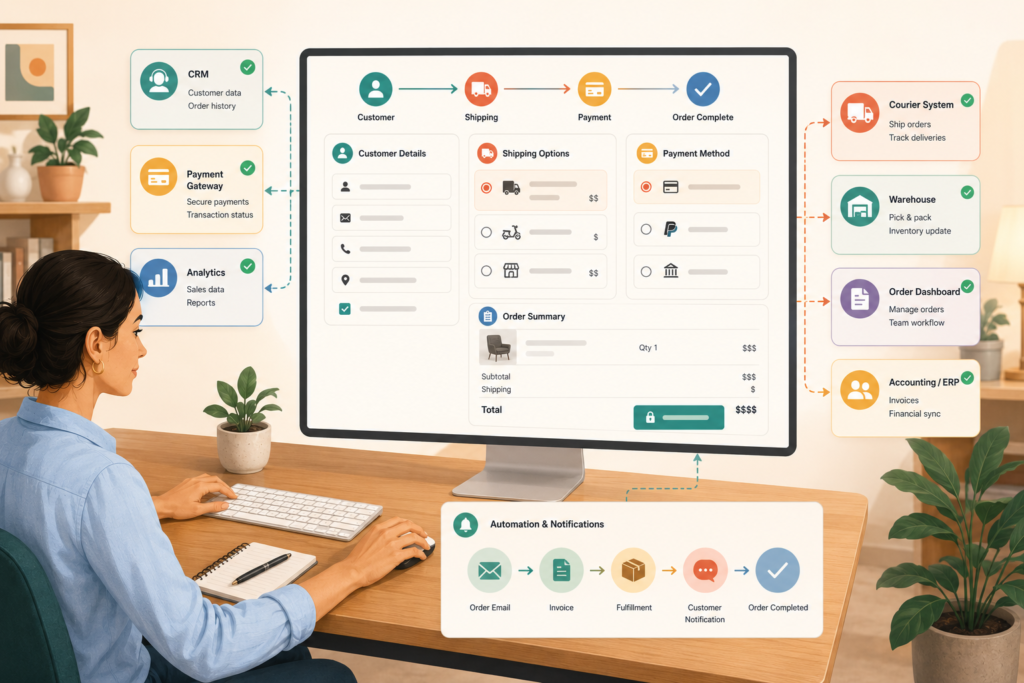
It may appear in:
- WooCommerce order records
- Customer accounts
- Admin emails
- Invoices
- Courier systems
- CRM records
- Accounting software
- Exported spreadsheets
- Support tickets
Custom checkout development should follow secure WordPress and WooCommerce development practices, including sanitisation, validation, permission checks, secure API authentication, and safe error handling.: WooCommerce Developer Documentation ↗
Only collect data that has a clear operational, legal, or customer-service purpose.
Checklist Before Changing Your WooCommerce Checkout
Use this checklist before installing an extension or commissioning WooCommerce checkout customisation:
- □ Confirm whether your store uses Checkout Blocks or classic checkout
- □ Define the checkout problem in one sentence
- □ List every affected product, category, customer role, and region
- □ Decide which fields are required, optional, or conditional
- □ Remove fields that are no longer useful
- □ Check payment gateway compatibility
- □ Check shipping method compatibility
- □ Test guest and logged-in checkout
- □ Test desktop and mobile layouts
- □ Test tax, coupons, shipping, and payment together
- □ Check order emails and admin screens
- □ Check invoices, exports, and fulfilment systems
- □ Test failed payments and validation errors
- □ Use a staging site before changing the live checkout
- □ Keep a rollback plan
- □ Document the final checkout rules
- □ Assign responsibility for maintenance
A checkout change is not complete until the full order journey has been tested.
Common Mistakes With WooCommerce Checkout Customisation
Adding too many fields
Every field asks for time and attention.
Only add fields that support payment, delivery, compliance, customer communication, or fulfilment.
Forgetting about Checkout Blocks
A plugin or snippet that worked with classic checkout may not support WooCommerce Checkout Blocks. Always confirm the checkout type before choosing a solution.
Building around one ideal order
Test unusual orders too.
Include coupons, failed payments, guest checkout, logged-in checkout, mobile users, different shipping zones, different customer roles, and products with special rules.
Hiding payment methods without explanation
If customers expect a payment method and it disappears, they may abandon the order.
Payment rules should be logical, tested, and supported by clear messaging where needed.
Putting business logic in the wrong place
Checkout business logic should usually live in a plugin, not directly inside a theme. Theme changes should not break order rules, payment conditions, or field validation.
Ignoring ongoing maintenance
WooCommerce, themes, payment gateways, checkout blocks, and extensions change over time. Checkout customisation needs testing after important updates.
VVRapid’s Website Maintenance & Care service can support ongoing updates, backups, testing, and stability checks for WordPress and WooCommerce websites.
How to Brief a Developer
A good brief for WooCommerce checkout customisation does not need to be technical. It needs to be specific.
Include:
- What is wrong with the current checkout
- What customers should see
- What staff need after the order is placed
- Which products or categories are affected
- Which customer roles are affected
- Which countries, regions, or postcodes are affected
- Which payment methods should appear and when
- Which shipping methods should appear and when
- Which fields are required
- What should happen when validation fails
- Where the checkout data should be stored
- Which external systems need the data
- Examples of real orders
- Screenshots of current workarounds
For wider ecommerce planning, VVRapid’s Website Design & Development service can help align checkout improvements with product pages, navigation, conversion paths, mobile experience, and site structure.
How VVRapid Can Help
VVRapid can review whether your WooCommerce checkout customisation should be handled through settings, a trusted extension, or a custom WooCommerce plugin.
Support can include WooCommerce checkout fields, conditional checkout rules, WooCommerce shipping rules, WooCommerce payment rules, B2B checkout flows, API integrations, custom admin tools, and ecommerce automation.
The goal is to make checkout easier for customers and easier for your team to manage.
No unnecessary plugin bloat. No overbuilt solution. Just the right level of customisation for the job.
FAQ About WooCommerce Checkout Customisation
Can I add custom fields to WooCommerce checkout?
Yes. You can add custom checkout fields through compatible extensions or custom WooCommerce plugin development. The best method depends on your checkout type and the complexity of the field rules.
What are conditional checkout rules?
Conditional checkout rules show, hide, require, or change checkout fields based on customer type, product, cart contents, delivery method, order value, or other conditions.
Can I control payment methods by customer type?
Yes. WooCommerce payment rules can show or hide payment methods based on user role, location, cart value, shipping method, product type, or approval status.
Do I need a custom WooCommerce plugin?
Not always. Use standard settings or a trusted extension when the requirement is common. A custom WooCommerce plugin is useful when the checkout follows business-specific rules or connects to other systems.
Can checkout customisation affect speed?
Yes. Heavy extensions, unnecessary scripts, slow API requests, or conflicting plugins can affect checkout performance. Test changes carefully before launch.
Should checkout changes be made on the live store?
No. Use a staging site where possible. Test checkout fields, shipping rules, payment rules, emails, order records, and mobile layouts before updating the live store.
Final Thoughts
WooCommerce checkout customisation works best when it solves a clear business problem.
Use standard settings when the requirement is simple. Use a reliable extension when the need is common and well supported. Consider a custom WooCommerce plugin when your checkout needs specific logic, connected systems, B2B rules, or cleaner internal workflows.
The goal is not to make checkout complicated.
It is to make the right complexity invisible to the customer and manageable for your team.
To discuss checkout fields, payment logic, shipping rules, or an integrated WooCommerce workflow, view VVRapid’s Custom Plugin Development service.