Custom WordPress plugin requirements help turn a rough idea into a plugin that can actually be planned, quoted, built, tested, and maintained. The clearer your requirements are before development starts, the less time you lose to rework, assumptions, and “that’s not what we meant” moments.
Table of Contents
A custom plugin can be a smart way to automate business processes, extend WooCommerce, connect third-party systems, improve admin workflows, or replace several bloated plugins with one focused solution. But before anyone writes code, the functionality needs to be defined in plain business language.
This guide walks through what to define before asking for a custom plugin quote, what details developers usually need, and how to avoid vague requirements that make the plugin development process harder than it needs to be.
If you already know your website needs custom functionality, VVRapid’s Custom Plugin Development service can help shape the requirements and build a plugin that fits your workflow.
Why Custom WordPress Plugin Requirements Matter
Poorly defined custom WordPress plugin requirements create avoidable problems.
A developer may understand the general idea, but not the exact workflow. Your team may assume a feature works one way, while the developer builds it another way. A hidden edge case may appear late in testing. A user role may need access that nobody mentioned. An integration may need data that your current system does not store properly.
That is how small assumptions become expensive changes.
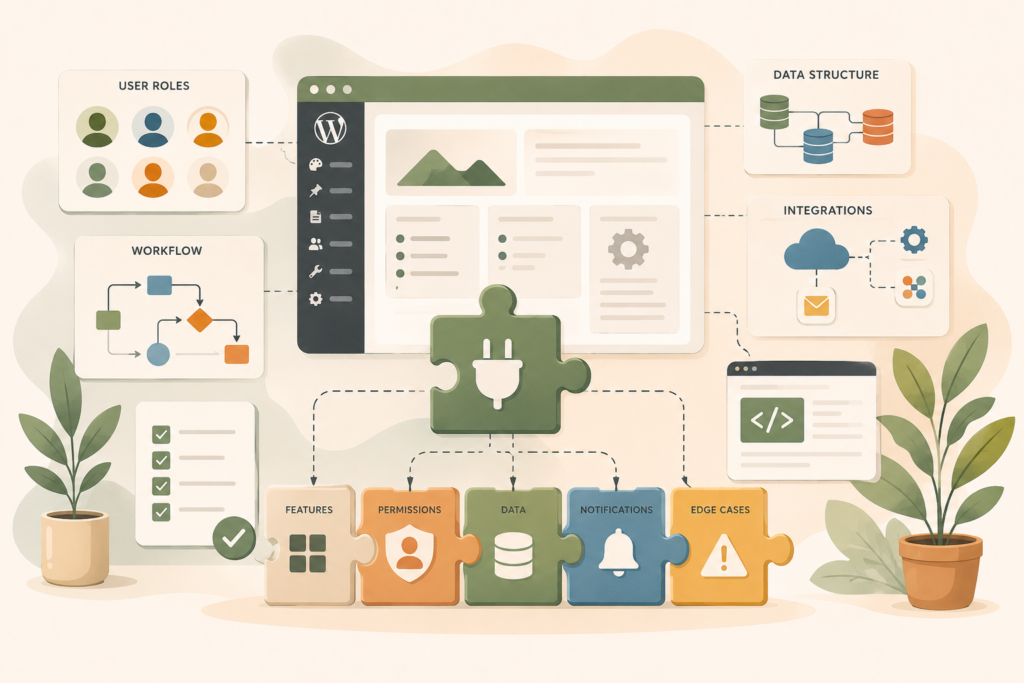
Strong requirements help everyone understand:
- What the plugin must do
- Who will use it
- What data it needs
- Which systems it connects to
- What happens when something goes wrong
- How success will be tested
- What is inside or outside the custom plugin scope
This does not mean you need to write technical documentation yourself. It means you should define the business problem clearly enough that the technical solution can be planned properly.
Think: less guesswork, better build.
Start With the Business Workflow, Not the Feature List
The best custom WordPress plugin requirements start with the workflow.
Many business owners begin with a feature request, such as:
“We need a plugin that sends booking data to our CRM.”
That is a useful start, but it is not enough.
A stronger requirement explains the workflow behind the feature:
“When a customer completes a booking form, the booking details should be saved in WordPress, sent to the CRM, assigned to the correct sales person, and marked with the service category. If the CRM does not respond, the booking should still be saved and the admin team should be notified.”
That gives the developer much more to work with.
Useful workflow questions
Before development starts, answer these questions:
- What task is currently manual, slow, duplicated, or error-prone?
- Who performs the task now?
- What should the plugin automate?
- What should still be reviewed by a human?
- What triggers the workflow?
- What happens after the workflow is complete?
- What should happen if the workflow fails?
This is where WordPress plugin planning becomes practical. The goal is not to list every button first. The goal is to understand how the plugin functionality supports the business process.
For larger workflow changes, VVRapid’s Digital Strategy Roadmaps can help connect plugin planning to your wider website, operations, and digital priorities.
Define the Users and User Roles
User roles are one of the most important parts of custom WordPress plugin requirements.
A plugin may behave differently depending on who is using it. Admins, shop managers, editors, customers, members, suppliers, staff, and external partners may all need different permissions.
If these details are not defined early, the plugin may be too open, too restricted, or awkward for your team to use.
Define who can do what
For each user type, define:
- What they can view
- What they can create
- What they can edit
- What they can delete
- What they can approve
- What notifications they receive
- What data should be hidden from them
For example, a staff member may need to update order notes, but not change pricing. A client may need to upload documents, but not see internal comments. A store manager may need access to plugin reports, but not technical settings.
Clear user roles help with security, usability, and testing.
The official WordPress developer documentation is useful for understanding how capabilities and permissions work in plugin development: WordPress Roles and Capabilities ↗.
Define the Plugin Functionality in Plain Language
Once the workflow and users are clear, define the actual plugin functionality.
This is the part most people think of first, but it works better after the workflow is understood.
Your plugin functionality might include:
- A custom admin screen
- Custom fields
- WooCommerce checkout changes
- Automated emails
- CRM syncing
- Booking logic
- Member access rules
- Report generation
- Data import or export
- Payment gateway logic
- PDF creation
- API connections
- Approval workflows
Write each feature as a simple statement.
For example:
- Admin users can create custom discount rules.
- Customers can upload files during checkout.
- The plugin sends new enquiry data to the CRM.
- The sales team can filter enquiries by service type.
- Failed API syncs are logged for review.
This makes the custom plugin scope easier to discuss.
Separate must-have from nice-to-have
Not every idea belongs in version one.
Split features into:
- Must-have
- Should-have
- Nice-to-have
- Future phase
This helps control scope and budget. It also makes the first release easier to test and launch.
A lean first version is often better than an overloaded plugin that tries to solve every possible future problem.
Map the Data Your Plugin Needs
Data is where many custom WordPress plugin requirements become more complex.
A plugin may need to store, display, update, send, or receive data. That data may come from WordPress, WooCommerce, forms, user profiles, external APIs, spreadsheets, or internal systems.
Before development starts, define what data the plugin needs and where it should live.
Data questions to answer
Ask:
- What information does the plugin collect?
- Where does the data come from?
- Where should the data be stored?
- Who can access it?
- Can users edit it later?
- Should data be exported?
- Should data be deleted after a certain time?
- Does the plugin need to sync data with another system?
- What happens if required data is missing?
For example, a quote request plugin may collect name, email, phone number, service type, budget range, location, deadline, and uploaded files. Some of that data may be saved in WordPress. Some may be sent to a CRM. Some may trigger an email notification.
Data planning helps avoid messy workarounds later.
If your plugin needs to connect to external systems, the WordPress REST API documentation may be useful background reading: WordPress REST API Handbook ↗.
Define Integrations and External Systems
Many custom plugins need to connect WordPress with other tools.
That might include CRMs, payment providers, booking platforms, email marketing tools, inventory systems, accounting tools, internal databases, or mobile apps.
These integrations should be part of your custom WordPress plugin requirements from the start.
What developers need to know about integrations
For each integration, define:
- Which system the plugin connects to
- What data is sent
- What data is received
- How often syncing happens
- Whether the sync is instant or scheduled
- What API access is available
- What happens if the external system is offline
- Whether test credentials are available
- Who owns the external account
Integration work can change the custom plugin quote because it often involves extra testing, error handling, authentication, documentation, and support.
If the plugin may also connect to mobile apps or external user portals later, VVRapid’s App Design & Development service can help plan the broader system architecture.
Plan Edge Cases Before They Become Problems
Edge cases are situations that do not follow the happy path.
They are easy to forget during early planning, but they matter in real-world plugin development.
Examples include:
- A user submits a form twice.
- A payment succeeds, but the confirmation email fails.
- The CRM is offline.
- A customer uploads the wrong file type.
- A staff member deletes required data.
- Two admins edit the same record.
- A subscription expires mid-process.
- A product is out of stock during checkout.
- A required API field is missing.
- A user does not have permission to complete an action.
Good custom WordPress plugin requirements include these situations early.
You do not need to imagine every possible failure. But you should identify the most likely ones and define what the plugin should do.
For complex websites, ongoing support matters too. VVRapid’s Website Maintenance & Care can help keep custom functionality stable after launch.
Set Acceptance Criteria
Acceptance criteria define how you will know the plugin works.
This is one of the most useful parts of a plugin requirements checklist because it turns vague expectations into testable outcomes.
Instead of saying:
“The plugin should sync orders to the CRM.”
Say:
“When a paid WooCommerce order is completed, the plugin sends the customer name, email, order ID, product name, order value, and payment status to the CRM within two minutes. If the sync fails, the order is added to a retry queue and the admin receives a notification.”
That is much easier to test.
Acceptance criteria should cover:
- Successful actions
- Failed actions
- Permissions
- Admin screens
- Front-end behaviour
- Emails or notifications
- Data storage
- Integration responses
- Mobile usability, if relevant
- Performance expectations
Acceptance criteria protect both the business and the developer. They make the plugin development process clearer and reduce disagreement during testing.
Create a Practical Plugin Requirements Checklist
Use this plugin requirements checklist before asking for a custom plugin quote:
- □ Define the business problem the plugin must solve.
- □ Describe the current workflow.
- □ Describe the improved workflow.
- □ List all user roles.
- □ Define what each user can view, edit, create, delete, or approve.
- □ List must-have plugin functionality.
- □ Separate future features from version one.
- □ Identify what data the plugin collects or creates.
- □ Define where data is stored.
- □ List any third-party integrations.
- □ Confirm whether API access is available.
- □ Define notifications and email rules.
- □ Identify common edge cases.
- □ Define what happens when something fails.
- □ Add acceptance criteria for key features.
- □ Share access to a staging site, if available.
- □ List your WordPress version, theme, and important plugins.
- □ Confirm who will test and approve the plugin.
This checklist helps make custom WordPress plugin requirements more complete before development starts.
It also makes quoting more accurate because the developer can see the real scope, not just the headline idea.
Common Mistakes When Defining Plugin Requirements
Mistake 1: Starting with the solution too soon
Sometimes a business asks for a specific plugin feature when the real issue is a broken workflow.
A good developer may suggest a different approach if they understand the underlying problem. Start with the business need first.
Mistake 2: Forgetting admin users
Many plugin ideas focus on what customers see, but forget the admin experience.
If your team has to use the plugin every day, the admin screen needs to be clear, fast, and practical.
Mistake 3: Ignoring permissions
Permissions can affect security, privacy, and daily usability.
Define user roles early so the plugin does not expose sensitive data or block legitimate team members from doing their work.
Mistake 4: Treating integrations as simple
Third-party integrations can be powerful, but they are not always simple.
APIs can have limits, authentication requirements, missing fields, delays, errors, and version changes. Include integration detail in your custom plugin scope.
Mistake 5: Not defining “done”
Without acceptance criteria, everyone may have a different idea of when the plugin is finished.
Clear acceptance criteria make testing more objective.
When Requirements Discovery Is Worth Paying For
If your plugin is simple, you may be able to define the requirements quickly.
But for complex workflows, integrations, WooCommerce logic, membership rules, reporting, or multi-user systems, requirements discovery can save money later.
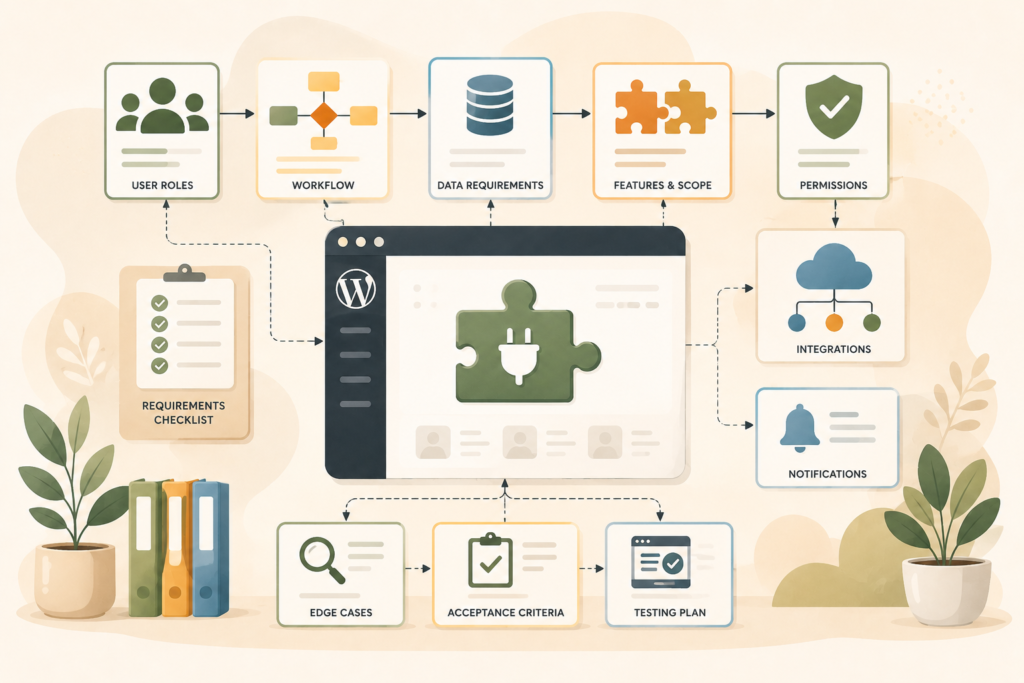
Discovery may include:
- Workflow mapping
- Technical review
- Plugin stack review
- User role planning
- Data mapping
- Integration checks
- Feature prioritisation
- Risk notes
- Version one scope
- Quote preparation
This is especially useful when several people in your team have different expectations.
A short discovery phase can prevent a long rebuild.
If your website also needs design, layout, or user journey improvements around the plugin, VVRapid’s Website Design & Development service can help make sure the front-end experience supports the custom functionality.
How VVRapid Can Help
VVRapid helps small businesses turn plugin ideas into clear, buildable requirements.
That can include shaping the custom plugin scope, mapping user roles, defining plugin functionality, planning integrations, writing acceptance criteria, and recommending a sensible first version.
The goal is not to build the biggest plugin possible. It is to build the right plugin for the workflow, the team, and the website.
For hands-on support, view VVRapid’s Custom Plugin Development service or contact the team for a practical custom plugin quote.
FAQ: Custom WordPress Plugin Requirements
What are custom WordPress plugin requirements?
Custom WordPress plugin requirements are the details that define what a plugin must do, who will use it, what data it needs, which systems it connects to, and how the finished plugin will be tested.
Do I need technical knowledge to define plugin requirements?
No. You can start by explaining the business workflow, user roles, desired outcome, and current problem. A developer can help translate that into a technical plan.
What should I prepare before asking for a custom plugin quote?
Prepare a plugin requirements checklist, including the workflow, must-have features, user roles, data needs, integrations, examples, WordPress setup, and acceptance criteria.
How detailed should the custom plugin scope be?
It should be detailed enough to separate must-have functionality from future ideas. The clearer the custom plugin scope, the easier it is to estimate cost, timeline, and testing.
Can requirements change during the plugin development process?
Yes, but changes can affect timeline and budget. That is why clear requirements, phased development, and acceptance criteria are useful before coding starts.