
Website maintenance cost is one of those business expenses that feels simple until something breaks. A small website might only need light monthly care, while a busy lead-generation site, ecommerce store, or custom WordPress build needs more protection, testing, and support.
Table of Contents
The tricky part is that website maintenance pricing is not only about “updates”. It is about keeping your website secure, usable, fast, backed up, and ready to support enquiries or sales. Think of it less like buying a task and more like protecting a business asset.
For small businesses, the right question is not “What is the cheapest option?” It is “What level of website upkeep matches how much we rely on this site?”
This guide explains what small businesses actually pay for, what affects WordPress maintenance cost, and how to compare monthly website care without getting stuck on price alone.
Website Maintenance Cost: What Is Usually Included?
Website maintenance cost usually covers the regular work needed to keep a website stable, secure, and useful. The exact scope changes by provider, platform, and business needs, but most professional maintenance includes some mix of updates, backups, monitoring, security checks, small fixes, and support.

For a WordPress site, that often means:
- WordPress core updates
- Theme and plugin updates
- Website backups
- Security monitoring
- Malware scans
- Uptime monitoring
- Performance checks
- Form testing
- Small content edits
- Technical support
- Reporting
WordPress itself recommends regular backups, especially before upgrades or major changes.: WordPress Backups Handbook ↗ That is one reason business website maintenance is not just a once-a-month admin task. Good maintenance reduces the chance of small technical issues becoming expensive interruptions.
VVRapid’s Website Maintenance & Care service covers ongoing support for keeping business websites updated, monitored, backed up, and performing reliably.
Why Website Maintenance Pricing Varies So Much
Two businesses can both say they need website maintenance, but they may need completely different levels of care.
A five-page brochure website with occasional enquiries is not the same as a WooCommerce store, a membership site, or a lead-generation website with paid traffic running into landing pages. The more your website affects revenue, customer trust, bookings, or operations, the more important reliable maintenance becomes.
Website maintenance cost is usually shaped by:
- Website size
- Platform complexity
- Number of plugins
- Hosting quality
- Backup frequency
- Security risk
- Ecommerce functionality
- Content update volume
- Speed and performance requirements
- Support response expectations
- Whether staging is needed before updates
Industry guides often show wide pricing ranges because maintenance can mean anything from basic self-managed updates to professional monthly support. Recent public pricing guides suggest small business website maintenance can range from low-cost DIY tools to hundreds of dollars per month for professional support, with higher costs for ecommerce or complex websites.
Pricing varies by scope and region, so treat any general range as illustrative. A South African business, UK consultancy, UAE ecommerce store, or Australian service company may all have different costs based on labour rates, platform complexity, and support needs.
What You Are Really Paying For
At first glance, website support cost can feel like paying someone to click update buttons. That is not the full picture.
A proper maintenance provider is usually being paid for judgement, prevention, testing, and recovery. Those are the parts you notice only when they are missing.
1. Updates That Do Not Break the Site
Updates matter because WordPress, themes, and plugins change often. They can fix bugs, close security gaps, improve compatibility, and add features.
But updates can also cause problems if they are applied carelessly.
That is why monthly website care should include a safe update process. For more complex websites, this can involve checking backups first, testing key pages, reviewing plugins, and using a staging environment before changes go live.
A low WordPress maintenance cost may look attractive, but ask what happens if an update breaks your checkout, quote form, booking form, or homepage layout.
2. Backups You Can Actually Restore
Backups are only useful if they are current, complete, and restorable.
A business website maintenance plan should make clear:
- How often backups run
- Where backups are stored
- How long backups are kept
- Whether files and database are included
- How restoration is handled
- Whether backups happen before updates
CISA includes backups as part of stronger cybersecurity practices for small and medium-sized businesses.: CISA Small and Medium Business Resources ↗
For a simple site, monthly backups may be enough. For an ecommerce or active lead-generation site, daily backups may be more sensible because data changes more often.
3. Security Monitoring and Malware Checks
Website maintenance cost should be considered alongside risk. If your site is hacked, the cost is rarely just the cleanup fee.
You may lose leads, damage trust, trigger browser warnings, expose customer data, or spend time rebuilding content. Security maintenance helps reduce avoidable risks through updates, monitoring, strong access control, malware scans, and basic hardening.
Cloudflare explains that HTTPS encrypts data between a browser and a website, which helps protect information in transit.: Cloudflare HTTPS Guide ↗ HTTPS is only one part of security, but it shows why website upkeep is not optional for business websites that collect enquiries, bookings, payments, or account details.
4. Uptime and Performance Monitoring
A website can look fine when you check it, but still go down while you are in meetings, travelling, or asleep.
Uptime monitoring helps catch outages earlier. Performance checks help identify speed problems before they frustrate visitors or hurt conversions.
Google’s SEO Starter Guide explains that SEO is about helping search engines understand your content and helping users decide whether to visit your site.: Google SEO Starter Guide ↗ A slow, broken, or unreliable site makes that harder.
Website maintenance cost should therefore include some attention to performance, not only software updates.
For businesses that need stronger hosting performance, VVRapid’s LiteSpeed WebServer Hosting can support a faster, more stable website foundation.
5. Small Fixes Before They Become Bigger Projects
Many website problems start small.
A form stops sending. A plugin warning appears. A page layout shifts. A phone number is outdated. A tracking script stops working. A broken image makes a service page look neglected.
Good monthly website care catches these issues early. That does not mean unlimited redesign work is included. It means the maintenance scope should define how small fixes, minor content updates, and support requests are handled.
This is where website support cost becomes practical. You are paying for continuity.
DIY Maintenance vs Professional Website Maintenance
Some small businesses can handle basic maintenance internally. Others should not.
DIY maintenance may work when the website is simple, low-risk, and not central to sales. It can also work if someone on the team understands WordPress, backups, plugins, hosting, and troubleshooting.
Professional maintenance makes more sense when:
- Your website generates regular leads or sales
- You run paid ads to the site
- You use ecommerce, booking, membership, or custom features
- You do not have technical time in-house
- You need faster support when something breaks
- You want reports and accountability
- You have had update issues before
The lower website maintenance cost of DIY can disappear quickly if one broken update takes your site offline during a busy campaign.
For many small businesses, the best option is not the cheapest or the most expensive plan. It is the plan that matches the business risk.
What Drives WordPress Maintenance Cost Up?
WordPress maintenance cost tends to increase when the website has more moving parts.
A small brochure site may only need routine updates, backups, and light checks. A larger WordPress site may need plugin compatibility reviews, staging, advanced security, database optimisation, performance work, and more frequent backups.
Common cost drivers include:
Ecommerce
Online stores need more careful maintenance because orders, payment gateways, stock, shipping, and customer accounts are involved. A failed update can affect revenue directly.
Too Many Plugins
Plugins add features, but they also add maintenance responsibility. Outdated, abandoned, duplicated, or poorly coded plugins can increase risk and support time.
Custom Development
Custom themes, plugins, integrations, or API connections often need more technical review. For websites with custom functionality, VVRapid’s Custom Plugin Development service may be relevant when maintenance reveals that an existing plugin setup is no longer the best fit.
High Traffic or Paid Campaigns
If your site receives steady traffic from SEO, paid ads, email campaigns, or social media, downtime becomes more expensive. A higher website maintenance cost may be justified if the site supports active revenue generation.
Poor Hosting
Cheap hosting can create hidden costs. Slow servers, limited backups, weak support, and security issues can make maintenance harder.
Frequent Content Changes
A site that needs weekly service updates, landing page edits, team changes, portfolio updates, or blog publishing support may need a broader support plan.
How to Compare Website Maintenance Plans
When comparing website maintenance pricing, do not only ask, “How much per month?”
Ask what is included, what is excluded, and what happens when something goes wrong.
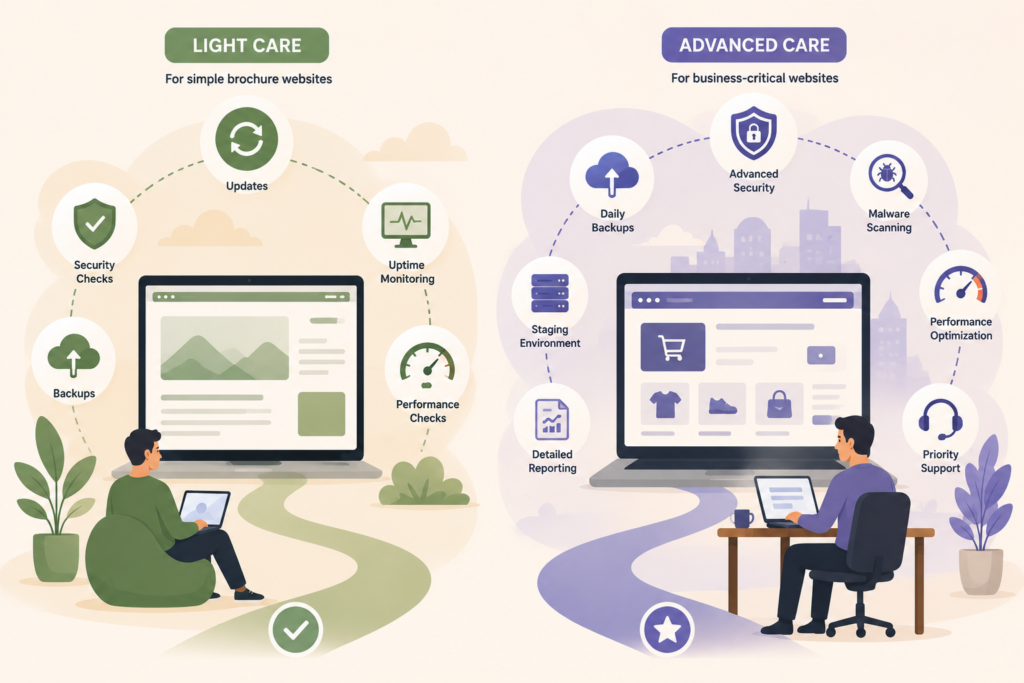
Use these questions:
- Are backups included?
- How often do backups run?
- Are updates tested?
- Is staging included?
- Are malware scans included?
- Is uptime monitoring included?
- Are performance checks included?
- Are small content edits included?
- What counts as a support request?
- What is the response time?
- Are reports provided?
- What happens after hours?
- Are ecommerce sites covered?
- Are hosting issues included?
- Is emergency recovery billed separately?
A lower monthly fee may only cover updates. That can be fine for a simple site, but it may not be enough for a business that depends on website enquiries.
Checklist: What Small Businesses Should Budget For
Use this checklist before choosing a maintenance plan or setting a website maintenance cost budget.
- □ Domain renewal
- □ Hosting
- □ SSL or HTTPS setup
- □ WordPress core updates
- □ Theme updates
- □ Plugin updates
- □ Website backups
- □ Backup restoration support
- □ Security monitoring
- □ Malware scanning
- □ Uptime monitoring
- □ Form testing
- □ Speed checks
- □ Basic technical support
- □ Small content updates
- □ Staging for higher-risk updates
- □ Ecommerce testing, if relevant
- □ Reporting
- □ Emergency support terms
This checklist helps you compare like with like. A cheap plan may look better until you realise backups, security, restoration, and support are billed separately.
Common Mistakes When Budgeting for Website Maintenance
Mistake 1: Treating Maintenance as Optional
A website is not static. Software changes, browsers update, plugins age, security threats evolve, and business information becomes outdated.
Website upkeep protects credibility.
Mistake 2: Choosing Only on Price
The cheapest website maintenance cost is not always the best value. A plan that saves money but excludes backups, testing, or support may cost more later.
Mistake 3: Assuming Hosting Includes Everything
Hosting and maintenance are related, but they are not the same. Hosting keeps your site online. Maintenance keeps the website itself updated, monitored, and working properly.
Mistake 4: Forgetting About Recovery
Backups are not the same as recovery. Ask who restores the site, how quickly it can happen, and whether restoration is included.
Mistake 5: Ignoring Plugin Risk
Plugins need review. More plugins can mean more compatibility issues, more updates, and more potential vulnerabilities.
Mistake 6: Not Matching the Plan to the Website
A basic maintenance plan may suit a simple information site. It may not suit an ecommerce store, active campaign site, or custom WordPress build.
How Much Should a Small Business Spend?
There is no universal answer.
A small business should spend enough to protect the role the website plays in the business. If your site is mainly a credibility brochure, basic care may be enough. If it brings in leads, sales, bookings, or customer requests, a stronger plan is usually more sensible.
Think about the cost of downtime:
- How many enquiries could you miss in a day?
- Would broken forms affect paid campaigns?
- Would a hacked site damage trust?
- Would lost content take hours to rebuild?
- Would slow pages affect conversions?
This is the practical way to assess website maintenance cost. Compare the monthly fee with the risk and inconvenience of not maintaining the site properly.
When a Maintenance Plan Is Worth It
A maintenance plan is worth considering when you want predictable support instead of reactive fixes.
It can help small businesses:
- Reduce emergency repair costs
- Keep plugins and themes updated
- Improve website reliability
- Protect customer trust
- Catch issues earlier
- Maintain speed and usability
- Free up internal time
- Keep reporting and accountability in one place
Monthly website care is especially useful for business owners who do not want to log into WordPress, read update notes, test plugins, check backups, and troubleshoot hosting issues themselves.
How VVRapid Can Help
VVRapid helps small businesses keep their websites maintained, monitored, backed up, and supported through practical Website Maintenance & Care plans.
The aim is not to overcomplicate maintenance. It is to keep your site stable, secure, and ready for the people who use it.
If your website also needs design improvements, hosting, SEO, or broader digital planning, VVRapid can connect maintenance with the rest of your digital setup.
Start with the maintenance level that matches your website’s role in the business, then adjust as your site grows.
View the Website Maintenance & Care service page to compare what ongoing support could look like for your business: https://vvrapid.com/website-maintenance-care/
FAQ
What is website maintenance cost?
Website maintenance cost is the recurring amount a business pays to keep its website updated, secure, backed up, monitored, and supported. It can include updates, backups, security checks, uptime monitoring, performance reviews, and small fixes.
Why does website maintenance pricing vary?
Website maintenance pricing varies because websites differ in size, risk, platform, traffic, functionality, hosting, update complexity, and support needs. Ecommerce and custom WordPress sites usually need more care than simple brochure websites.
Is WordPress maintenance cost worth it for small businesses?
WordPress maintenance cost is usually worth it if your website supports leads, sales, bookings, or credibility. Regular maintenance helps reduce avoidable downtime, broken features, security issues, and emergency repair costs.
Can I maintain my website myself?
Yes, some small business owners can handle basic website upkeep themselves. But DIY maintenance requires time, technical confidence, reliable backups, safe updates, and troubleshooting skills.
What should monthly website care include?
Monthly website care should usually include updates, backups, uptime checks, security monitoring, malware scans, performance checks, small fixes, and clear support terms. The exact scope should match how important the website is to your business.
How do I reduce website support cost without taking risks?
Keep your website lean, remove unused plugins, use reliable hosting, avoid unnecessary custom features, keep access controlled, and choose a maintenance plan that matches your actual needs.