
A website scoping checklist helps you define what your website must do before you ask agencies or developers for pricing. It gives potential suppliers a clearer brief, reduces assumptions and makes website proposals easier to compare.
Table of Contents
Without a defined website project scope, quotes may be based on different interpretations of the same request. One provider may include content migration, booking integration and training. Another may price only the design and build.
That difference can make a cheaper quote look more attractive even when it excludes important work.
What is a website scoping checklist?
A website scoping checklist is a practical document that records the pages, features, integrations, content, user roles and technical requirements involved in a website project.
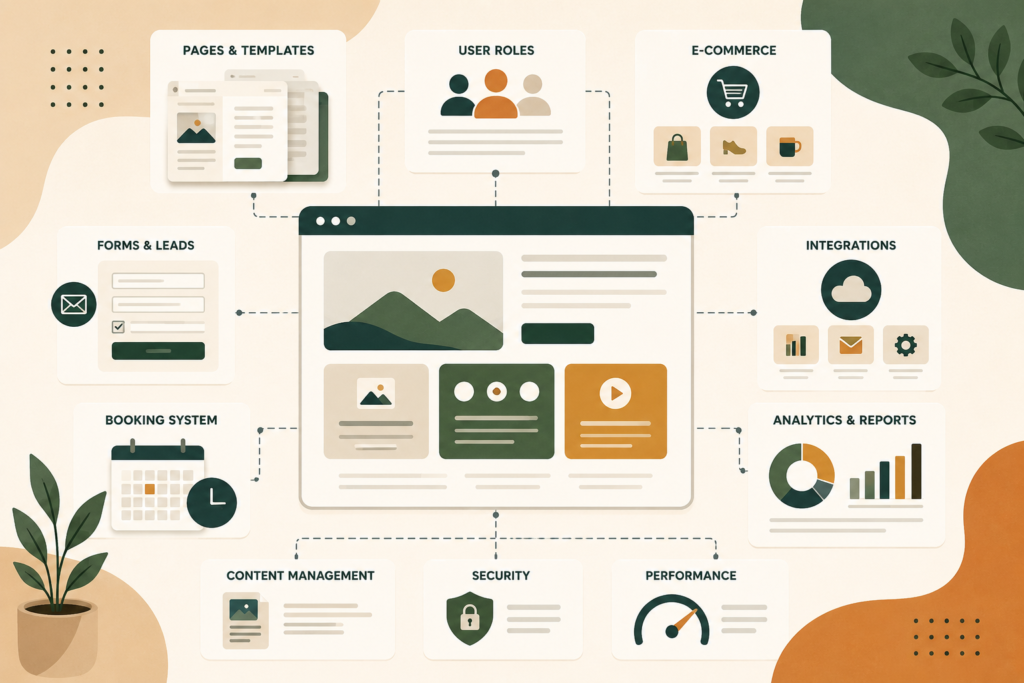
It should help answer questions such as:
- What should the website achieve?
- Who will use it?
- Which pages are required?
- What actions should visitors complete?
- Which systems must connect to the website?
- Who will manage content after launch?
- Is existing content being migrated?
- Are payments, bookings or user accounts required?
- What needs to happen before the site can go live?
A good scope does not need to describe every design detail.
It should describe the business requirements clearly enough for a website provider to estimate the work, identify risks and explain what is included.
For an overview of strategy, UX, design and development support, review VVRapid’s Website Design & Development service.
Start with business goals, not features
Many website requests begin with features.
A business may ask for a booking system, live chat, a customer portal or an online shop without first defining the problem the feature is meant to solve.
Start with the business outcome.
Examples include:
- Generate more qualified enquiries
- Reduce repetitive customer questions
- Sell products online
- Allow clients to book appointments
- Present services more clearly
- Support a new market or region
- Replace manual admin tasks
- Provide customers with secure account access
- Improve trust and credibility
- Make content easier to update internally
Once the goal is clear, you can evaluate whether a feature is necessary.
Think: outcome first, feature second.
A live chat tool may support faster enquiries, but it also needs staffing. A customer portal may reduce email admin, but it introduces user accounts, permissions, password recovery and data security requirements.
Your website requirements checklist should connect every major feature to a practical business need.
Define the website’s users
A website may serve more than one type of visitor.
Common user groups include:
- Prospective customers
- Existing customers
- Staff members
- Partners
- Suppliers
- Job applicants
- Members
- Students
- Donors
- Administrators
Each group may need different information or functionality.
For example, prospective customers may need service information and a quote form. Existing customers may need a login area. Staff members may need permission to update pages or process orders.
Record the main user groups and what each group needs to do.
This is part of effective user journey planning. It also helps prevent features from being added without a clear audience.
List required pages and page templates
Your website project scope should distinguish between individual pages and reusable page templates.
A page is a specific destination, such as:
- Home
- About
- Contact
- Pricing
- Privacy policy
A template is a reusable layout used across several pages.
Examples include:
- Service page template
- Product page template
- Blog article template
- Team member template
- Case study template
- Location page template
- Course page template
- Event page template
This distinction matters because ten pages built from two templates may require less design work than ten unique layouts.
Your website scoping checklist should record:
- Number of expected pages
- Number of unique templates
- Which pages need custom layouts
- Which sections should be reusable
- Whether new pages will be added regularly
- Who will create the page content
- Whether multilingual versions are required
Do not assume that “a ten-page website” describes the full scope.
Two websites with the same number of pages can have very different design and development requirements.
Define core website functionality
Functionality describes what the website must do.
This is where a website requirements checklist becomes especially useful.
Lead generation features
These may include:
- Contact forms
- Quote request forms
- Multi-step forms
- File uploads
- Appointment requests
- Click-to-call buttons
- WhatsApp links
- Newsletter sign-ups
- CRM integration
- Automated email responses
Record what information each form should collect, where submissions should go and whether they need to trigger any follow-up process.
Booking functionality
A booking website may need:
- Calendar availability
- Time-slot selection
- Staff selection
- Service selection
- Deposits or full payment
- Cancellation rules
- Automated reminders
- Customer confirmation emails
- Calendar synchronisation
- Booking limits
“Add booking functionality” is too broad for accurate website scoping.
A simple enquiry form is very different from a real-time booking system with staff calendars, payments and automated notifications.
Ecommerce functionality
An ecommerce website requirements section should cover:
- Number and type of products
- Physical, digital or subscription products
- Product variations
- Stock management
- Shipping zones
- Collection options
- Tax handling
- Discount codes
- Payment gateways
- Refund processes
- Customer accounts
- Order emails
- Product filtering
- Search functionality
- Integration with accounting or inventory systems
If the store sells across regions, include currency, language, tax and delivery considerations.
Pricing and legal requirements vary by scope and region, so clarify these with the relevant technical and professional advisers.
Membership and gated content
Membership functionality may include:
- Registration
- Login
- Password reset
- Profile management
- Subscription levels
- Restricted content
- Course access
- Downloads
- Renewal reminders
- Payment integration
- Administrator approval
A member area introduces more complexity than a standard content website.
Record what each user type can see, edit or download.
Identify website integrations
Website integrations connect the site to another platform or system.
Common website integrations include:
- CRM platforms
- Email marketing tools
- Booking systems
- Payment gateways
- Accounting software
- Inventory systems
- Customer support tools
- Learning platforms
- Social media feeds
- Analytics platforms
- Mapping services
- Recruitment systems
- Marketing automation tools
- Property listing feeds
- Shipping providers
For each integration, document:
- Name of the system
- Purpose of the integration
- Information being sent or received
- Whether the connection already exists
- Whether API access is available
- Who owns the account
- Any subscription costs
- Whether custom development may be needed
Some platforms offer ready-made plugins. Others require custom API work.
Where standard plugins cannot meet the requirement, VVRapid’s Custom Plugin Development service may be relevant.
Do not assume that every system can connect easily. Ask providers to identify integration risks before quoting.
Define user roles and permissions
Website permissions determine what different users can do.
A small brochure website may need only one administrator. A larger website may require several roles.
Examples include:
- Administrator
- Content editor
- Shop manager
- Customer support agent
- Member
- Subscriber
- Instructor
- Student
- Partner
- Customer
Your website scoping checklist should explain:
- Who can add or edit pages
- Who can publish content
- Who can manage orders
- Who can view customer data
- Who can approve new users
- Who can export reports
- Who can change settings
- Who receives form submissions
Permissions should follow the principle of least access. Users should have only the access required for their role.
This reduces accidental changes and limits unnecessary exposure of sensitive information.
Clarify content creation and migration
Content is often one of the largest hidden parts of a website project.
Your website quote checklist should state who is responsible for:
- Copywriting
- Editing
- Proofreading
- Photography
- Video
- Product descriptions
- Service descriptions
- Team biographies
- Legal pages
- Downloadable documents
- Image selection
- Image optimisation
- Metadata
- Content entry
If an old site already exists, define the migration scope.
Ask:
- How many pages need to be moved?
- How many blog posts are being retained?
- Are product records being imported?
- Are customer accounts being migrated?
- Are old URLs being redirected?
- Are images being reused?
- Is outdated content being removed?
- Does the content need reformatting?
- Are files stored in downloadable libraries?
Content migration is not always a simple copy-and-paste task.
Old page builders, inconsistent formatting, broken media and duplicated content can increase the effort required.
VVRapid’s Socials, Blog & Article Writing Services can support website copy and ongoing content development.
Record SEO and URL requirements
A new website can affect existing search visibility.
Your website development planning should include:
- Existing high-performing pages
- Current URL structure
- Redirect requirements
- Metadata migration
- Indexing controls
- XML sitemap setup
- Search Console access
- Analytics access
- Structured data requirements
- Image optimisation
- Internal linking
- Regional or multilingual SEO
- Local business information
A redesign should not change URLs casually.
If an old page is removed or moved, a redirect may be needed to guide users and search engines to the most relevant replacement.
VVRapid’s Search Engine Optimisation service can support website structure, migration planning and search visibility.
Include performance, hosting and security needs
Website requirements are not limited to visible features.
Your scope should also cover the environment in which the site will run.
Record requirements for:
- Hosting
- Backups
- Security monitoring
- SSL certificates
- Caching
- Image optimisation
- Content delivery networks
- Staging environments
- Uptime monitoring
- Email delivery
- Traffic expectations
- Storage
- Video hosting
- Data retention
- Software updates
A site with a few service pages has different hosting needs from a busy online store, membership platform or media library.
If performance is important, define how it will be assessed. Avoid vague statements such as “the site must be fast.”
Ask what testing will be completed, which pages will be tested and what factors may affect results.
VVRapid’s LiteSpeed WebServer Hosting service is available for projects requiring managed hosting and performance-focused infrastructure.
Define accessibility and compliance requirements
Accessibility should be included in the scope before design and development begin.
Possible requirements include:
- Keyboard-friendly navigation
- Logical heading structure
- Sufficient colour contrast
- Visible focus indicators
- Form labels
- Helpful error messages
- Image alt text
- Video captions
- Responsive zoom behaviour
- Accessible menus and pop-ups
You should also identify legal and policy requirements that may apply.
These could involve:
- Privacy notices
- Cookie consent
- Terms and conditions
- Ecommerce policies
- Data protection
- Accessibility obligations
- Sector-specific disclosures
Website providers can implement supplied requirements, but they should not be expected to invent legal wording unless legal drafting is explicitly included.
Seek qualified legal advice where required.
Set boundaries around design and revisions
Design scope can become unclear when revision expectations are not recorded.
Define:
- Number of initial design concepts
- Which pages receive custom designs
- Number of revision rounds
- Who provides consolidated feedback
- How quickly feedback will be supplied
- What counts as a revision
- What counts as a new requirement
- When design approval occurs
A revision adjusts agreed work.
A new feature, new template or major change in direction is usually a scope change.
This distinction protects both the buyer and the provider.
Define testing, training and launch support
A complete website scope should explain what happens before and after launch.
Testing may include:
- Browser testing
- Mobile testing
- Form testing
- Payment testing
- Booking testing
- User account testing
- Keyboard testing
- Redirect testing
- Analytics verification
- Backup testing
- Performance checks
- Content review
Training may include:
- Editing pages
- Publishing articles
- Managing products
- Processing orders
- Updating menus
- Reviewing form entries
- Managing users
- Basic troubleshooting
Also clarify:
- Who approves launch
- Who changes DNS settings
- Whether email is affected
- Whether a staging site is provided
- Whether launch support is included
- How long the defect period lasts
- What happens after handover
Ongoing support is separate from the original build unless it is specifically included.
VVRapid’s Website Maintenance & Care service can support post-launch updates and technical upkeep.
Website scoping checklist
Use this website requirements checklist before requesting a website quote:
Business and audience
- □ Primary business goal defined
- □ Main conversion action identified
- □ User groups listed
- □ Key customer journeys described
- □ Regions and languages confirmed
Pages and content
- □ Required pages listed
- □ Reusable templates identified
- □ Unique layouts identified
- □ Content owner confirmed
- □ Copywriting responsibility confirmed
- □ Image and video responsibility confirmed
- □ Migration volume estimated
- □ Redirect requirements recorded
Functionality
- □ Forms defined
- □ Booking requirements documented
- □ Ecommerce requirements documented
- □ Search and filtering requirements recorded
- □ User accounts defined
- □ Membership features defined
- □ Downloads or gated content listed
- □ Reporting needs identified
Integrations
- □ Third-party systems listed
- □ API or plugin availability checked
- □ Account ownership confirmed
- □ Data flow described
- □ Subscription costs identified
- □ Custom development risks noted
Technical requirements
- □ Hosting responsibilities confirmed
- □ Security requirements listed
- □ Backup requirements listed
- □ Performance expectations defined
- □ Analytics requirements documented
- □ SEO migration needs recorded
- □ Accessibility expectations included
Project process
- □ Design deliverables defined
- □ Revision rounds agreed
- □ Feedback responsibility assigned
- □ Testing responsibilities confirmed
- □ Training requirements listed
- □ Launch responsibilities confirmed
- □ Post-launch support defined
- □ Exclusions recorded
Common website scoping mistakes
Asking for a quote with only a page count
Page count does not explain functionality, templates, integrations, content or migration.
Provide enough detail for suppliers to estimate the real work.
Mixing essential and optional features
A long feature list can inflate the quote and make priorities unclear.
Separate requirements into:
- Essential for launch
- Useful if budget allows
- Possible future phase
This helps providers recommend a practical first release.
Assuming all integrations are simple
A familiar brand name does not guarantee an easy connection.
Confirm whether the integration uses an existing plugin, a supported API or custom development.
Forgetting content migration
Old pages, blog posts, files, products and redirects can add substantial work.
Include them in the scope from the beginning.
Ignoring internal responsibilities
A project may stall because nobody is responsible for copy, images, feedback or final approval.
Assign owners and deadlines before work begins.
Comparing quotes only by price
Two proposals may appear similar while covering different deliverables.
Compare inclusions, exclusions, assumptions, support, licensing, training and ownership.
Leaving post-launch support undefined
Ask what happens after launch.
Clarify defect fixes, updates, backups, security, content changes and support response expectations.
How to compare website proposals fairly
Once you receive quotes, create a comparison table.

Review each proposal against the same categories:
- Strategy and planning
- UX and information architecture
- Number of templates
- Custom design work
- Development features
- Integrations
- Content support
- Migration
- SEO setup
- Accessibility
- Hosting
- Testing
- Training
- Launch support
- Maintenance
- Licensing
- Exclusions
- Timeline
- Payment schedule
Pay attention to assumptions.
A proposal may state that all content will be supplied in final form, integrations are subject to third-party compatibility or migration is limited to a certain number of pages.
These details often matter more than the headline price.
FAQ about website scoping
How detailed should a website scope be?
It should be detailed enough for a provider to understand the users, pages, features, integrations, content responsibilities and technical requirements. It does not need to prescribe every visual detail.
Should I choose the platform before requesting a quote?
Not always. Define the business requirements first. A suitable provider can then recommend a platform based on the required functionality, budget, content management needs and future plans.
What is the difference between a website brief and a website scope?
A brief explains the business, audience, goals and overall project context. A scope defines the specific work, deliverables, features, responsibilities and boundaries.
Can the website scope change during the project?
Yes, but changes may affect price and timing. A clear change-control process helps both parties understand the impact before additional work begins.
Should optional features be included in the quote request?
Yes. Mark them as optional so providers can price them separately. This helps you compare the core project with possible additions.
Who should prepare the website scoping checklist?
The business owner, internal project lead or consultant can prepare the first version. The selected website provider should then review it, ask questions and turn it into a confirmed project scope.
How VVRapid can help
VVRapid can help turn business goals into a practical website project scope. This may include page planning, user journeys, functionality requirements, integrations, content needs and technical considerations. The aim is to define what is essential for launch and what can be phased later. Clear scoping also makes proposals, timelines and responsibilities easier to understand. Where custom functionality is required, VVRapid can assess whether a standard plugin, integration or custom build is appropriate.
A strong website scoping checklist does not remove every unknown. It gives both sides a clearer starting point and reduces avoidable surprises.
View VVRapid’s Website Design & Development service to discuss planning, scoping and delivery for a new website.
External sources used in this article (helpful resources)
- Source: Google Search Central Site Moves Guide ↗
- Source: W3C WCAG Overview ↗
- Source: OWASP Web Security Testing Guide ↗