A website hosting upgrade is not always the first thing business owners think about when a website starts feeling slow, unreliable, or awkward to manage. Most people blame the theme, the plugins, the page builder, or the internet connection before they look at the hosting.
Table of Contents
But hosting is the foundation. If the foundation is weak, every other improvement has a ceiling. Better images, cleaner design, good SEO, and stronger content all depend on a server that can deliver your website quickly and consistently.
This guide explains when a website hosting upgrade makes sense, what problems cheap shared hosting can create, and how to prepare for a smooth move to faster business website hosting.
Think: not “buy the biggest plan.”
Think: “choose hosting that matches the job your website now has to do.”
Website Hosting Upgrade Signs Small Businesses Should Not Ignore
A website hosting upgrade becomes worth considering when your website is no longer just an online brochure. Maybe it now brings in leads, supports paid ads, publishes regular content, handles online bookings, or sells products.
That shift matters.
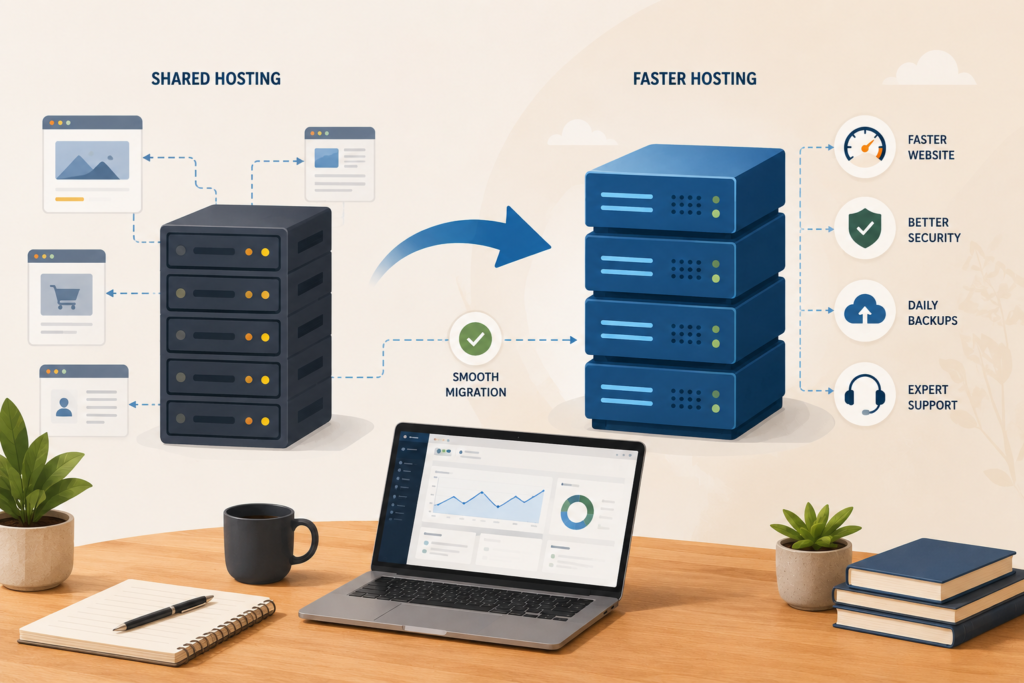
A small website with five pages and low traffic can often survive on basic shared hosting. A growing business website usually needs more. More speed. More stability. Better backups. Better support. Better security. A more suitable hosting environment.
Here are common signs your current hosting may be holding you back.
Your website feels slow even after basic optimisation
If you have compressed images, removed obvious plugin bloat, updated WordPress, and added caching, but your pages still feel heavy, slow website hosting may be part of the problem.
Website speed is affected by many factors, including code, images, scripts, database performance, caching, and the hosting environment. Google’s Core Web Vitals focus on real-world user experience signals such as loading performance, responsiveness, and visual stability.: Google Search Central Core Web Vitals ↗
Hosting will not magically fix every performance issue. But poor hosting can limit everything else.
Your site slows down during busy periods
A strong clue is inconsistency.
Your website may load acceptably at quiet times, then become sluggish during traffic spikes, campaigns, month-end searches, or seasonal demand. For South African businesses, this can also happen when local audiences browse during lunch breaks, after work, or during promotion-heavy periods such as Black Friday.
A website hosting upgrade can help when your current server struggles with traffic peaks or resource sharing.
You are getting downtime or random errors
Occasional maintenance is normal. Frequent downtime is not.
If customers mention that your site was unavailable, forms failed, checkout pages timed out, or pages returned server errors, your hosting provider should be part of the investigation. Downtime can damage trust quickly, especially if your website supports bookings, quotes, ecommerce, or lead generation.
For a business website, reliability is not a luxury feature.
Your WordPress admin area is painfully slow
Slow front-end pages are bad. A slow WordPress dashboard is also a warning sign.
If it takes too long to edit pages, upload media, process WooCommerce orders, or update content, your hosting may be underpowered for the workload. This is especially common when a site has grown over time with more plugins, more images, more orders, more content, and more database activity.
A WordPress hosting upgrade is often about the admin experience too, not only public page speed.
Your support experience is poor
Cheap hosting can become expensive when support is slow, vague, or purely script-based.
When your website is down, infected, misconfigured, or failing after an update, you need clear help. If your current provider cannot explain what happened or what to do next, a website hosting upgrade may reduce future stress.
Support quality matters because most small business owners do not want to become server administrators.
Why Cheap Shared Hosting Starts Well but Becomes a Bottleneck
Cheap shared hosting has its place. It helps many new websites get online quickly.
The problem is not that shared hosting is always bad. The problem is that it is often designed for basic usage, not growing business needs. On many shared environments, your website sits on the same server as many other websites. The server resources are divided across accounts.
That setup can work until your website needs more consistent resources.
A website hosting upgrade becomes more relevant when your website has:
- More traffic than before
- More plugins and integrations
- Larger media libraries
- Ecommerce functionality
- Booking systems or membership features
- Regular blog publishing
- Paid advertising traffic
- Heavier database queries
- More security and backup requirements
At that point, the cheapest plan may no longer be the best value.
A low monthly fee can look attractive, but it may cost you in lost enquiries, poor user experience, weaker conversion rates, and wasted time troubleshooting issues that come from the hosting layer.
What Better Business Website Hosting Should Include
A good website hosting upgrade is not only about more disk space. Disk space is rarely the full story.
For most small business websites, the better questions are:
- Does the server respond quickly?
- Is caching available and properly configured?
- Are backups included?
- Is SSL included?
- Is support practical and responsive?
- Can the hosting handle your CMS and plugins?
- Is the environment suitable for WordPress?
- Are security basics in place?
- Is hosting migration handled carefully?
For WordPress sites, the official WordPress requirements recommend a modern server stack, including current PHP and database support as a baseline for performance and security.: WordPress.org Requirements ↗
That does not mean every business needs enterprise hosting. It means your hosting should not be outdated, overloaded, or poorly maintained.
Why LiteSpeed Hosting Is Often a Smart Upgrade Path
For many WordPress and small business websites, LiteSpeed hosting is a practical middle ground between basic shared hosting and expensive custom infrastructure.
LiteSpeed Web Server is designed for performance and efficiency, and LiteSpeed Cache for WordPress provides server-level caching and optimisation features when used with a compatible LiteSpeed environment.: LiteSpeed Web Server ↗ & LiteSpeed Cache for WordPress ↗
A website hosting upgrade to LiteSpeed hosting can be useful when you want:
- Faster page delivery
- Better caching options
- Improved handling of WordPress workloads
- A smoother visitor experience
- More reliable performance during normal growth
- A hosting setup that supports SEO and conversion work
This is where VVRapid’s LiteSpeed WebServer Hosting can fit naturally. It supports faster load times, improved security, uptime focus, SSL, daily backups, and managed hosting support for business websites.
The key is to treat hosting as part of your website performance system, not a separate technical bill.
Website Hosting Upgrade Checklist Before You Move
Before making a website hosting upgrade, review your website properly. A careful move is better than a rushed one.
Use this checklist before you switch hosting providers.
- □ Check current website speed using more than one page, not only the homepage.
- □ Review Core Web Vitals in Google Search Console if data is available.
- □ Note recent downtime, errors, and support issues.
- □ Confirm your current PHP and database versions.
- □ Check your WordPress theme and plugin update status.
- □ Identify large images, unused plugins, and heavy scripts.
- □ Confirm whether email hosting is part of your current setup.
- □ Ask whether SSL is included on the new hosting.
- □ Confirm backup frequency and restore options.
- □ Ask how hosting migration will be handled.
- □ Check whether staging is available for safer testing.
- □ Confirm what support includes after migration.
- □ Plan the move outside peak business hours where possible.
- □ Test forms, checkout, search, login areas, and key landing pages after migration.
A website hosting upgrade should leave your website faster, safer, and easier to manage. It should not create confusion about email, DNS, SSL, or backups.
What to Ask a Hosting Provider Before Upgrading
Not all managed hosting is equal. The phrase sounds reassuring, but the details matter.
Before you commit, ask simple, practical questions.
What exactly is managed?
Managed hosting can mean server updates only. It can also include backups, SSL, migration help, basic troubleshooting, monitoring, and security support.
Clarify what is included before you move.
Will you help with hosting migration?
Hosting migration is one of the biggest stress points for small business owners. A good provider should explain what they need, what they will move, what may need testing, and what risks exist.
Ask whether the migration includes files, database, SSL, DNS guidance, and post-migration checks.
Are backups automatic?
Daily website backups are useful, but only if they can be restored. Ask how often backups run, how long they are stored, and how restore requests are handled.
Backups are not a replacement for website maintenance, but they are an important safety net.
Is the hosting suitable for WordPress?
If your site runs WordPress, the hosting should support modern WordPress requirements and common performance tools. WordPress Developer Resources notes that hosting environment, configuration, software versions, images, and file sizes can all affect performance.: WordPress Performance Optimization ↗
A website hosting upgrade should fit your actual website platform, not just offer generic space on a server.
What happens if the site grows again?
A business website hosting setup should have room to grow. Ask what happens if traffic increases, the site adds ecommerce, or you start running paid campaigns.
You do not need to overbuy now, but you should understand the next step.
Common Mistakes During a Website Hosting Upgrade
A website hosting upgrade can solve real problems, but only if handled properly. Here are the mistakes to avoid.
Choosing only by price
Price matters. Small businesses need sensible budgets.
But the cheapest option is rarely the best decision if your website is now a lead source, sales tool, or customer support channel. Pricing varies by scope and region, but value should include performance, support, security, and reliability.
Moving without cleaning up the website
A faster server can help, but it will not fix every issue inside the website.
If your site has oversized images, outdated plugins, unused scripts, or a bloated theme, upgrade hosting and clean up the website together. That combination usually produces a better result.
For deeper technical improvements, connect hosting with website maintenance and performance work.: Website Maintenance & Care
Forgetting about SEO impact
A hosting move can affect SEO if handled badly. Broken links, downtime, SSL problems, slow DNS changes, or missing redirects can create issues.
If organic traffic matters, your website hosting upgrade should include basic SEO checks before and after migration.: Search Engine Optimisation
Ignoring email and DNS
Many business owners only think about the website files. But hosting changes can involve DNS, domain records, email routing, SSL validation, and third-party tools.
Before moving, confirm where your email is hosted and who manages DNS records. This is especially important for small teams using Google Workspace, Microsoft 365, CRM tools, booking systems, or email marketing platforms.
Not testing after migration
Do not assume everything works because the homepage loads.
After a website hosting upgrade, test your contact forms, checkout flow, login pages, booking forms, image uploads, search function, analytics tracking, and important landing pages. Small issues are easier to fix immediately after migration.
How a Hosting Upgrade Supports SEO, Leads, and Conversions
Hosting is not a complete SEO strategy. It will not replace useful content, technical SEO, good page structure, or relevant backlinks.
But website speed and reliability support almost everything else.
A faster website can improve user experience. Stable hosting can reduce interruptions during campaigns. Better caching can help pages load more smoothly. Security basics can protect trust. Backups can reduce recovery time when something goes wrong.
A website hosting upgrade is especially useful when paired with:
- Technical SEO cleanup
- Image optimisation
- Better landing page structure
- Content improvements
- Website maintenance
- Conversion-focused design updates
- Analytics and tracking checks
For businesses planning a redesign, it is smart to review hosting before the new website goes live. A fast, modern website deserves a hosting environment that can support it.: Website Design & Development
When You Might Not Need a Website Hosting Upgrade Yet
Sometimes hosting is not the main issue.
You may not need a website hosting upgrade yet if your site is small, loads quickly, has no downtime, runs on modern server software, and is easy to manage. In that case, your next improvement might be better content, stronger calls to action, improved SEO, or a cleaner design.
You may also need website maintenance before hosting. For example, if the site is full of outdated plugins, broken layouts, oversized images, or unused tracking scripts, moving hosts may only move the same problems to a faster server.
The best approach is to diagnose before deciding.
Check the hosting, but also check the website itself.
A Simple Decision Framework
Use this simple framework to decide whether a website hosting upgrade should be a priority.

Upgrade soon if:
- Your site is slow despite basic optimisation.
- You have regular downtime or server errors.
- Your WordPress dashboard is slow.
- You are preparing for paid ads or a campaign.
- You run ecommerce, bookings, memberships, or lead forms.
- Support from your current provider is weak.
- Your hosting stack is outdated.
- You need better backups, SSL, or security basics.
Review first if:
- You have not optimised images.
- Your plugins are outdated or excessive.
- You recently changed themes.
- You have tracking scripts everywhere.
- You do not know whether the issue is hosting, design, or code.
Stay where you are for now if:
- Your site is fast and stable.
- Your hosting support is responsive.
- Backups and SSL are working.
- Your website has low traffic and simple functionality.
- You have no growth campaign planned.
A website hosting upgrade should be a business decision, not a panic reaction.
How VVRapid Can Help
VVRapid can review your current hosting setup, website speed, WordPress condition, and growth goals before recommending the next step.
If LiteSpeed hosting is the right fit, VVRapid can help with managed LiteSpeed WebServer Hosting, hosting migration, SSL, backups, and performance-focused setup. The goal is simple: a faster, more reliable website foundation without making you manage the technical details.
VVRapid can also connect hosting with SEO, website maintenance, and website design improvements where needed.
Start with the LiteSpeed WebServer Hosting service page or contact VVRapid for a practical hosting review.
FAQ: Website Hosting Upgrade
How do I know if I need a website hosting upgrade?
You may need a website hosting upgrade if your site is slow, unreliable, difficult to manage, or struggling during traffic spikes. It is also worth reviewing hosting before paid campaigns, ecommerce growth, or a major redesign.
Will better hosting automatically make my website fast?
Not always. Better hosting can improve server response and caching potential, but website speed also depends on images, code, plugins, scripts, database health, and design choices.
Is LiteSpeed hosting good for WordPress?
LiteSpeed hosting can be a strong fit for WordPress when combined with proper caching, updated software, and good website maintenance. LiteSpeed Cache for WordPress is built to work with compatible LiteSpeed environments.
Will a hosting migration affect my email?
It can, depending on how your domain, DNS, and email are configured. Before any hosting migration, confirm whether email is hosted with your website provider, Google Workspace, Microsoft 365, or another platform.
How often should business websites review hosting?
Review hosting at least once a year, and sooner if your website becomes slower, traffic grows, campaigns are planned, or your site adds ecommerce, bookings, memberships, or more complex functionality.
What should I do before switching hosting providers?
Back up the site, check DNS and email settings, confirm SSL, review plugin updates, test key pages, and plan post-migration checks. A careful website hosting upgrade reduces risk and avoids unnecessary downtime.
External sources used in this article (helpful resources)
- Source: Google Search Central Core Web Vitals ↗
- Source: WordPress.org Requirements ↗
- Source: LiteSpeed Web Server ↗
- Source: LiteSpeed Cache for WordPress ↗
- Source: WordPress Performance Optimization ↗