A WordPress custom admin dashboard plugin can give your team a clearer way to track the numbers, tasks, and exceptions that actually matter, instead of forcing everyone to dig through menus, export spreadsheets, or rely on mismatched tools. For agency leaders and operations managers, a WordPress custom admin dashboard plugin is not about adding more screens. It is about making reporting easier, faster, and more useful for the people who work inside WordPress every day.
Table of Contents
If your agency or ops team is managing multiple client sites, lead flows, publishing schedules, or internal reports, a WordPress custom admin dashboard plugin can turn WordPress into a more practical reporting layer. WordPress supports dashboard widgets, user roles, capabilities, and API-driven workflows, which makes a WordPress custom admin dashboard plugin a sensible solution when the default backend no longer fits how your team works. (developer.wordpress.org, wordpress.org)
For many agencies, including growing teams in South Africa, the issue is not whether data exists. The issue is that the data is scattered. One person checks form submissions. Another exports WooCommerce orders. Someone else opens analytics, then project notes, then a spreadsheet. That is manageable for a while. Then it becomes a drag on time, consistency, and decision-making.
A focused dashboard changes that. It puts the right reporting in one place, for the right people, at the right level of detail.
What a WordPress custom admin dashboard plugin actually does
A WordPress custom admin dashboard plugin reshapes the WordPress backend around your team’s real reporting needs. Instead of using a generic dashboard built for everyone, you create a reporting view built for your agency, your internal workflows, and your users.
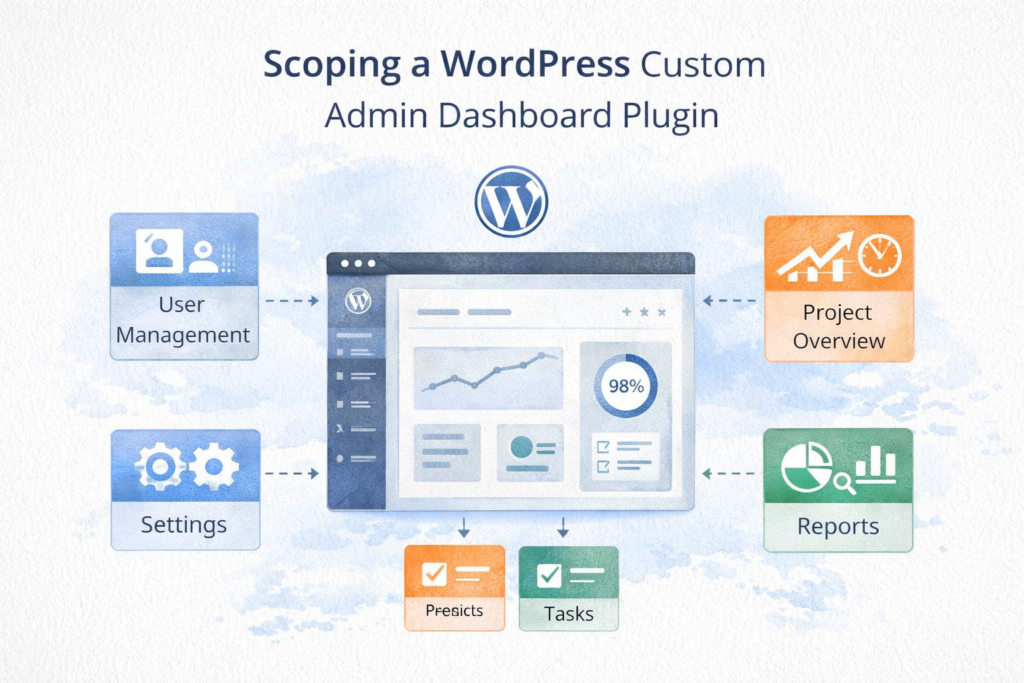
In practice, a WordPress custom admin dashboard plugin can show:
- lead volumes by source
- publishing status by client or team
- upcoming deadlines
- WooCommerce sales snapshots
- open maintenance issues
- exceptions that need attention
- team activity summaries
- approval queues
- quick actions for common tasks
A WordPress custom admin dashboard plugin is most useful when your team needs one reporting view that reflects how the business actually runs. Instead of adapting your process to generic tools, the WordPress custom admin dashboard plugin is shaped around your users, your metrics, and your reporting cadence.
Think: the goal is not to rebuild your whole business inside WordPress. The goal is to reduce friction around the information your team checks most often.
Why agencies and operations teams outgrow the default dashboard
The standard WordPress dashboard is broad by design. It gives a general overview, but that is rarely enough for an agency or operations environment.
Teams usually outgrow the default setup when:
- the same numbers are pulled manually every week
- key data lives in multiple plugins
- team members keep asking where to find the same reports
- different users need different reporting views
- managers cannot get a quick summary without opening several tools
- staff rely on spreadsheets because WordPress is not giving them what they need
That is usually the point where a WordPress custom admin dashboard plugin becomes easier to justify than another layer of disconnected plugins.
For agencies, this often shows up as reporting fatigue. An account manager wants a quick client summary. An ops manager wants to see delivery status. A technical lead wants visibility into exceptions or site health. A client-facing editor only needs a simple view of assigned items. When everyone sees the same cluttered admin area, nobody gets exactly what they need.
How to scope a WordPress custom admin dashboard plugin properly
A good WordPress custom admin dashboard plugin starts with scope, not design. Before you think about widgets, charts, or colours, you need to define what the dashboard is supposed to help people do.
The best WordPress custom admin dashboard plugin projects start with a narrow scope, clear users, and realistic reporting goals. A rushed WordPress custom admin dashboard plugin build often becomes bloated because the team tries to solve every reporting problem in version one.
Start with these five questions.
1. What decisions should the dashboard support?
This is the first filter.
Ask:
- What decisions do managers need to make from this dashboard?
- What reporting tasks take too long right now?
- What information do people ask for repeatedly?
- What is the one thing users should understand within 30 seconds of opening the screen?
Examples might include:
- Which client accounts need attention today?
- Which leads came in this week?
- Which content items are behind schedule?
- Which websites have unresolved maintenance issues?
- Which internal tasks are blocked?
If a widget does not support a real decision, it probably does not belong in version one.
2. Who will use the dashboard?
WordPress uses roles and capabilities to control what users can do and see. That makes role-based reporting a key part of scoping from the start. (wordpress.org)
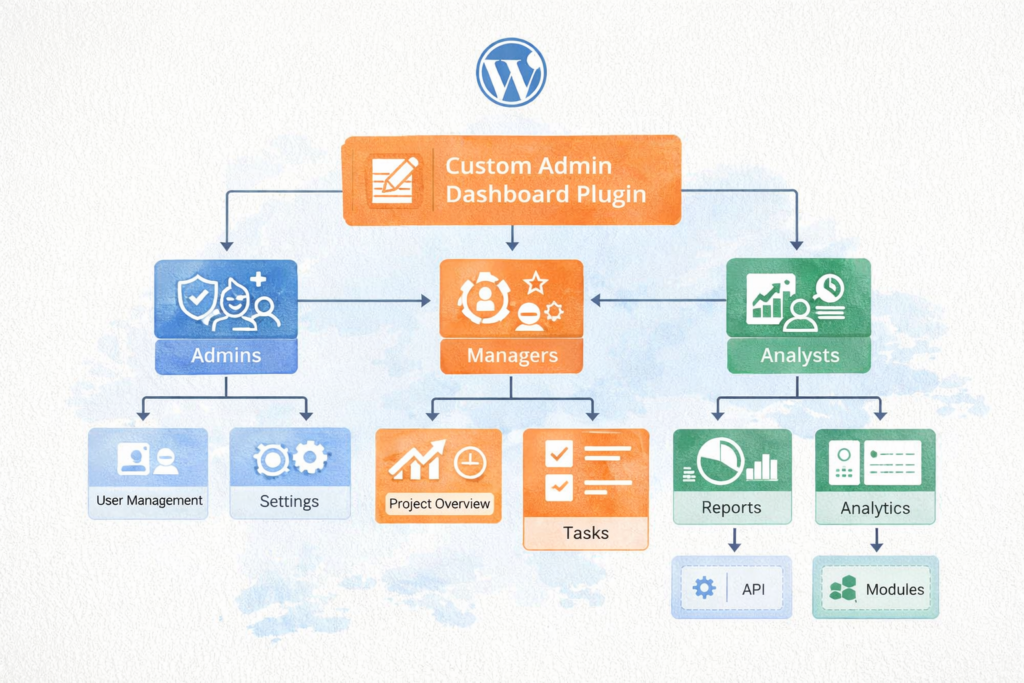
Map your users clearly:
- Operations manager: high-level status, exceptions, team output, approvals
- Account manager: client-specific summaries, lead volumes, project visibility
- Technical admin: diagnostics, sync logs, system alerts, configuration notices
- Editor or coordinator: assigned tasks, status changes, publishing queues
A WordPress custom admin dashboard plugin should reflect real responsibilities, not just generic admin access.
3. What data needs to be included?
List every source the dashboard may need.
For example:
- WordPress posts and custom post types
- WooCommerce data
- form submissions
- CRM records
- maintenance logs
- SEO metrics
- internal workflow statuses
- support notes
- external API data
This matters because the data model affects complexity. A simple dashboard pulling from WordPress itself is very different from a dashboard combining several plugins and external services.
4. Should users only view data, or take action too?
Some dashboards are read-only. Others need actions built in.
Examples of actions include:
- approve an item
- assign a task
- mark a step complete
- export a report
- trigger a sync
- flag an exception
- move an item to the next stage
This is an important scoping line. A dashboard that displays reporting is simpler than a WordPress custom admin dashboard plugin that also changes records, permissions, or workflow states.
5. How fresh does the data need to be?
Not everything needs live updates.
Some metrics can refresh daily. Others may need hourly updates. A few may need near real-time visibility.
A WordPress custom admin dashboard plugin performs better when freshness rules are scoped deliberately. Pulling everything live, all the time, often creates unnecessary load and complexity.
A practical plugin brief structure
You do not need a giant requirements document to scope well. You need a clear one.
Here is a simple structure that works.
Objective
One short paragraph explaining what the dashboard must help the team understand or do.
Users
List the user groups and what each group needs to see.
Data sources
List the plugins, tables, tools, and external systems involved.
Core widgets
Name the exact modules you want, such as:
- weekly lead summary
- content pipeline status
- client site alerts
- revenue snapshot
- unresolved issues list
- team activity panel
Actions
Clarify whether the dashboard is read-only or action-enabled.
Permissions
State who can view, edit, export, approve, or configure.
Refresh rules
Note what can be cached and what must be updated more often.
Success criteria
Define what success looks like.
For example:
- managers can review status in under five minutes
- weekly reporting prep takes less time
- staff stop relying on spreadsheet workarounds
- client-facing users see only what is relevant to them
Checklist: what to include before development starts
Use this checklist before requesting a quote or briefing your developer for a WordPress custom admin dashboard plugin.
- A clear statement of the reporting problem
- A list of user roles
- The key numbers or exceptions to display
- The data sources involved
- Any rough layout or screen ideas
- Which parts are essential for version one
- Which parts can wait for later phases
- Whether the dashboard is read-only or action-enabled
- Any export requirements
- Any permission or security rules
- How often data should refresh
- What success should look like after launch
This checklist helps agencies avoid vague requests like “we need a better dashboard” and replace them with something buildable.
Common mistakes when scoping an internal reporting dashboard
1. Trying to do everything at once
Many teams weaken a WordPress custom admin dashboard plugin by treating it like a full business intelligence platform instead of a focused internal reporting tool.
Start with the few views your team actually needs every day or every week. You can always expand later.
2. Copying another tool too closely
It is common to say, “We want something like this other platform.” That can be useful for inspiration, but not as the whole brief.
Your dashboard should match your reporting process, not copy another company’s interface.
3. Ignoring permissions until late
Permissions should not be added at the end. They affect layout, usability, and security from the start.
A WordPress custom admin dashboard plugin should reflect what each role needs to see and what each role should be able to do.
4. Pulling in too much live data
If every panel depends on live API requests or heavy queries, the dashboard can become slow and frustrating.
A better approach is to decide early what needs to be live, what can be cached, and what can be generated on a schedule.
5. Forgetting maintenance after launch
A dashboard plugin still needs care after release.
That can include:
- compatibility updates
- role changes
- layout refinements
- performance tuning
- integration fixes
- small workflow adjustments
That is why it can be helpful to support this article with links to Website Maintenance & Care and related service pages in the live post.
When a WordPress custom admin dashboard plugin is better than stacking plugins
Sometimes an off-the-shelf reporting plugin is enough. But a WordPress custom admin dashboard plugin is often the better route when your reporting logic, permissions, and workflows are specific to your agency or operations process.
Custom is usually a better fit when:
- you need reporting from several sources in one place
- different user roles need different views
- the existing admin area feels cluttered
- generic plugins solve only half the problem
- your reporting process is unique to your team
- managers need clarity, not more settings
- internal language and workflow matter
In other words, a WordPress custom admin dashboard plugin is usually the right move when clarity, control, and usability matter more than adding another generic reporting extension.
This is also where it makes sense to link naturally to Custom Plugin Development and, where strategic planning is relevant, Digital Strategy Roadmaps.
A practical phased approach for agencies
A phased rollout helps a WordPress custom admin dashboard plugin stay useful from the start instead of becoming overbuilt before launch.
Phase 1: Core reporting
Focus on the essentials:
- top KPIs
- client or team status summary
- key exceptions
- role-based visibility
- one or two high-value quick actions
Phase 2: Deeper integrations
Add:
- CRM or external system summaries
- export functions
- advanced filters
- notifications
- scheduled snapshots
Phase 3: Workflow refinement
Then consider:
- approvals
- assignments
- audit trails
- multi-site summaries
- more advanced operational reporting
This approach is practical for agency teams because it keeps the first version useful while making room for future complexity. It can also support a natural link to Fractional Digital Team if ongoing delivery support is part of the wider journey.
How VVRapid can help with a WordPress custom admin dashboard plugin
If your team needs a cleaner reporting experience inside WordPress, VVRapid can help scope and build a WordPress custom admin dashboard plugin around the way your agency or operations function actually works. The aim is not to overload the backend. It is to create a lean, reliable WordPress custom admin dashboard plugin that surfaces the right numbers, permissions, and actions in one place.
For agencies and internal operations teams, a WordPress custom admin dashboard plugin can reduce reporting friction, improve visibility, and make day-to-day decisions easier. That fits closely with VVRapid’s Custom Plugin Development service, especially where custom admin tools, dashboards, integrations, and workflow-focused builds are involved.
FAQ
What is a WordPress custom admin dashboard plugin?
A WordPress custom admin dashboard plugin is a plugin that reshapes the backend so your team sees the most useful reporting, summaries, and actions in one place.
Who is a WordPress custom admin dashboard plugin best for?
It is especially useful for agencies, operations teams, and businesses that need role-based reporting or a cleaner internal admin experience.
Can a WordPress custom admin dashboard plugin show different views to different users?
Yes. WordPress roles and capabilities support different permissions and visibility rules for different users. (wordpress.org)
Does a WordPress custom admin dashboard plugin need real-time reporting?
Not always. Many dashboards work better when some data is cached or refreshed on a schedule.
Can a WordPress custom admin dashboard plugin work across multiple client sites?
Yes, but that should be scoped early because multi-site reporting, separate installs, and aggregated external data each affect the build differently.
If your current admin area feels too busy, too generic, or too dependent on manual reporting work, a WordPress custom admin dashboard plugin may be a better fit than another stack of add-ons. View the Custom Plugin Development service page or contact VVRapid to explore the right scope.